
- Why Real-Time Video Conferencing Demands Different Network Metrics Than Streaming
- Architectural Comparison: How FTTH and 5G Handle Live Bidirectional Media
- Eliminating "Robotic Audio" and Frozen Webcams: Solving Household Bufferbloat
- 1. Wire Your Work Desk with Cat6 Ethernet (or Isolate 5 GHz Wi-Fi 6)
- 2. Enable Quality of Service (QoS) and DSCP Packet Prioritization
- 3. Select a Broadband Tier with at Least 100 Mbps Upload Capacity
- Evaluating Verified Saudi Broadband Plans for Remote Work (VAT Inclusive)
- Engineering Zero-Downtime Redundancy: Dual-WAN Failover and Power Backup
- Frequently Asked Questions About Remote Work Internet in Saudi Arabia
- Is a 100 Mbps internet plan fast enough for working from home and daily video calls?
- Why do colleagues say my webcam video looks pixelated on Teams when my speed test shows 400 Mbps?
- Does using a corporate VPN degrade Zoom and Microsoft Teams call quality?
- Should a renter who moves apartments every year choose fiber or 5G for remote work?
- How can I test if my home internet is truly ready for executive video meetings?
Yes, you can rely completely on a residential broadband plan for mission-critical work video meetings across Microsoft Teams, Zoom, Cisco Webex, and Google Meet—provided you prioritize uplink consistency, low packet jitter, and zero packet loss rather than chasing headline download bursts. For remote professionals across Saudi Arabia, Fiber-to-the-Home (FTTH) delivers a decisive architectural advantage because optical glass cables carry real-time voice and video frames through a dedicated, interference-free physical medium, achieving local latency between 2 and 6 milliseconds and jitter below 3 milliseconds. Fixed Wireless Access over 5G (5G FWA) can support crisp high-definition video calls in neighborhoods with strong line-of-sight tower reception, yet it remains inherently exposed to radio scheduling fluctuations, cellular sector congestion during evening hours, and indoor signal attenuation. Consequently, FTTH stands as the primary standard for executives, engineers, and consultants working from home, while 5G serves either as an agile primary solution where fiber trenches have not yet arrived or as an automated failover backup that keeps your home office online during physical cable cuts.
Understanding why video conferencing behaves differently from ordinary web browsing or streaming video explains why many remote workers experience robotic audio distortion and frozen webcams even on connections advertising 300 Mbps or more. The bottleneck is rarely raw downstream bandwidth; instead, it is the network's ability to pace thousands of tiny bidirectional UDP packets every second without queuing delays or wireless retransmission spikes.

Why Real-Time Video Conferencing Demands Different Network Metrics Than Streaming
When you watch a 4K movie on Netflix or load a corporate spreadsheet, your device communicates over Transmission Control Protocol (TCP) and builds a multi-second playback buffer. If a burst of radio interference delays packets for half a second, the application silently requests retransmissions in the background and your screen never stutters. Interactive video conferencing and live screen sharing operate under a completely different set of physical constraints: they rely on Real-Time Transport Protocol (RTP/SRTP) and WebRTC running over User Datagram Protocol (UDP). Because human conversation breaks down whenever one-way audio delay exceeds 150 milliseconds, conferencing platforms cannot hold a deep buffer or wait for late packets to be re-sent.
According to telecommunications quality benchmarks defined by the International Telecommunication Union (ITU-T G.114) and local performance frameworks monitored by the Communications, Space and Technology Commission (CST), four core metrics govern whether your remote meeting feels effortless or exhausting:
- Inter-Packet Arrival Jitter: In a live call using the Opus audio codec and H.264/AV1 video encoding, your computer transmits and receives media frames at strict 10-to-20-millisecond intervals. Jitter measures the variation in arrival timing between consecutive packets. While FTTH connections maintain jitter between 0.5 and 3 milliseconds, wireless 5G links can experience jitter spikes reaching 20 to 40 milliseconds when the base station reschedules radio slots. Once jitter exceeds the application's adaptive jitter buffer (typically 15–30 ms), late frames are discarded, producing metallic, robotic voice artifacts and jerky facial movements.
- Bidirectional Packet Loss: Modern conferencing software incorporates Forward Error Correction (FEC) and packet-loss concealment algorithms that mask up to 1% packet loss by sending redundant audio payloads. However, if upstream packet loss climbs past 1.5% or 2%—a common occurrence when a 5G router sits behind thick interior walls—Microsoft Teams and Zoom immediately throttle your outbound resolution from 1080p down to 360p or disable your camera feed altogether to preserve audio intelligibility.
- Sustained Uplink Headroom: Unlike passive entertainment where 95% of traffic flows downstream, a video conference turns your home office into a live broadcast studio. A single 1080p HD video call coupled with high-frame-rate screen sharing consumes 4 to 8 Mbps of continuous, unthrottled upload capacity. When two professionals work from the same residence while cloud backup agents (OneDrive, SharePoint, iCloud) synchronize project folders in the background, sustained uplink demand easily reaches 25 to 50 Mbps.
- Loaded Latency Under Concurrent Traffic: Many users run a speed test when the home network is completely idle, seeing an encouraging 8 ms or 18 ms ping. What actually matters during a workday is loaded latency—how much round-trip delay increases when a background cloud sync or family stream runs simultaneously. On properly queued FTTH connections, loaded latency stays within 5 to 15 ms of idle ping; on congested wireless links or poorly buffered routers, loaded latency can spike past 250 ms, causing severe voice overlap.
| Conferencing Network Metric | Executive Telework Target | Saudi FTTH Fiber Performance | Saudi 5G Home Wireless Performance | Visible Impact When Threshold Is Breached |
|---|---|---|---|---|
| Baseline Round-Trip Latency | Under 25 ms | 2 ms to 8 ms (local exchange) | 12 ms to 35 ms (tower dependent) | Awkward conversational pauses and people talking over each other |
| Packet Jitter | Under 10 ms | 0.5 ms to 3 ms (highly uniform) | 5 ms to 28 ms (rises during peak load) | Robotic audio distortion, choppy syllables, frozen webcam frames |
| Packet Loss Rate | 0% to 0.2% maximum | ~0% across sealed optical glass | 0.1% to 2.5% during RF modulation shifts | Blurry screen shares, sudden call drops, "Unstable Connection" warnings |
| Sustained Uplink Consistency | 98%+ of provisioned tier | Dedicated GPON/XGS-PON time slots | Fluctuates with indoor SINR and cell load | Outbound video pixelates while incoming audio remains clear |
Architectural Comparison: How FTTH and 5G Handle Live Bidirectional Media
To understand why fiber and 5G behave so differently during a 10:00 AM board presentation or a 7:00 PM transatlantic team sync, we must inspect how each access technology arbitrates upstream traffic at the physical and data-link layers.
In Saudi FTTH deployments operated by STC, Mobily, Salam, and Zain, a single-mode optical fiber links your indoor Optical Network Terminal (ONT) to the neighborhood Optical Line Terminal (OLT). Standard GPON infrastructure provides 2.488 Gbps of downstream capacity and 1.244 Gbps of upstream capacity on separate optical wavelengths (1490 nm downstream and 1310 nm upstream), while newer XGS-PON rollouts scale symmetrically up to 10 Gbps. Upstream transmissions from your home office are governed by Dynamic Bandwidth Allocation (DBA) scheduling at the microsecond level. Because laser light traveling inside glass is completely immune to electromagnetic noise, neighbor Wi-Fi congestion, and weather events, your uplink frames arrive at the ISP core with clockwork precision.
Conversely, 5G Fixed Wireless Access in Saudi Arabia predominantly utilizes the 3.5 GHz mid-band spectrum (NR band n78) operating in Time Division Duplex (TDD) mode. In a TDD system, downstream and upstream transmissions share the exact same radio frequency channel by alternating rapidly across millisecond time slots. Because consumer internet traffic is overwhelmingly download-heavy, cellular networks configure their TDD slot ratios to allocate roughly 75% to 80% of air-interface time to downloading and only 20% to 25% to uploading.
This wireless architecture introduces three operational challenges for remote workers:
- Asymmetric Uplink Power Budgets: A cellular tower transmits downstream signals using high-power macro amplifiers (40 to 80 watts) and Massive MIMO antenna arrays, allowing your indoor 5G router to display full signal bars even inside a hallway. Your indoor router, however, is restricted by regulatory and hardware limits to roughly 200–400 milliwatts (23–26 dBm) of transmit power. Fighting back through reinforced concrete walls and thermally coated Low-E glass windows weakens your outbound signal, forcing the tower to trigger Hybrid Automatic Repeat Request (HARQ) retransmissions at the link layer. Those micro-retransmissions manifest directly as jitter spikes in Zoom and Teams.
- Shared Sector Contention Across the Workday: At 8:30 AM, a residential 5G sector is relatively quiet, allowing a 5G home router to deliver snappy uplink performance. By late afternoon and evening—when neighborhood households begin streaming 4K video and downloading console updates—dozens of active user terminals compete for the limited TDD uplink slots on that same cell tower, increasing queuing delay right when you join late-day calls with international colleagues.
- Dynamic Modulation Step-Downs: Whenever outdoor multipath reflections shift due to dust storms or heavy urban traffic, the 5G modem protects link integrity by stepping down upstream modulation from 256-QAM to 16-QAM or QPSK, temporarily cutting your effective upload throughput during a live screen share.
You can verify whether your building already has an active optical termination box or relies on wireless coverage by checking the national address broadband coverage tool.
Eliminating "Robotic Audio" and Frozen Webcams: Solving Household Bufferbloat
One of the most frustrating moments in remote work happens when your video call runs smoothly for thirty minutes, and then colleagues tell you your voice sounds like a broken synthesizer or your shared slide deck has frozen—precisely because someone in another room started a cloud backup, a game patch download, or a 4K stream.
Network engineers refer to this phenomenon as Bufferbloat. When a device on your local network initiates a massive file transfer, it floods the router's internal memory buffers with large 1,500-byte TCP packets. Without intelligent queue management, your tiny, time-sensitive 150-byte UDP voice and video packets get trapped at the back of a bloated First-In, First-Out (FIFO) queue behind megabytes of bulk data. Within milliseconds, your effective round-trip latency spikes from 6 ms to over 350 ms.
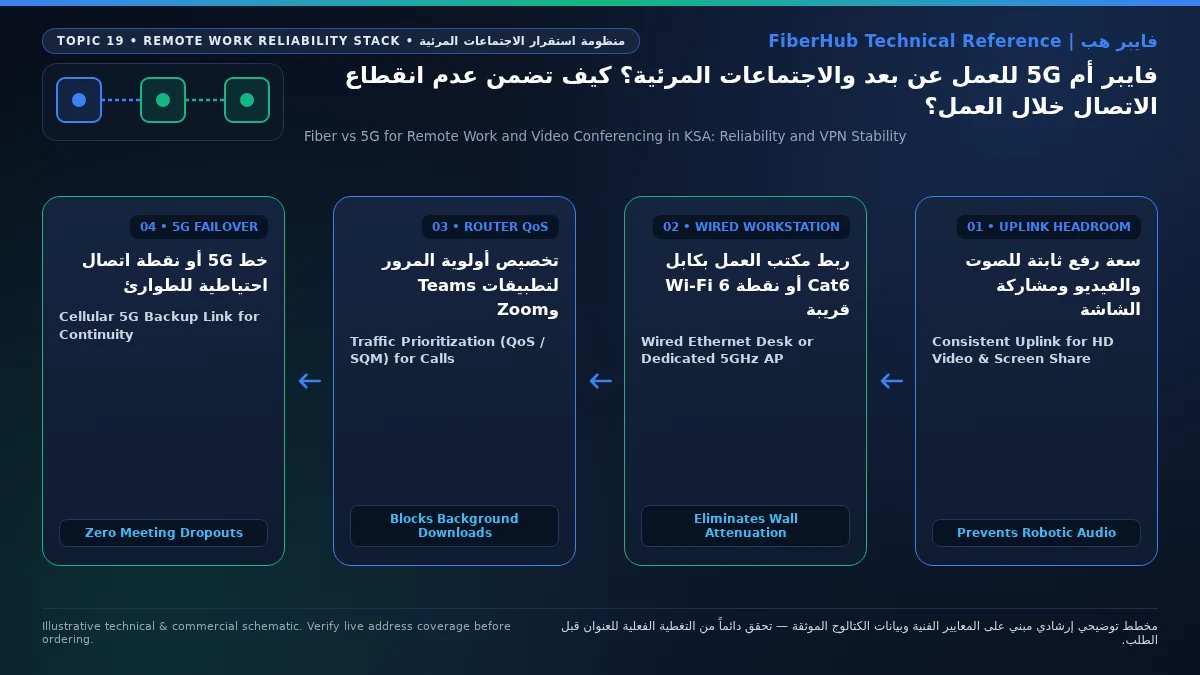
To immunize your home office against household congestion, implement a three-layer mitigation strategy:
1. Wire Your Work Desk with Cat6 Ethernet (or Isolate 5 GHz Wi-Fi 6)
Even the fastest gigabit fiber plan cannot save a video call if your laptop connects through a congested 2.4 GHz Wi-Fi signal passing through concrete walls. Wi-Fi is a half-duplex medium where only one device can transmit on a channel at an instant; when smart TVs, tablets, and phones contend for airtime, collision backoff timers introduce 15 to 50 ms of local wireless jitter. Running a direct Cat6 Ethernet cable from the router to your laptop docking station provides a dedicated, full-duplex 1 Gbps lane with zero wireless contention. If cabling is impossible, bind your work laptop exclusively to a 5 GHz Wi-Fi 6 SSID certified by the Wi-Fi Alliance with Orthogonal Frequency-Division Multiple Access (OFDMA) enabled so the router schedules uplink voice packets deterministically.
Check 5G and fiber availability in your district
Home 5G performance depends on local sector coverage and window line-of-sight. Check your address options before committing.
2. Enable Quality of Service (QoS) and DSCP Packet Prioritization
Modern Wi-Fi 6 gateways allow you to configure Quality of Service (QoS) or Smart Queue Management (SQM using FQ-CoDel or CAKE algorithms). Microsoft Teams, Zoom, and Webex tag their outbound packets with Differentiated Services Code Point (DSCP) headers—Expedited Forwarding (EF / DSCP 46) for real-time audio and Assured Forwarding (AF41 / DSCP 34) for interactive video. By enabling WMM (Wi-Fi Multimedia) and assigning top priority to your workstation or DSCP-marked traffic, the router lets your voice and video frames cut directly to the front of the transmission queue ahead of background downloads.
3. Select a Broadband Tier with at Least 100 Mbps Upload Capacity
On entry-level plans with only 25 Mbps upload speed, a single OneDrive folder sync or smartphone photo backup can saturate 90% of the upstream pipe, triggering severe uplink bufferbloat. Upgrading to a mid-tier fiber plan that provisions 100 Mbps to 200 Mbps of upload bandwidth creates an expansive safety cushion so background cloud tasks finish almost instantaneously without encroaching on real-time conferencing streams.
Evaluating Verified Saudi Broadband Plans for Remote Work (VAT Inclusive)
When selecting a broadband package in Saudi Arabia for daily telework, examining the verified upload speeds across major operators reveals clear price-to-performance tiers (all prices cited below include 15% Value Added Tax per official tariff schedules):
- The Core Professional Tier (300 Mbps Download / 100 Mbps Upload):
This tier represents the sweet spot for solo remote professionals and dual-income home offices. STC offers
STC Baity Fiber Basic (300 Mbps)with 100 Mbps upload at 287.5 SAR/month (andSTC Baity Fiber 300at 345 SAR/month), Salam providesSalam Fiber 300with 100 Mbps upload at 287.5 SAR/month, Zain offersZain Fiber Home Plus (300 Mbps)with 100 Mbps upload at 279 SAR/month (orZain Fiber 300at 287.5 SAR/month), and Mobily deliversMobily Fiber Postpaid 300with 100 Mbps upload at 345 SAR/month (orMobily Home Fiber Prepaid 300at 287.5 SAR/month). Having 100 Mbps of dedicated optical upload bandwidth comfortably supports multiple simultaneous 1080p/4K video conferences alongside continuous cloud collaboration. - High-Upload Executive & Technical Tiers (500 Mbps to 1 Gbps):
For households where multiple family members attend concurrent live sessions or engineers push large repositories while on calls, stepping up to the 500 Mbps tier boosts upload headroom significantly.
Salam Fiber 500(500/125 Mbps) is priced at 345 SAR/month,Zain Fiber Home Premium (500 Mbps)delivers 200 Mbps upload at 389 SAR/month,Salam Fiber Gamingprovides 500/200 Mbps at 399 SAR/month, andMobily Fiber Gamersoffers 500/150 Mbps at 402.5 SAR/month. Gigabit tiers such asSalam Fiber 1000(460 SAR/month) and 1 Gbps packages from STC and Mobily (920 SAR/month) provide 300 Mbps upload. - 5G Home Broadband Options for Unfibred Addresses or Backup Lines:
Where FTTH is unavailable,
STC Baity 5G Home,Mobily 5G Wireless Home Broadband, andSalam 5G Wireless Homeoffer 300/50 Mbps at 287.5 SAR/month, whileZain 5G Home Prodelivers 400/50 Mbps at 287.5 SAR/month. For higher wireless uplink capacity,STC Baity 5G UnlimitedandMobily Home 5G Unlimitedprovide 500/100 Mbps at 402.5 SAR/month, andZain 5G Max Homescales up to 1000/200 Mbps at 299 SAR/month.
You can filter and compare these verified packages side by side on our broadband plan comparison page, or explore dedicated listings for Saudi fiber broadband plans and 5G home internet plans.
Engineering Zero-Downtime Redundancy: Dual-WAN Failover and Power Backup
Even the most reliable FTTH network can experience rare physical disruptions—such as a street duct cut or a neighborhood power outage. You can achieve enterprise-grade uptime at home by combining primary fiber with cellular backup:
- Automated Dual-WAN Router Failover:
Connect your primary FTTH ONT to
WAN 1and a secondary 5G router (on a different carrier network) toWAN 2. If the fiber link drops, the router switches routing tables to 5G within 2 to 3 seconds. Because your local Wi-Fi SSID and internal IP addresses remain unchanged, WebRTC sessions in Zoom and Teams renegotiate their media path over 5G without dropping you from the call. - USB Smartphone Tethering / WISP Failover: Choose a home office router supporting USB cellular tethering or Wireless ISP (WISP) mode. During a fiber outage, plug your 5G smartphone into the router's USB port to keep your wired Ethernet desk setup online immediately.
- Mini DC Uninterruptible Power Supply (UPS) for ONT and Router: Installing a compact 12V DC Mini-UPS inline with your ONT and router power adapters keeps your optical connection alive for 4 to 6 hours during AC power cuts, and you can explore all suitable telework packages on our complete internet plans directory.
Frequently Asked Questions About Remote Work Internet in Saudi Arabia
Compare home 5G plans, router terms, and billing
Review prepaid vs postpaid 5G tiers, CPE router conditions, and operator contract terms side by side.
Is a 100 Mbps internet plan fast enough for working from home and daily video calls?
A 100/25 Mbps plan (STC Baity Fiber 100 or Mobily Home 5G 100 Mbps) can handle a single worker's calls if no other heavy traffic is active. However, the 25 Mbps upload ceiling leaves little margin when cloud storage synchronization or family devices run concurrently. Stepping up to a 300 Mbps fiber tier with 100 Mbps upload provides four times the upstream capacity for almost the same monthly cost.
Why do colleagues say my webcam video looks pixelated on Teams when my speed test shows 400 Mbps?
Your outbound webcam quality depends on your upload speed, packet jitter, and packet loss, not download speed. A weak indoor Wi-Fi link or uplink congestion on a 5G tower causes delay variation. When Teams detects rising uplink jitter or packet loss above 1–2%, it steps down your outbound camera resolution to protect audio clarity.
Does using a corporate VPN degrade Zoom and Microsoft Teams call quality?
Yes, routing live UDP media through an encrypted VPN tunnel adds header overhead and increases latency if the VPN concentrator is hosted abroad. Enterprise IT teams solve this by enabling Split Tunneling for conferencing IP ranges so Teams and Zoom streams flow directly over your local fiber link while internal file access stays inside the VPN.
Should a renter who moves apartments every year choose fiber or 5G for remote work?
If your apartment building has an active FTTH box, fiber remains the best choice for work stability, and you can select prepaid fiber packages (from Mobily, Salam, or STC) to avoid termination fees. If you relocate frequently to buildings without optical boxes, a 5G home plan or 1-month 5G eSIM plan offers plug-and-play portability on moving day.
How can I test if my home internet is truly ready for executive video meetings?
Run an interactive packet-loss and bufferbloat diagnostic (or use the CST Meqyas suite) during your busiest workday hour. Verify three benchmarks: unloaded ping under 15 ms, jitter strictly below 10 ms, and loaded latency under stress increasing by no more than 15 to 20 ms.
Need fast home internet without waiting for trenching?
Check your address first to confirm whether fiber is ready or compare eligible home 5G plans for your location.
Editorial Transparency & Neutrality Notice:
This guide is provided for comparison and decision support. It does not constitute final address coverage confirmation, binding operator pricing, or regulatory accreditation. Always verify final plan terms and box readiness before completing your subscription request.