
- Why Official Operator Coverage Maps Cannot Guarantee Indoor Apartment Speeds
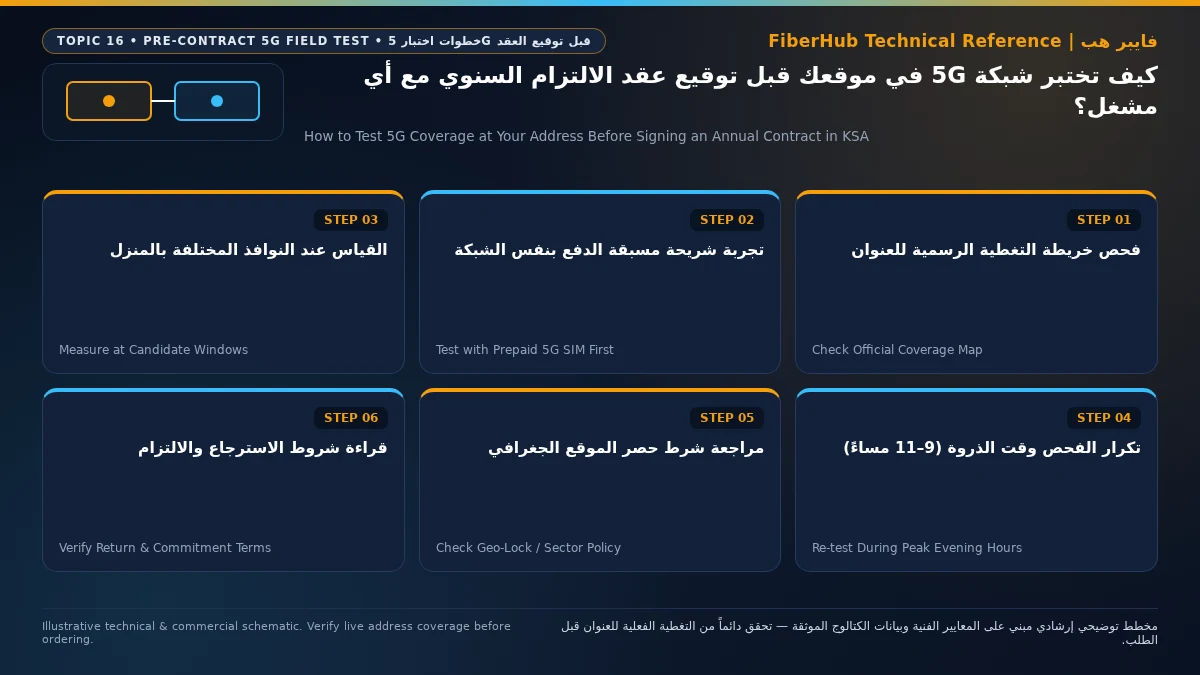
- The 48-Hour Prepaid SIM Field Audit: Step-by-Step Testing Protocol
- Verifying True Band n78 Connection Using Smartphone Engineering Menus
- Three Contract Clauses to Inspect Before Signing: Location Locks and Exit Fees
- 1. Geographic Location Locking (Home Zone / Sector Lock)
- 2. Hardware Amortization and Early Termination Penalties
- 3. Consumer Rights Under CST Service Quality Regulations
- Low-Risk Trial Alternatives: 1-Month eSIM and 3-Month Prepaid Home Plans
- Testing Packet Loss, Loaded Latency (Bufferbloat), and Pre-Lease Apartment Checks
- Frequently Asked Questions About Testing 5G Coverage Before Subscribing
- If I get 500 Mbps on my phone outside in the street, is that enough to sign a home 5G contract?
- Can I move my home 5G router to a new apartment if I relocate mid-contract?
- Why are Thursday and Friday nights the best times to run a pre-subscription 5G test?
- Do unlimited home 5G plans in Saudi Arabia throttle speeds after a daily data cap (FUP)?
- What should I do if my new 5G router has terrible signal on the very first day of activation?
To accurately test 5G coverage at your address before signing a 12-month or 18-month home broadband contract with STC, Mobily, Zain, or Salam in Saudi Arabia, do not rely solely on green shading on an operator's marketing coverage map; instead, conduct an indoor field audit using a prepaid 5G SIM card (or a friend's active 5G smartphone on the candidate network) positioned at your exact interior window sills during both daytime off-peak hours (1:00 PM–4:00 PM) and evening prime time (9:00 PM–11:30 PM), inspect the smartphone's hidden engineering Field Test screen to verify a genuine 3.5 GHz (Band n78) carrier lock rather than a cosmetic 5G status icon riding on 4G spectrum, and review Geographic Location Lock clauses before committing.
Every year, thousands of tenants and new homeowners across Riyadh, Jeddah, and the Eastern Province lock themselves into multi-month wireless contracts based on a neighbor's recommendation or an outdoor map lookup—only to discover after activating the router that their apartment windows face away from the serving tower or that the local cell sector saturates every night. Running a structured pre-subscription test protects you from early termination penalties and months of frustrating buffering.

Why Official Operator Coverage Maps Cannot Guarantee Indoor Apartment Speeds
Online coverage maps published by telecom providers are a helpful first filter—and you should always start by checking your street on our unified home broadband coverage tool to see which networks serve your district. However, signing a legally binding annual contract based strictly on a coverage map exposes you to three technical blind spots:
- Outdoor Street-Level RF Modeling: Operator coverage maps are generated by computer propagation models that estimate radio signal strength outdoors at street level (1.5 meters above the pavement) or on rooftops. The map has no way of knowing whether your apartment sits on the ground floor behind a 3-meter concrete wall, faces an enclosed interior light shaft (manwar), or has Low-E metallic-coated thermal windows that strip away 15 dB of incoming signal.
- Invisibility of Evening Sector Congestion: A neighborhood can appear dark green on a coverage map because a 5G tower stands 300 meters away with booming signal power (RSRP -72 dBm), yet the map will never reveal whether that specific radio sector is oversubscribed by 450 high-density apartments streaming 4K video simultaneously at 10:00 PM.
- The Cosmetic "5G Icon" Trap (Upper Layer Indication - ULI): Under Non-Standalone (5G NSA) signaling rules standardized by 3GPP Release 15, a 4G LTE base station can broadcast a single status bit called Upper Layer Indication (ULI) telling smartphones that the tower is part of a 5G-capable network. As soon as your phone sees that bit, it displays the 5G logo in the top corner of the screen—even if your phone is transmitting data 100% over a slow 4G LTE channel with zero active 5G Band n78 connection! Seeing a 5G icon on your phone screen inside the living room is never proof of real 5G coverage.
The 48-Hour Prepaid SIM Field Audit: Step-by-Step Testing Protocol
Before committing to a postpaid home contract, execute this zero-risk indoor field audit:
- Step 1 (Source Candidate SIM Cards): Borrow smartphones from family members or colleagues who use STC, Mobily, Zain, or Salam 5G mobile plans, or purchase a low-cost prepaid data SIM / eSIM from the operator you intend to test. Turn off Wi-Fi on the smartphone and ensure 5G Auto/On is enabled in cellular data settings.
- Step 2 (Test at the Exact Candidate Windows Indoors): Never run your qualification test while parked in your car outside the building. Stand indoors right next to the specific windows where you plan to place your future 5G CPE, holding the phone 1.5 meters above the floor.
- Step 3 (Compare Afternoon Baseline vs. Evening Prime Time): Run three consecutive speed and latency tests at 2:00 PM (when neighborhood cell traffic is light, revealing the physical signal ceiling at your window), and then repeat the exact same tests at the exact same window between 9:30 PM and 11:30 PM (when residential streaming and gaming load peaks).
- Step 4 (Calculate the Peak-Hour Speed Retention Ratio): Divide your 10:00 PM download speed by your 2:00 PM download speed. If an operator delivers 360 Mbps at 2:00 PM and 250 Mbps at 10:00 PM, it retains nearly 70% of its capacity during peak load—indicating a healthy, well-provisioned sector. Conversely, if daytime speed is 320 Mbps but evening speed plunges to 14 Mbps with jitter spiking above 35 ms, that tower sector is severely congested and must be ruled out immediately.
| Pre-Contract Field Audit Metric | Green Light (Safe for 12/18-Month Contract) | Yellow Light (Caution / Needs Outdoor CPE) | Red Light (Do Not Sign a Contract) |
|---|---|---|---|
| 10:00 PM Peak Download Speed | Consistently above 180 Mbps | 60 to 170 Mbps | Below 35 Mbps or erratic drops |
| Peak-to-Off-Peak Speed Retention | Retains >60% of daytime speed at night | Retains 30% to 59% of daytime speed | Collapses below 15% of daytime speed |
| 10:00 PM Peak Upload Speed | Above 30 Mbps | 10 to 29 Mbps | Below 5 Mbps |
| Evening Unloaded Ping & Jitter | Ping <22 ms and Jitter <5 ms | Ping 23–40 ms and Jitter 6–12 ms | Ping >50 ms or Jitter >20 ms |
| Engineering Menu Band Verification | Active lock on 5G Band n78 (3500 MHz) | Weak n78 (-100 dBm) at only one window | Camped on 4G LTE only despite 5G icon |
Verifying True Band n78 Connection Using Smartphone Engineering Menus
To prove beyond a shadow of a doubt that your test smartphone is actively receiving mid-band 5G (Band n78) inside your room—rather than displaying a fake 5G ULI icon over 4G—open your phone's built-in radio diagnostic screen while standing at the window:
- On Apple iPhone (iOS Field Test Mode): Open the Phone dialer app, type 3001#12345#, and press the Call button. This launches the hidden iOS Field Test dashboard. Tap 5G Nr ConnectionStats or Serving Cell Info and check the Band field. If you see Band n78 (or n41) alongside an RSRP reading stronger than -95 dBm and a positive SINR above +10 dB, your window has genuine high-capacity 5G coverage. If the 5G NR section is blank and only LTE Band 3, Band 1, or Band 28 appears while a Speedtest is running, your room only receives 4G.
- On Android Smartphones (NetMonster or CellMapper): Install the free NetMonster utility from the Play Store. Unlike the status bar icon, NetMonster queries the Qualcomm/Exynos modem directly and explicitly labels whether the phone is actively aggregating 5G NR 3500 MHz (n78) or merely showing 5G NSA Disconnected (ULI).
Keep one hardware advantage in mind when interpreting smartphone results: a dedicated desktop 5G home router houses much larger internal 4x4 or 8x8 MIMO antennas with 4 dB to 6 dB higher gain than a slim smartphone chassis. If a 5G phone achieves a clean 200 Mbps at your window at 10:00 PM, a full-size Wi-Fi 6 5G CPE stationed in that exact spot will typically deliver 260 to 340 Mbps.
Three Contract Clauses to Inspect Before Signing: Location Locks and Exit Fees
Postpaid 5G home broadband agreements in Saudi Arabia differ from standard mobile data SIMs in three critical contractual areas that every subscriber should understand upfront:
Check 5G and fiber availability in your district
Home 5G performance depends on local sector coverage and window line-of-sight. Check your address options before committing.
1. Geographic Location Locking (Home Zone / Sector Lock)
To prevent subscribers from buying subsidized home 5G routers and using them as portable hotspots across crowded city centers, Saudi operators enforce Geographic Location Locking (حصر الموقع الجغرافي) on fixed wireless home plans. When you first power on the router at your registered National Address, the operator binds your SIM profile to the Physical Cell IDs serving that specific residential coordinates block. If you pack the router into a suitcase and take it to a weekend chalet or another district, the connection will be blocked until you submit a formal location-transfer request through the operator's app (which is typically capped at a limited number of moves per year and requires available tower capacity at the new address).
2. Hardware Amortization and Early Termination Penalties
Standard postpaid 5G home packages carry a 12-month commitment (across STC, Mobily, Salam, and core Zain plans) or an 18-month commitment (on Zain 5G+ Home tiers) because the operator bundles a Wi-Fi 6 5G router worth 1,000 to 1,500 SAR at zero upfront cost. If you cancel the contract voluntarily after three months, you are contractually obligated to pay the remaining prorated device installments or the early exit fee stipulated in your service tariff sheet.
3. Consumer Rights Under CST Service Quality Regulations
Under telecommunications consumer protection frameworks enforced by the Communications, Space and Technology Commission (CST), operators must deliver service matching the technical terms of the contract. If your newly activated home 5G line suffers from a verifiable technical defect or fails to deliver usable connectivity at the registered installation address, you have the right to log an official technical fault ticket immediately. If the provider cannot remedy a verified network failure within the statutory resolution window, the subscriber is entitled to contract termination without early exit penalties.
Low-Risk Trial Alternatives: 1-Month eSIM and 3-Month Prepaid Home Plans
If you are renting on a short-term lease or want to test home 5G for a month or two before locking into a full annual contract, the Saudi market offers flexible short-commitment alternatives that you can browse on our verified 5G home broadband page and compare directly via our broadband comparison tool:
- 1-Month Commitment eSIM Home Plans (BYO Router): STC offers Baity 5G eSIM tiers with just a 1-month commitment and no bundled router hardware—ideal if you already own an unlocked 5G CPE or want total freedom to cancel after thirty days without hardware installment penalties.
- 3-Month Prepaid Home 5G Bundles: Providers like Salam and STC offer prepaid 5G home packages with a short 3-month commitment that include the Wi-Fi 6 router, eliminating recurring monthly postpaid billing risk.
The table below contrasts flexible short-term 5G options against standard 12-month and 18-month postpaid plans (all prices include 15% VAT):
| Operator | Verified Catalog Plan | Billing & Commitment Term | Speed (Download / Upload) | Monthly Price (Incl. 15% VAT) | Router Hardware Included |
|---|---|---|---|---|---|
| STC | STC Baity 5G Basic eSIM (200 Mbps) | Postpaid — 1 Month Commitment | 200 / 40 Mbps | 299 SAR | BYO Device (eSIM Only) |
| STC | STC Baity 5G Unlimited eSIM | Postpaid — 1 Month Commitment | 500 / 100 Mbps | 402.5 SAR | BYO Device (eSIM Only) |
| Salam | Salam HomeFi 5G Prepaid | Prepaid — 3 Months Commitment | 200 / 40 Mbps | 287.5 SAR | Wi-Fi 6 Router Included |
| STC | STC Baity 5G Prepaid Home | Prepaid — 3 Months Commitment | 100 / 25 Mbps | 533 SAR | Wi-Fi 6 Router Included |
| STC | STC Baity 5G Home Wireless Unlimited | Postpaid — 12 Months Commitment | 300 / 50 Mbps | 287.5 SAR | Wi-Fi 6 Router Included |
| Mobily | Mobily 5G Wireless Home Broadband | Postpaid — 12 Months Commitment | 300 / 50 Mbps | 287.5 SAR | Wi-Fi 6 Router Included |
| Zain | Zain 5G Home Pro | Postpaid — 12 Months Commitment | 400 / 50 Mbps | 287.5 SAR | Wi-Fi 6 Router Included |
| Zain | Zain 5G+ Home (200 Mbps) | Postpaid — 18 Months Commitment | 200 / 40 Mbps | 287.5 SAR | Wi-Fi 6 Router Included |
You can also review all Saudi home internet plans to verify whether prepaid or postpaid FTTH fiber optics is available at your building before signing a wireless contract.
Testing Packet Loss, Loaded Latency (Bufferbloat), and Pre-Lease Apartment Checks
A standard 15-second download speed test only measures burst throughput; it does not reveal whether the cellular sector suffers from micro-stutters that ruin online gaming and Microsoft Teams calls. Even a tower delivering 250 Mbps can suffer from 2% to 4% intermittent packet loss or severe queuing delay under load.
To validate real-time connection stability on your trial SIM before committing to a contract, run these three stress checks at 10:00 PM:
- Loaded Latency (Bufferbloat) Evaluation: Run an advanced diagnostic test that measures ping while the download and upload channels are fully saturated. If your idle ping is 17 ms but loaded ping spikes to 380 ms during a download, the cell sector suffers from heavy scheduler queue congestion.
- Continuous 100-Packet ICMP Loss Check: Using a mobile network utility, send 100 consecutive ping probes to a regional server and verify 0% Packet Loss. Any sustained packet loss above 1% during evening hours will cause voice dropouts and rubber-banding in multiplayer games.
- Pre-Lease Building Infrastructure Inspection for Tenants: If you are viewing a prospective apartment or villa before signing a rental lease, always inspect the building's exterior boundary wall or ground-floor utility room for a metallic FTTH Optical Distribution Box (ODB) first. If fiber optics is already terminated inside the building, you can bypass wireless uncertainty entirely. If the building relies on 5G, check during your viewing that living-room windows face an open street rather than an enclosed four-wall concrete shaft, and record the exact National Address building number so you can verify sector availability across all four operators before moving in.
Frequently Asked Questions About Testing 5G Coverage Before Subscribing
Compare home 5G plans, router terms, and billing
Review prepaid vs postpaid 5G tiers, CPE router conditions, and operator contract terms side by side.
If I get 500 Mbps on my phone outside in the street, is that enough to sign a home 5G contract?
Never rely on an outdoor street test alone. A 3.5 GHz 5G signal that delivers 500 Mbps on the sidewalk can drop below 15 Mbps inside a rear-facing apartment separated from the street by three reinforced concrete walls and Low-E thermal glass. Always perform your speed and Field Test checks indoors right beside the window where the router will live.
Can I move my home 5G router to a new apartment if I relocate mid-contract?
Yes, Saudi operators allow subscribers to request a registered address transfer (Location Unlock / Relocation) through their customer care app. However, approval depends on whether the operator has active 5G coverage and spare sector capacity at your new National Address.
Why are Thursday and Friday nights the best times to run a pre-subscription 5G test?
Residential internet traffic across Saudi Arabia reaches its weekly peak on Thursday and Friday evenings between 9:00 PM and 1:00 AM, when families gather at home, stream live football matches, and play online games. If a candidate operator's cell tower maintains 180+ Mbps and stable ping at your window on a Thursday night, it will perform effortlessly the rest of the week.
Do unlimited home 5G plans in Saudi Arabia throttle speeds after a daily data cap (FUP)?
Mainstream postpaid unlimited 5G home broadband plans from STC, Mobily, Zain, and Salam documented in the official tariff catalog do not enforce daily Fair Usage Policy (FUP) data caps; instead, they govern connection capacity by the plan's subscribed speed tier (such as 200 Mbps, 300 Mbps, 400 Mbps, or 500 Mbps) throughout the billing cycle.
What should I do if my new 5G router has terrible signal on the very first day of activation?
During the first 24 to 48 hours, test every exterior window in your home and document the router's RSRP/SINR diagnostic screen alongside wired Ethernet speed tests. If the service fails to meet minimum usable thresholds across all windows, open a formal technical support ticket immediately via the operator's app and keep the ticket reference number; early technical fault documentation is essential if you need to request a penalty-free cancellation under CST consumer protection rules.
Need fast home internet without waiting for trenching?
Check your address first to confirm whether fiber is ready or compare eligible home 5G plans for your location.
Editorial Transparency & Neutrality Notice:
This guide is provided for comparison and decision support. It does not constitute final address coverage confirmation, binding operator pricing, or regulatory accreditation. Always verify final plan terms and box readiness before completing your subscription request.