
- 1. The Practical Replacement Equation and Housing Scenarios Where 5G Wins
- 2. Indoor Mid-Band (n78 C-Band) Signal Qualification Before Signing a Contract
- 3. Fixed-Location Sector Locks and Geo-Fencing Policies on Home 5G Subscriptions
- 4. The Evening Busy-Hour Stress Test Protocol (8 PM to Midnight)
- 5. Technical Boundaries Where Fiber Remains Irreplaceable and the Bridge Strategy
- Frequently Asked Questions About Replacing Fiber with 5G Home Broadband
- Can a single 5G home router support multiple 4K TV streams and remote work video calls at the same time?
- Why does my 5G home router get much lower speeds than my neighbor's router in the exact same apartment building?
- Can I take my 5G home router with me when moving to a new apartment in another district?
- When should I request an Outdoor 5G CPE antenna instead of a standard indoor window router?
Yes, 5G Fixed Wireless Access (5G Home Broadband) can genuinely replace Fiber-to-the-Home (FTTH) as a primary residential internet connection in Saudi Arabia when three site-specific conditions hold true simultaneously: your property receives clean indoor mid-band 5G coverage on band n78 (3.5 GHz C-band), your connection maintains stable download/upload throughput and low latency jitter during the evening busy-hour window between 8:00 PM and midnight, and your household workload centers on 4K streaming, remote work, video conferencing, and multi-device browsing rather than ultra-low-jitter competitive esports or continuous multi-gigabyte cloud server uploads. Furthermore, 5G home broadband decisively outperforms optical fiber operationally when you are renting a short-term apartment, moving into a newly developed residential district awaiting fiber trenching or optical cabinet activation, or living in a building where the landlord prohibits wall drilling and external cable conduits. You can begin evaluating your address immediately by running a residential coverage check and exploring available options on our 5G home broadband hub to determine whether fixed wireless can serve as your primary home line.
1. The Practical Replacement Equation and Housing Scenarios Where 5G Wins
Residential wireless internet in Saudi Arabia has evolved far beyond the slow, data-capped emergency hotspots of earlier cellular generations. Backed by nationwide investments in standalone and non-standalone 5G radio networks and wide contiguous C-band spectrum allocations, modern indoor and outdoor 5G Customer Premises Equipment (CPE) gateways routinely deliver multi-hundred-megabit speeds over the air directly through a residential window. Yet the decisive question facing a homeowner or tenant moving into a new property in Riyadh, Jeddah, the Eastern Province, or regional cities is never "What is the theoretical peak speed advertised on a brochure?" Instead, the real question is: "Can this wireless gateway replace a dedicated optical fiber cable as the sole primary connection for my household every night of the year?"
Answering that question accurately requires understanding the architectural distinction between optical and wireless access networks. Fiber-to-the-Home (FTTH) provisions a dedicated glass wave-guide path from the neighborhood Optical Line Terminal (OLT) through passive splitters right into the Optical Network Terminal (ONT) inside your living room, making it immune to reinforced concrete walls, thermal window coatings, and radio interference. Conversely, a 5G home broadband router communicates over shared radio spectrum with a specific directional antenna sector (Cell Sector) mounted on a nearby telecom tower. National benchmarks published by the Communications, Space and Technology Commission (CST) through its Meqyas reporting framework consistently confirm strong 5G median speeds across Saudi cities, but household reliability depends on your specific building orientation and evening sector load.
Across Saudi Arabia, three everyday residential scenarios make 5G home broadband the superior operational and financial choice over wired fiber:
- Renters in Short-Term Apartments and Flexible Leases: Professionals on project assignments, university students, and families in temporary furnished apartments face logistical hurdles when ordering fixed FTTH lines that require landlord approval and active optical boxes at future addresses. A 5G home gateway eliminates physical installation dependencies: the router powers up immediately out of the box, serves the apartment over Wi-Fi 6/6E and Gigabit Ethernet ports, and moves with you when your lease ends.
- Newly Built Residential Districts Pending Fiber Trenching or ODB Splicing: Rapid urban expansion across northern Riyadh, northern Jeddah, and Dammam frequently creates a timing gap between housing occupancy and fixed-line readiness. Families often move into newly completed villas or apartments where civil trenching has not finished or where the exterior fiber box (ODB) awaits upstream OLT splicing. Deploying a dedicated 5G home CPE equipped with high-gain internal 4x4 or 8x8 MIMO antennas delivers whole-home broadband immediately while the district awaits optical completion.
- Divided Villas, Rooftop Annexes, and No-Drilling Buildings: In subdivided villas, upper-floor annexes, or stone-facade apartment buildings where landlords prohibit drilling through structural beams or running visible drop cables, an indoor 5G gateway sidesteps exterior cabling entirely when placed near a window facing the serving cell tower and paired with an indoor Mesh Wi-Fi system.
| Operational Decision Criterion | 5G Home Broadband (FWA on n78 C-Band) | Optical Fiber to the Home (FTTH GPON/XGS-PON) | Which Technology Wins at Home? |
|---|---|---|---|
| Activation & Setup Lead Time | Instant same-day activation (plug-and-play once the SIM is active and router powered) | Requires technician scheduling, external splicing, and drop cable installation (days to weeks) | 5G Home wins whenever immediate connectivity is essential |
| Wall Drilling & Civil Modifications | Zero drilling required for indoor gateways placed near an exterior window | Requires routing an optical cable from the exterior ODB box through wall penetrations | 5G Home wins for tenants and properties forbidding structural drilling |
| Evening Busy-Hour Consistency (8 PM–12 AM) | Sensitive to active subscriber load sharing the same radio sector during peak hours | Highly consistent 24/7 throughput backed by dedicated optical distribution capacity | Optical Fiber wins for guaranteed prime-time bandwidth stability |
| Latency & Jitter Stability | Moderate latency (15–35 ms) with occasional micro-jitter spikes during air-interface congestion | Ultra-low latency (2–8 ms domestically) with near-zero packet jitter | Optical Fiber wins decisively for competitive multiplayer esports |
| Upstream Capacity (Upload Speeds) | Asymmetric TDD radio framing limits uploads (typically 20 to 80 Mbps in real indoor use) | High sustained upstream capacity scaling into hundreds of megabits per second | Optical Fiber wins for video creators, streamers, and cloud NAS backups |
| Relocation & Moving Flexibility | High portability of hardware across residences (subject to carrier address-lock updates) | Requires formal line transfer order and an active fiber ODB cabinet at the new building | 5G Home wins for frequent movers and short-term leaseholders |

2. Indoor Mid-Band (n78 C-Band) Signal Qualification Before Signing a Contract
The single most important technical factor determining whether a 5G home router will feel like fiber or feel like a sluggish legacy connection is the specific radio frequency band captured inside your home. Across Saudi networks standardized under 3GPP Release 15 through Release 18 specifications, true fiber-like Fixed Wireless Access relies on Band n78 (the 3.5 GHz C-Band spectrum), complemented in certain areas by Band n41 (2.5 GHz). Band n78 provides wide channel bandwidths (commonly 80 MHz to 100 MHz per carrier) capable of sustaining real-world download speeds between 300 Mbps and 800 Mbps.
However, radio waves at 3.5 GHz experience significantly higher free-space path loss and building penetration loss than lower 4G LTE frequencies (such as 700 MHz, 800 MHz, or 1800 MHz). If your apartment is located far from the serving macro cell site, or if the radio path must penetrate multiple reinforced concrete shear walls and modern double-glazed windows coated with metallic Low-Emissivity (Low-E) solar film, the 3.5 GHz signal can attenuate sharply indoors. When indoor n78 signal strength drops below the receiver sensitivity threshold, the router either falls back to low-band 5G or anchors exclusively on 4G LTE bands, causing throughput to drop sharply.
Before relying on 5G as your primary household connection, perform an indoor RF qualification check at the exact window sill or shelf where the router will sit:
- 5G Reference Signal Received Power (RSRP): Inspect the router's diagnostic web interface (or use a 5G smartphone with an active SIM from the target carrier). For fiber-replacement stability, indoor 5G RSRP should ideally read better than -95 dBm (for example, -72 dBm to -88 dBm). Readings weaker than -105 dBm indicate cell-edge reception where indoor signal fluctuations will cause speed drops unless you switch to an exterior rooftop or wall-mounted Outdoor CPE.
- 5G Signal-to-Interference-plus-Noise Ratio (SINR): Signal strength alone is insufficient if neighboring cell towers create overlapping interference. Look for a 5G SINR reading above 15 dB (and ideally above 20 dB), which enables the radio modem to maintain high-order 256-QAM modulation. An SINR below 5 dB indicates heavy co-channel interference that will cap throughput and inflate packet latency even when signal bars appear full.
- Confirmed Band Lock on n78: Verify in the router's system status page that the active "5G NR Band" displays "n78" (or "n78 + n41" carrier aggregation) continuously under load, rather than dropping back to LTE-only operation during file transfers.
3. Fixed-Location Sector Locks and Geo-Fencing Policies on Home 5G Subscriptions
A critical operational distinction that prospective subscribers must understand before ordering is the difference between a Mobile Data SIM and a Fixed Wireless Access (Home 5G) subscription. Because residential home broadband plans offer unlimited high-volume data tailored for whole-family consumption, telecom operators engineer and provision these plans around fixed capacity planning models.
To prevent sudden network congestion caused by thousands of high-consumption home routers migrating unpredictably across city sectors, Saudi telecom providers commonly enforce Fixed-Location and Cell-Sector Locking (Geo-Fencing) on dedicated Home 5G packages:
- National Address & Sector Binding: During subscription activation, your service is bound to your registered National Address coordinates and the specific serving radio cells covering that residential block. As long as the router operates within its registered home zone, it receives full unlimited service as contracted.
- Home Gateway vs. Portable Travel Hotspot: If you unplug a geo-locked Home 5G router and take it to a weekend chalet across town or another city, the network may restrict data sessions because the SIM detects attachment to an unauthorized cell sector outside the registered service polygon. Users who require true nomadic mobility across cities should carefully evaluate plan terms on our broadband plan comparison page to distinguish fixed-address home packages from portable data subscriptions.
- Streamlined Address Relocation Process: When you permanently move to a new apartment or villa, fixed-location locking does not trap you. Unlike FTTH—which requires physical technician dispatches and optical port availability—moving a Home 5G subscription simply requires verifying coverage at the new National Address and submitting a location-update request through the carrier's customer portal or support channel so the system re-binds your SIM to the new neighborhood cell sector.
Check 5G and fiber availability in your district
Home 5G performance depends on local sector coverage and window line-of-sight. Check your address options before committing.
4. The Evening Busy-Hour Stress Test Protocol (8 PM to Midnight)
The most common mistake buyers make when testing a new 5G home connection is running a single speed test at 11:00 AM on a weekday. At midday, residential cell sectors are lightly loaded while residents are at work or school, allowing a 5G router to effortlessly achieve 500+ Mbps. However, because wireless broadband shares air-interface time-frequency resource blocks (PRBs) among all active users in the sector, the true test of whether 5G can replace fiber occurs during the Saudi residential peak window between 8:00 PM and 12:30 AM, especially on Thursday and Friday nights or during major live football broadcasts.
Before finalizing your decision to rely solely on 5G home broadband, execute this structured three-night Busy-Hour Stress Test:
- Midday vs. Prime-Time Throughput Ratio: Record three download and upload measurements at 2:00 PM as your baseline, then repeat the exact same measurements at 9:30 PM and 11:00 PM. If evening speeds retain at least 60% to 75% of daytime performance (for instance, shifting from 480 Mbps at midday to 320 Mbps at 10:00 PM), your serving tower has robust fiber backhaul and healthy sector capacity. Conversely, if speeds collapse from 450 Mbps in the afternoon to 18 Mbps at night, the radio sector is heavily oversubscribed, and moving the router along the window will not cure tower congestion.
- Loaded Latency & Bufferbloat Inspection: Measure not only idle ping, but latency while an active download and upload are running simultaneously. For smooth video calls and responsive web browsing, loaded latency should remain stable below 70–90 ms. Severe spikes exceeding 200–300 ms under load indicate air-interface scheduling queues that will disrupt real-time voice and video communication when multiple family members use the internet concurrently.
- Sustained Uplink Verification: Because a residential router transmits at strictly regulated milliwatt power levels compared to the high-wattage amplifiers on a cellular tower, the uplink is always more fragile than the downlink. Test uploading a 500 MB workspace archive or hosting a high-definition video call at 10:00 PM; sustained upload speeds above 25–35 Mbps confirm healthy two-way link budgets.
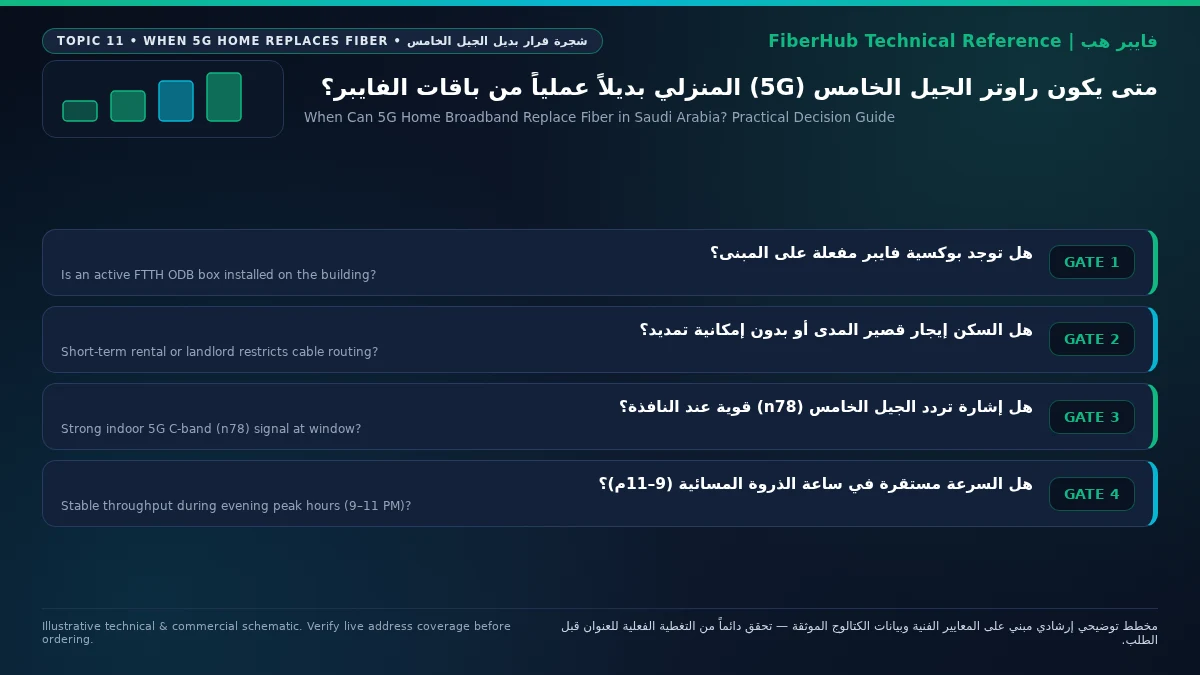
5. Technical Boundaries Where Fiber Remains Irreplaceable and the Bridge Strategy
Even when an apartment enjoys a direct line-of-sight view to a 5G tower and achieves 600 Mbps on speed tests, certain household workloads remain fundamentally better served by a physical optical fiber cable whenever an active FTTH box is available on site:
- Frame-Critical Competitive Esports: Competitive players in fast-twitch online titles depend on deterministic packet delivery where latency never fluctuates by more than 1 to 2 milliseconds. Over a wireless radio link, even brief environmental reflections or Hybrid Automatic Repeat Request (HARQ) air-interface retransmissions introduce occasional 10–25 ms jitter spikes. Fiber optics eliminate radio-layer retransmission jitter entirely.
- Heavy Upstream Workflows, Cloud Backups, and Home Servers: Time-Division Duplex (TDD) 5G networks in Saudi Arabia allocate the majority of time slots (typically around 75% to 80%) to download traffic, leaving a smaller fraction for upload traffic. Households running daily multi-gigabyte video production uploads, continuous multi-camera cloud CCTV streams, or self-hosted NAS backups benefit immensely from the dedicated upstream capacity of FTTH packages. If your building already has an active fiber termination box, you can browse current home fiber and wireless plans to compare long-term value before ordering.
- Transitional Bridge Strategy While Awaiting FTTH: For households moving into developing neighborhoods where our address coverage verification tool shows fiber under construction, 5G Home Broadband serves as a seamless transitional bridge. Place the 5G router near an upper-floor window where RSRP and SINR are strongest, and connect a dedicated Mesh Wi-Fi system to the 5G router's LAN port via Cat6 Ethernet to handle indoor wireless coverage. When the fiber technician eventually installs the optical ONT months later, you simply unplug the main Ethernet WAN cable from the 5G router and plug it into the new fiber ONT—transitioning every device in the house to optical fiber without changing a single Wi-Fi password.
Frequently Asked Questions About Replacing Fiber with 5G Home Broadband
Can a single 5G home router support multiple 4K TV streams and remote work video calls at the same time?
Yes, effortlessly, provided your router maintains a stable indoor 5G Band n78 connection delivering at least 150 to 250 Mbps during evening hours. A single 4K Ultra HD video stream consumes roughly 20 to 25 Mbps, and a high-definition corporate video call uses 4 to 8 Mbps. A well-placed 5G home gateway on a healthy tower sector can simultaneously power three 4K televisions, multiple remote work laptops, and family smartphones without buffering, especially when paired with a modern Wi-Fi 6 indoor mesh network.
Compare home 5G plans, router terms, and billing
Review prepaid vs postpaid 5G tiers, CPE router conditions, and operator contract terms side by side.
Why does my 5G home router get much lower speeds than my neighbor's router in the exact same apartment building?
High-frequency 3.5 GHz (Band n78) radio waves are highly directional and sensitive to structural obstacles. An apartment whose windows face the serving telecom tower directly enjoys unobstructed line-of-sight propagation with high RSRP and clean SINR. Conversely, an apartment on the opposite side of the same building forces the radio signal to penetrate multiple interior reinforced concrete walls and elevator shafts, losing 20 to 30 dB of signal power and often forcing the router to connect to a weaker, more distant cell tower.
Can I take my 5G home router with me when moving to a new apartment in another district?
Yes, hardware portability is one of the strongest advantages of 5G home broadband over wired fiber, but you must account for carrier location-locking policies. Because residential Fixed Wireless Access plans are provisioned for a registered National Address, you should first check 5G coverage at your new building and then contact your telecom provider to update your registered service address so the network unlocks the new neighborhood cell sector for your SIM.
When should I request an Outdoor 5G CPE antenna instead of a standard indoor window router?
An indoor window router is ideal when indoor 5G RSRP is stronger than -90 dBm and SINR exceeds 15 dB right inside your room. However, if your villa or apartment uses thick thermal insulation and metallic Low-E solar window glazing that blocks 3.5 GHz signals indoors—while standing on your balcony or roof yields a fast, full-strength 5G signal—an Outdoor 5G CPE mounted on the exterior wall or roof and powered via a single Power-over-Ethernet (PoE) cable into the house will dramatically transform your indoor speeds and stability.
Need fast home internet without waiting for trenching?
Check your address first to confirm whether fiber is ready or compare eligible home 5G plans for your location.
Editorial Transparency & Neutrality Notice:
This guide is provided for comparison and decision support. It does not constitute final address coverage confirmation, binding operator pricing, or regulatory accreditation. Always verify final plan terms and box readiness before completing your subscription request.