
- The Household Bandwidth Sizing Formula: Modeling Peak Evening Concurrency
- Evaluating Saudi Fiber Tiers: Where Is the Best Price-to-Performance Value?
- Why Upgrading to 1,000 Mbps Fails If Your Indoor Wi-Fi Is the Real Bottleneck
- Four Practical Network Tweaks So a 300 Mbps Plan Feels Like Gigabit
- Accounting for Saudi Seasonal Peaks, Majlis Gatherings, and Upgrade Flexibility
- Frequently Asked Questions About Choosing Family Fiber Speeds
- Is a 100 Mbps fiber plan enough for a Saudi family of five watching 4K TV and gaming?
- Who actually needs a 1,000 Mbps (1 Gbps) home fiber subscription?
- Do 40 smart home devices (bulbs, AC controllers, sensors) slow down my fiber speed?
- Should I upgrade from 300 Mbps to 500 Mbps or buy a Mesh Wi-Fi system for a two-story villa?
A typical Saudi family of four to six people needs a 300 Mbps fiber plan (with 100 Mbps upload) as the optimal sweet spot to run three concurrent 4K UHD video streams, competitive online gaming, distance learning, and remote work simultaneously without evening buffering, while larger households of seven or more—or homes with multiple consoles regularly downloading 100 GB game updates—benefit from stepping up to 500 Mbps, and 100 Mbps to 200 Mbps suffices for singles or couples in compact apartments. Sizing home broadband accurately is not about counting every lightbulb and tablet registered on your Wi-Fi over a month; it is an engineering calculation based on Peak Concurrent Demand between 8:00 PM and 1:00 AM, combined with your indoor Wi-Fi network's ability to deliver those megabits through reinforced concrete walls.
When you examine verified Saudi home internet plans, you will quickly notice that monthly pricing across speed tiers is nonlinear. In several cases, entry-level 100 Mbps packages and mainstream 300 Mbps packages carry the exact same 287.5 SAR monthly tariff, whereas jumping from 500 Mbps to 1,000 Mbps (1 Gbps) can nearly double your monthly bill depending on the operator. By modeling your family's simultaneous evening bandwidth consumption and understanding where indoor Wi-Fi bottlenecks actually occur, you can select the exact tier that guarantees zero peak-hour lag without wasting thousands of riyals a year on unused capacity.

The Household Bandwidth Sizing Formula: Modeling Peak Evening Concurrency
A common misconception when sizing internet speed is assuming that a 25 Mbps 4K movie stream pulls a flat, gentle 25 Mbps line on a graph. Modern adaptive bitrate streaming protocols (HLS and MPEG-DASH) used by Shahid VIP, Netflix, YouTube, and Apple TV+ actually transmit video in high-speed bursts (Chunk Buffering). To keep its playback buffer full, a smart TV periodically pulls 50 Mbps to 65 Mbps for two seconds, pauses briefly, and repeats. When three televisions in different rooms burst at the exact same second while someone is playing an online match, a tightly sized connection experiences instantaneous queue saturation and ping spikes.
To calculate your household's true peak requirement, sum the bandwidth of all active streams running at the exact same moment during a busy Thursday or Friday evening:
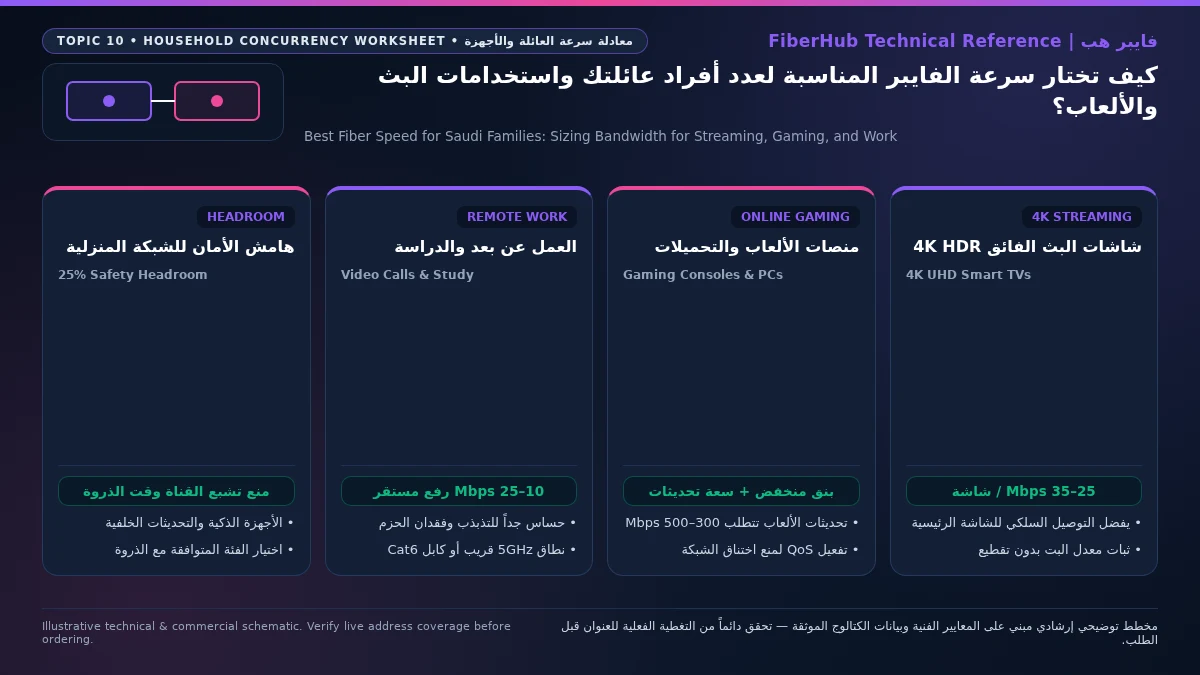
- 4K UHD / HDR10 / Dolby Vision Video & Live Sports (Shahid VIP, SSC Sports, Netflix): Each active 4K television consumes 20 Mbps to 35 Mbps of sustained throughput, with short transient bursts reaching 50 Mbps when switching channels or starting playback.
- Full HD (1080p) Streaming & Short-Form Video Scrolling (YouTube, TikTok, Instagram Reels): Each smartphone or tablet consumes 5 Mbps to 10 Mbps on average, though rapid vertical scrolling pre-fetches upcoming video clips in 15 Mbps to 25 Mbps micro-bursts.
- Real-Time Multiplayer Gaming (EA FC, Call of Duty, Fortnite, Valorant, Overwatch): Active gameplay itself uses minimal bandwidth—only 1 Mbps to 3 Mbps downstream and upstream—but demands an uncongested 20% bandwidth headroom cushion on the line so small UDP game packets never wait behind family video chunks.
- Massive Console & PC Game Patch Downloads (PS5, Xbox Series X, Steam): Modern game updates routinely weigh 60 GB to 150 GB. Content Delivery Networks (CDNs) from Sony, Microsoft, and Valve are engineered to saturate whatever bandwidth is available—easily pulling 350 Mbps to 600 Mbps on an uncapped console. A single unthrottled PlayStation 5 downloading a season patch at 9:00 PM will completely choke a 100 Mbps or 200 Mbps family connection unless extra headroom or QoS limits are in place.
- Remote Work & Distance Learning Video Calls (Microsoft Teams, Zoom, Webex, Madrasati): Two-way HD video calls with screen sharing require 4 Mbps to 8 Mbps symmetrically (both download and upload) and are highly sensitive to upstream congestion.
- Smart Home & Always-On IoT Devices (CCTV Cameras, Smart ACs, Robot Vacuums): A modern Saudi villa typically hosts 25 to 50 connected wireless devices. While idle sensors use negligible bandwidth, cloud-synced 4K security cameras and background smartphone OS updates consume 10 Mbps to 25 Mbps in the background.
| Household Profile & Property Type | Active Devices at Peak Hour | Typical Simultaneous Evening Workload | Recommended Fiber Speed Tier (Down / Up) | Time to Download a 100 GB Game Patch |
|---|---|---|---|---|
| Single Professional or Couple (Apartment) | 3 to 6 devices | 1x 4K TV + 2 smartphones + remote work | 100 to 200 Mbps (25–50 Mbps upload) | 1 hr 15 min to 2 hrs 20 min |
| Typical Family of 4 to 6 (Apartment / Villa) | 10 to 18 devices | 2–3x 4K TVs + 1 gaming console + study/work | 300 Mbps (100 Mbps upload) | Approx. 47 minutes at full line rate |
| Large Family of 7 to 9 (Two-Story Villa) | 20 to 35 devices | 4x 4K TVs + 2 gaming consoles/PCs + CCTV | 500 Mbps (125–200 Mbps upload) | Approx. 28 minutes |
| Multi-Generational Villa / Content Creators | 35+ devices | Multiple 4K streams + 4K cloud editing + heavy downloads | 1000 Mbps / 1 Gbps (300 Mbps upload) | Approx. 14 minutes |
Evaluating Saudi Fiber Tiers: Where Is the Best Price-to-Performance Value?
Inspecting official tariff disclosures regulated by the Communications, Space and Technology Commission (CST) and comparing verified packages on our broadband plan comparison tool reveals how Saudi telecom pricing makes specific speed tiers stand out (all monthly prices below include 15% VAT from the verified catalog):
- 100 Mbps and 200 Mbps Tiers (Entry-Level Budget Options): Mobily offers Mobily Fiber Postpaid 200 (200/50 Mbps) at 230 SAR/month, which is an economical entry point for a small two-person apartment. However, STC's legacy 100 Mbps tier (STC Baity Fiber 100 at 287.5 SAR/month) costs the exact same monthly amount as STC Baity Fiber Basic 300 (300/100 Mbps at 287.5 SAR/month)! Consequently, unless you are specifically choosing a lower-priced 200 Mbps tariff, paying 287.5 SAR for 100 Mbps leaves two-thirds of your potential speed on the table.
- 300 Mbps Tier (The Sweet Spot for 70% of Saudi Families): Across the Kingdom, 300 Mbps download paired with 100 Mbps upload represents the benchmark family standard. Verified 300/100 Mbps plans are available from STC (Baity Fiber Basic 300 at 287.5 SAR/month), Salam (Salam Fiber 300 at 287.5 SAR/month), Zain (Zain Fiber 300 at 287.5 SAR/month or Zain Fiber Home Plus 300 at 279 SAR/month), and Mobily (Fiber Prepaid 300 at 287.5 SAR/month or Postpaid 300 at 345 SAR/month). With 300 Mbps downstream and 100 Mbps upstream, four family members can watch separate 4K HDR streams simultaneously (consuming ~100 Mbps total) while leaving 200 Mbps of untouched headroom for gaming, Zoom calls, and browsing.
- 500 Mbps Tier (Heavy Gaming, Multi-Screen Villas, and Creator Households): When a household includes two or three avid gamers who frequently download 80+ GB updates on PlayStation, Xbox, or PC during prime evening hours, stepping up to 500 Mbps prevents download queues from colliding with family streaming. Verified options include Salam Fiber 500 (500/125 Mbps at 345 SAR/month), Zain Fiber Home Premium (500/200 Mbps at 389 SAR/month), Salam Fiber Gaming (500/200 Mbps at 399 SAR/month), STC Baity Fiber Stream (500/125 Mbps at 402.5 SAR/month), and Mobily Fiber Gamers (500/150 Mbps at 402.5 SAR/month). Notice that the price gap between 300 Mbps and 500 Mbps is often just 57.5 to 115 SAR per month—delivering 66% more download capacity and up to double the upload speed.
- 1000 Mbps / 1 Gbps Tier (Flagship Capacity for Wired Villas and Power Users): Gigabit fiber (1000 Mbps download / 300 Mbps upload) cuts massive file transfer times to a fraction. Salam Fiber 1000 stands out at 460 SAR/month (matching the price of some competitors' 500 Mbps tiers), whereas flagship 1 Gbps packages from STC (Baity Fiber Max at 920 SAR/month), Mobily (Fiber Postpaid 1GB at 920 SAR/month), and Zain (Fiber Home Black at 949 SAR/month) target ultra-connected smart villas and professional home studios.
Why Upgrading to 1,000 Mbps Fails If Your Indoor Wi-Fi Is the Real Bottleneck
Every week, homeowners across Riyadh, Jeddah, and Dammam call their ISP to upgrade from 300 Mbps to 500 Mbps or 1,000 Mbps because bedrooms on the second floor or the rooftop annex (Mulhaq) suffer from buffering video and slow downloads—only to discover that upstairs speeds remain stuck at 25 Mbps after the upgrade!
The engineering explanation is straightforward: your actual device speed is governed by the slowest link between the ISP and your screen. When the ISP installs a single ONT gateway on the ground floor, high-capacity 5 GHz radio waves certified under Wi-Fi Alliance Wi-Fi 6 standards must penetrate steel-reinforced concrete floor slabs (Hordi slabs) and 20 cm cement block walls. After passing through two concrete barriers, the 5 GHz signal drops below -75 dBm, forcing upstairs smartphones and smart TVs to fall back onto the crowded 2.4 GHz band—which physically maxes out at 20 Mbps to 45 Mbps in real-world indoor conditions, regardless of whether your fiber line downstairs is 300 Mbps or 1,000 Mbps!
Therefore, if your monthly broadband budget is around 400 to 490 SAR, subscribing to a 300 Mbps or 500 Mbps fiber plan and pairing it with wired-backhaul Mesh Wi-Fi 6 nodes or a Fiber-to-the-Room (FTTR) package (such as Salam Home FTTR 300 at 345 SAR, Salam Home FTTR 500 at 402.5 SAR, Mobily Home FTTR 500 at 460 SAR, or STC Baity Fiber Plus FTTR 500 at 488.75 SAR, all VAT-inclusive) will deliver a dramatically faster whole-home experience than paying 920 SAR/month for a 1 Gbps line connected to a single isolated router.
Verify fiber box readiness at your address first
Fiber availability depends on your building ODB plate and port status. Check your address to see eligible operators.
Four Practical Network Tweaks So a 300 Mbps Plan Feels Like Gigabit
Once you verify available infrastructure on the Saudi fiber coverage map and activate your chosen family tier, apply four practical network management rules to prevent any single device from monopolizing your household pipe:
- Hardwire Stationary Heavy Hitters via Cat6 Ethernet: Connect your main living room 4K Apple TV/smart TV, PlayStation 5, Xbox Series X, and desktop gaming PC directly to the ONT's Gigabit Ethernet ports (or wired room jacks). Offloading stationary 4K streams and console downloads onto copper cable frees up 100% of your Wi-Fi airtime for smartphones, tablets, and laptops.
- Throttle or Schedule 100 GB Game Downloads: Configure Steam, Battle.net, PlayStation, and Xbox network settings to cap background download speeds at roughly 70% of your plan's bandwidth during evening peak hours (for example, 200 Mbps on a 300 Mbps plan), or enable Rest Mode auto-updates so massive patches download automatically between 2:00 AM and 7:00 AM.
- Enable Wi-Fi 6 OFDMA and Dedicated 5 GHz SSIDs: Ensure your router's 802.11ax (Wi-Fi 6) mode and Orthogonal Frequency-Division Multiple Access (OFDMA) are enabled so the radio can bundle small data packets for dozens of family devices in a single transmission window without queuing delays.
- Match Your Contract Type to Your Living Situation: If your family owns the villa or has a long-term lease, standard 12-month or 18-month postpaid fiber plans offer seamless monthly billing and optional FTTR bundles; if you prefer zero long-term commitment, prepaid 300 Mbps and 500 Mbps fiber tiers from STC, Mobily, Salam, and Zain provide identical optical speeds on flexible terms.
Accounting for Saudi Seasonal Peaks, Majlis Gatherings, and Upgrade Flexibility
Household internet traffic in Saudi Arabia does not follow a flat year-round curve; it experiences dramatic seasonal and cultural surges that can increase simultaneous evening bandwidth consumption by 50% to 70% overnight. During the holy month of Ramadan, Eid holidays, and summer school breaks, the entire household's active schedule converges between sunset and 4:00 AM. While parents and guests stream ultra-high-definition Ramadan drama series in the ground-floor living room and external majlis, teenagers upstairs simultaneously launch multiplayer gaming sessions, Discord voice channels, and massive season-update downloads.
The same concurrency spike occurs on Thursday and Friday nights during marquee Roshn Saudi League football derbies and continental tournaments. Unlike pre-recorded movies that can buffer several minutes ahead, live 4K 50/60fps sports broadcasts rely on real-time low-latency HLS segments; if a background game download saturates your fiber pipe for even three seconds during a penalty shootout, the live broadcast resolution immediately drops into blurry pixelation. For families who regularly host relatives and friends in their majlis or outdoor annex, stepping up from 300 Mbps to 500 Mbps—and enabling a bandwidth-limited Guest Wi-Fi network capped at 25 Mbps per visitor—ensures guest smartphones never disrupt the home's primary 4K screens.
Finally, use telecom contract mechanics to protect your family budget when subscribing:
- Start at 300 Mbps and Upgrade On-Demand: Across STC, Mobily, Salam, and Zain, moving up a speed tier (for example, upgrading from 300 Mbps to 500 Mbps or 1 Gbps) is processed remotely via software profile provisioning at the central OLT within minutes, requiring zero technician visits or hardware swaps. By contrast, downgrading a postpaid contract mid-term from 1 Gbps to 300 Mbps often incurs early modification fees. Starting at 300 Mbps (or 500 Mbps for large gaming villas) eliminates the risk of overpaying.
- Weigh Postpaid Bundles Against Prepaid Flexibility: Postpaid 12-month or 18-month contracts allow you to bundle FTTR room fiber or entertainment add-ons on a predictable monthly bill. However, if your family rents on a short-term lease or travels extended periods during summer, verified prepaid fiber packages—such as Mobily Fiber Prepaid 300 (287.5 SAR/month equivalent on 1-month commitment), Mobily Fiber Prepaid 500 (402.5 SAR), or Salam and STC 6-month prepaid fiber options (all inclusive of 15% VAT)—deliver identical optical speeds without long-term cancellation penalties.
Frequently Asked Questions About Choosing Family Fiber Speeds
Is a 100 Mbps fiber plan enough for a Saudi family of five watching 4K TV and gaming?
While 100 Mbps can technically handle two 4K video streams and light web browsing, its 25 Mbps upload limit and lack of burst headroom mean the entire house will lag the moment anyone downloads a console game patch or backs up smartphone videos to the cloud. Because 300 Mbps fiber (with 100 Mbps upload) costs the exact same 287.5 SAR/month as 100 Mbps on major Saudi networks, choosing 300 Mbps is overwhelmingly better value for a family of five.
Match fiber speed and upload tiers to your household
Review published FTTH plans and compare download/upload speeds, commitment terms, and hardware conditions.
Who actually needs a 1,000 Mbps (1 Gbps) home fiber subscription?
A 1 Gbps tier is genuinely justified in three scenarios: large multi-generational villas with 8 to 12 heavy concurrent users connected via wired Ethernet/Mesh access points on every floor; professionals and content creators who upload and download hundreds of gigabytes of raw 4K/8K media daily (benefiting from the 300 Mbps upload channel); or subscribers in areas covered by competitively priced gigabit offers like Salam Fiber 1000 at 460 SAR/month (VAT included).
Do 40 smart home devices (bulbs, AC controllers, sensors) slow down my fiber speed?
Smart home IoT sensors and appliances consume almost zero internet bandwidth (often just a few kilobits per second for status heartbeats), so they do not eat into your 300 Mbps or 500 Mbps fiber speed. However, connecting 40+ devices to an older Wi-Fi 5 router can bog down its radio scheduler; using a modern Wi-Fi 6 router with OFDMA and keeping IoT devices on the 2.4 GHz band keeps the high-speed 5 GHz band completely clear for family streaming and gaming.
Should I upgrade from 300 Mbps to 500 Mbps or buy a Mesh Wi-Fi system for a two-story villa?
Test your speed standing two meters from the main fiber ONT first. If you get the full 300 Mbps downstairs near the router but only 20 Mbps in upstairs bedrooms, your fiber speed is not the problem—concrete wall attenuation is. Keeping your 300 Mbps plan and installing a wired-backhaul Wi-Fi 6 Mesh system (or switching to an FTTR room-fiber package) will solve upstairs buffering completely without overpaying for raw line speed you cannot reach wirelessly.
Ready to verify coverage and request home fiber?
Submit your address or ODB plate details so we can confirm availability and walk you through eligible plans.
Editorial Transparency & Neutrality Notice:
This guide is provided for comparison and decision support. It does not constitute final address coverage confirmation, binding operator pricing, or regulatory accreditation. Always verify final plan terms and box readiness before completing your subscription request.