
- Pre-Move Infrastructure Verification: Auditing Your New Address Before Handover
- Hardware Protocol: What to Pack With You vs What Must Stay on the Wall
- CST Consumer Protection Rules: How to Avoid Penalties When Your New Home Lacks Coverage
- Special Considerations When Moving a Fixed Home 5G Subscription
- The 14-Day Zero-Downtime Relocation Timeline
- Financial Comparison for Frequent Movers: Postpaid vs Prepaid Broadband Tiers
- Frequently Asked Questions About Moving Your Home Internet in KSA
- Can my telecom provider charge me an early termination fee if my new building has no fiber coverage?
- Should I leave the fiber modem and router in the old apartment for the next tenant?
- How many days in advance should I schedule a fiber relocation request before moving?
- What happens if the fiber box (ODB) at my new apartment building is completely full?
Yes, your active Fiber-to-the-Home (FTTH) or fixed Home 5G broadband contract can transfer with you when moving to a new apartment or villa in Saudi Arabia without triggering early termination penalties, provided your new National Address has serviceable optical infrastructure—either directly from your current operator or through a participating wholesale provider under the Open Access framework. Furthermore, if an official technical survey confirms that your new residence lacks fiber coverage or has no available optical ports, consumer protection regulations enforced by the Communications, Space and Technology Commission (CST) protect you from paying early contract cancellation fees caused by the provider's technical inability to deliver service at your destination address, provided you submit a formal relocation request first and return all leased customer premises equipment in good working order.
Moving home across rapidly expanding Saudi districts in Riyadh, Jeddah, Dammam, Khobar, or Makkah requires synchronizing your residential lease handover (Ejar) with your telecommunications commitment, which typically spans 12 or 18 months. Many subscribers unintentionally incur avoidable charges by requesting an immediate line cancellation before logging a formal relocation ticket, or by leaving their registered optical modem and Wi-Fi 6 router behind in the vacated apartment assuming it belongs to the landlord. Conversely, others accidentally strip wall-mounted passive optical sockets, jeopardizing their rental security deposit. This operational guide walks you through every technical, financial, and regulatory step required to move your home internet connection seamlessly.

Pre-Move Infrastructure Verification: Auditing Your New Address Before Handover
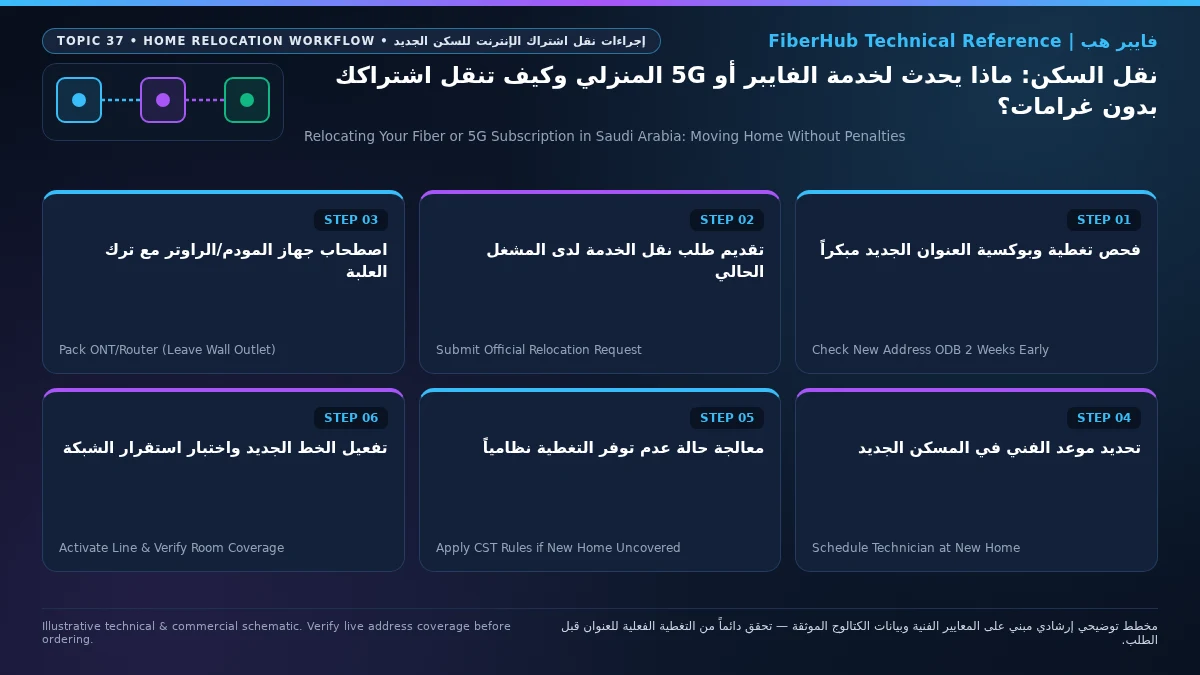
A frictionless broadband transfer begins 10 to 14 days before your moving truck arrives—not after you unpack in the new property. Whether your existing contract can continue unchanged depends entirely on the physical access network installed at the destination building. Before contacting your service provider (stc, Mobily, Zain, or Salam), gather four specific pieces of technical evidence from your new residence:
- Registered Saudi National Address (SPL Coordinates): Note the exact four-digit building number, postal code, additional four-digit number, street name, and district. Operator provisioning engines map optical cabinet availability against verified National Address coordinates.
- Optical Distribution Box (ODB) Plate Photograph: Walk around the exterior perimeter wall or inspect the ground-floor telecom room of your new building. Locate the gray or metallic fiber distribution box and photograph its stamped metal identification plate, noting the infrastructure owner logo (
stc,Mobily,Dawiyat, orSalam) and the cabinet code. - Indoor Optical Wall Outlet (Rosette) Inspection: Check the living room or low-voltage distribution panel inside the new apartment to verify that the internal fiber drop cable and small white wall socket (Optical Rosette) are intact. In newly constructed villas or subdivided apartments where internal conduits are empty, you may need landlord approval before the technician can pull an indoor fiber patch cable.
- Instant Digital Eligibility Check: Run your destination address through the FiberHub Coverage & Eligibility Checker to verify which wholesale and retail operators serve the new building and compare those options against your active plan.
Depending on what this pre-move inspection reveals, your relocation request will follow one of three operational paths:
| Destination Property Infrastructure Status | Operational Workflow with Your Current ISP | Financial Impact on Active Commitment (Inclusive of 15% VAT) | Typical Provisioning Lead Time |
|---|---|---|---|
| Same-Operator ODB Present with Spare Optical Ports | Submit a standard "Home Relocation / Transfer" request via the operator app or call center and book an installation slot. | Your contract continues at the exact same monthly tariff (e.g., 287.5 SAR or 345 SAR/month depending on your plan) and carries over your remaining commitment months without forcing a penalty. | 2 to 5 business days from appointment confirmation. |
| Different Wholesale Operator ODB Eligible via CST Open Access | Log a relocation request providing the destination ODB plate ID so your retail ISP can request a wholesale bitstream port. | Your subscription stays with your current ISP at your existing or equivalent Open Access tier price upon your confirmation, preserving contract continuity. | 3 to 7 business days to coordinate wholesale port patching and activation. |
| Zero Fiber Infrastructure or Exhausted ODB with No Expansion | Submit a formal relocation ticket first so the system records "Technical Infeasibility at Destination," then request penalty-free termination or a 5G conversion. | Full exemption from early termination commitment penalties due to technical inability to serve the new address; you only pay prorated usage up to closure and return leased hardware. | 5 to 10 business days including technical rejection report and equipment return receipt. |
Hardware Protocol: What to Pack With You vs What Must Stay on the Wall
One of the most frequent sources of billing disputes during residential moves is confusion between subscriber-assigned active CPE hardware and property-fixed passive optical wiring. To avoid equipment non-return charges from your telecom operator while simultaneously protecting your security deposit with your former landlord, follow this strict physical boundary:
- Equipment You Must Disconnect and Pack With You:
- Optical Network Terminal (ONT) and Primary Router (
Wi-Fi 6 Gigabit Router): Every verified postpaid and prepaid fiber plan in the Saudi catalog—such asSTC Baity Fiber Basic (300 Mbps)at 287.5 SAR/month,Mobily Fiber Postpaid 300at 345 SAR/month,Salam Fiber 300at 287.5 SAR/month, orZain Fiber Home Plus (300 Mbps)at 279 SAR/month (all inclusive of 15% VAT under ZATCA regulations)—includes a serializedWi-Fi 6 Gigabit Routeror integrated optical gateway bound to your customer account ID. You must power it down, carefully unclip the thin yellow SC/APC or SC/UPC fiber patch cord, and pack the unit along with its original power brick. - Mesh Wi-Fi Nodes and IPTV Set-Top Boxes: Any auxiliary mesh extenders or television receivers leased or bundled under your account remain your responsibility and must travel with you to the new address (or be returned to an official branch if terminating).
- FTTR (Fiber-to-the-Room) Optical Gateways: If you subscribe to a room-level optical tier such as
STC Baity Fiber Plus FTTR(488.75 SAR/month),Mobily Home FTTR 500 Mbps(460 SAR/month), orSalam Home FTTR 300(345 SAR/month), collect the main master gateway and satellite room units. However, do not forcefully rip surface-bonded transparent fiber cables off painted walls; coordinate with your operator's technical crew so walls are not damaged.
- Optical Network Terminal (ONT) and Primary Router (
- Passive Components You Must Leave Intact in the Old Property:
- Wall-Mounted Optical Rosette (Terminal Socket): The small white plastic wall box where the internal building fiber terminates belongs to the property's fixed wiring. Detaching it or cutting the internal pigtail breaks the optical path for the next tenant and gives the landlord grounds to deduct repair costs.
- External Drop Cable and Building ODB Connections: Never tamper with cables running through building risers or exterior walls.
- Optical Dust Cap Precaution: When unplugging your ONT, immediately place the tiny plastic dust cap over the optical transceiver port and patch cord tip. Construction dust settling on the microscopic ceramic ferrule during a move causes severe optical signal loss (
dBmattenuation) when reconnected.
CST Consumer Protection Rules: How to Avoid Penalties When Your New Home Lacks Coverage
Subscribers locked into a 12-month commitment (standard across stc, Mobily, and Salam postpaid plans) or an 18-month commitment (standard across Zain postpaid plans such as Zain Fiber Home Premium (500 Mbps) at 389 SAR/month VAT-inclusive) often worry: What happens if I move to a newly developed neighborhood where fiber cables have not been trenched yet? Am I forced to pay out the remaining months of my contract?
Under the Telecommunications and Information Technology User Rights Protection Regulations issued by the Communications, Space and Technology Commission (CST), there is a decisive legal distinction between voluntary early cancellation at a serviceable address and involuntary termination caused by technical unavailability at a new residence:
- Never Request Direct Cancellation Before Filing a Relocation Request: The most costly mistake consumers make is calling customer care and saying, "I am moving, please cancel my fiber line." If the agent processes a standard voluntary cancellation, the billing engine automatically calculates early termination fees (pro-rated hardware or commitment charges). Instead, always submit an official Service Relocation Request to your new National Address first.
- Obtain Official Proof of Technical Infeasibility: When the operator's GIS system or field technician inspects your destination address and confirms that neither direct network ports nor Open Access wholesale ports exist, the relocation order is closed with the status code Technical Infeasibility / Unserviceable Address. Save the SMS notification, ticket number, or email confirming that the operator cannot fulfill the transfer.
- Execute Penalty-Free Contract Settlement: Once technical inability is documented on your account, request contract termination citing the rejected relocation ticket. You are only obligated to pay normal usage charges up to the disconnection date and return leased CPE devices (
Wi-Fi 6 Gigabit Router) to an official operator branch against a stamped or digital return receipt. If an automated bill still includes an early termination penalty, you can file a formal dispute via the CST Mutasil portal attaching your rejected relocation ticket number and your authenticatedEjartenancy contract at the new address.
Verify fiber box readiness at your address first
Fiber availability depends on your building ODB plate and port status. Check your address to see eligible operators.
Special Considerations When Moving a Fixed Home 5G Subscription
Many users assume that relocating a Fixed Wireless Access (Home 5G) router is as simple as unplugging it from the old bedroom and plugging it into the new living room. While 5G requires no wall trenching, moving a Saudi Home 5G plan in 2026 involves three critical technical and contractual checks:
- Geo-Lock / Registered Home Sector Binding: Dedicated residential 5G plans—such as
STC Baity 5G Home Wireless Unlimited(300 Mbps at 287.5 SAR/month),Mobily Home 5G Unlimited(500 Mbps at 402.5 SAR/month),Zain 5G+ Home Prime (300 Mbps)(at 345 SAR/month), andSalam HomeFi 200 5G(at 287.5 SAR/month)—are provisioned as fixed residential services rather than nomadic mobile hotspots. Operators often bind the SIM/eSIM to the serving cell sectors covering your registered National Address to manage tower capacity. Before or immediately upon moving, update your registered home address through the operator's app or customer care so your CPE is authorized on the new neighborhood's 5G cell towers. - Dramatic Shifts in Indoor RF Signal Quality (
n783.5 GHz Propagation): Unlike optical fiber, where 300 Mbps or 500 Mbps remains identical in every covered building, 5G wireless throughput depends entirely on line-of-sight to the nearest macro tower, floor elevation, and Low-E thermal window glazing. An operator that delivered 450 Mbps in your old apartment might suffer from high interference or weak indoor penetration in your new building. Always check the FiberHub Home 5G Guide & Coverage Portal and test your router'sRSRPandSINRmetrics across multiple windows in the new home before finalizing placement. - Leveraging 1-Month eSIM Plans During Transitional Moves: If you are moving into temporary housing for two or three months while waiting for a permanent villa to finish construction, consider 1-month commitment eSIM tiers where you supply your own 5G router—such as
STC Baity 5G Unlimited eSIM(500 Mbps download / 100 Mbps upload at 402.5 SAR/month with a 1-month commitment) orSTC Baity 5G Basic eSIM (200 Mbps)(at 299 SAR/month with a 1-month commitment). These give you complete freedom to switch or cancel without long-term lock-in.
The 14-Day Zero-Downtime Relocation Timeline
For households relying on remote corporate VPNs, cloud collaboration, or online university lectures, losing internet connectivity for a week during a house move is unacceptable. Follow this structured 14-day schedule to achieve near-zero downtime:
- Days 14 to 10 Before Moving Day (Site Audit & Catalog Comparison): Immediately after signing your new
Ejarlease, photograph the destination building's ODB metal plate, record its National Address, and run a side-by-side comparison on the FiberHub Plan Comparison Tool to see whether keeping your current plan or upgrading via Open Access offers better value. - Days 7 to 5 Before Moving Day (Booking the Relocation Order): Submit your relocation request with your current ISP and schedule the field technician visit for the morning immediately following your furniture move (or the afternoon of key handover if power is already active in the new unit).
- Moving Day at the Old Residence (Safe Disconnection & Proof): Power off your
Wi-Fi 6 Gigabit Router, detach the optical patch cord gently, fit the protective dust cap, and take a clear timestamped photo of the intact wall optical rosette so your former landlord has proof that the property's passive fiber socket was left undamaged. - Activation Day at the New Residence (Optical Budget & Throughput Verification): Guide the technician to place the ONT/router in a central hallway or living area rather than locking it inside a metal shoe cabinet. Before signing the work completion order, verify that the optical receive power (
RX Optical Power) sits comfortably between-15 dBmand-24 dBm, and run a wired Gigabit Ethernet speed test to confirm full provisioned download and upload speeds.
Financial Comparison for Frequent Movers: Postpaid vs Prepaid Broadband Tiers
If your career or academic schedule requires relocating apartments every 6 to 12 months, choosing the right billing structure upfront eliminates contract transfer friction. The table below compares verified Saudi postpaid and prepaid fiber plans from the 2026 catalog (all prices include 15% VAT):
| Verified Plan Name & Provider | Billing Type | Download / Upload Speed | Monthly Price (15% VAT Inc.) | Commitment Period | Suitability for Frequent Movers |
|---|---|---|---|---|---|
Mobily Home Fiber Prepaid 300 (mobily-fiber-prepaid-300) |
Prepaid | 300 / 100 Mbps | 287.5 SAR | 1 Month | Maximum flexibility for short-term leases; includes a Wi-Fi 6 Gigabit Router with a 1-month commitment cycle. |
STC Baity Fiber 300 Prepaid (stc-baity-fiber-300-prepaid) |
Prepaid | 300 / 100 Mbps | 287.5 SAR | 6 Months | Ideal for semi-annual leases; predictable upfront budgeting without a 12-month postpaid lock-in. |
Salam Fiber 300 Prepaid (salam-fiber-300-prepaid) |
Prepaid | 300 / 100 Mbps | 287.5 SAR | 6 Months | Strong value for 6-month tenancy periods with full 300/100 Mbps optical performance and zero FUP. |
STC Baity Fiber Basic (300 Mbps) (stc-baity-fiber-basic) |
Postpaid | 300 / 100 Mbps | 287.5 SAR | 12 Months | Best for standard 1-year residential leases; easily transferable across stc and Open Access buildings. |
Salam Fiber 500 (salam-fiber-500) |
Postpaid | 500 / 125 Mbps | 345 SAR | 12 Months | High-throughput 500 Mbps tier at a competitive 345 SAR rate, transferable to eligible fiber addresses. |
Zain Fiber Home Plus (300 Mbps) (zain-fiber-home-plus) |
Postpaid | 300 / 100 Mbps | 279 SAR | 18 Months | Lowest monthly postpaid fee in the 300 Mbps class, best suited for tenants staying 18+ months or moving between covered districts. |
You can inspect all active fiber packages, hardware inclusions, and contract terms across all four licensed providers on our Saudi Fiber Broadband Plans Directory.
Frequently Asked Questions About Moving Your Home Internet in KSA
Match fiber speed and upload tiers to your household
Review published FTTH plans and compare download/upload speeds, commitment terms, and hardware conditions.
Can my telecom provider charge me an early termination fee if my new building has no fiber coverage?
No. Under CST consumer protection regulations, if you relocate to a new residence where your current provider cannot deliver service (either directly or via Open Access wholesale infrastructure), you are exempt from early contract termination penalties. However, you must submit an official relocation request first so the provider logs a "Technical Infeasibility" status, present proof of your move if requested (such as your new Ejar contract), and return all leased routers/ONTs to an official branch.
Should I leave the fiber modem and router in the old apartment for the next tenant?
No. You must unplug and take the active ONT/router (Wi-Fi 6 Gigabit Router), power adapter, and any Mesh extenders or TV receivers with you, as their serial numbers are registered under your personal account and National ID/Iqama. Conversely, you must leave the fixed plastic optical wall outlet (Rosette) mounted on the wall untouched, as it is part of the building's permanent passive infrastructure.
How many days in advance should I schedule a fiber relocation request before moving?
You should submit your relocation request 7 to 10 days before your moving date and schedule the technician appointment for the day your furniture arrives or the day after. Direct same-network transfers typically take 2 to 5 business days, while transfers across different wholesale infrastructure owners under CST Open Access typically take 3 to 7 business days.
What happens if the fiber box (ODB) at my new apartment building is completely full?
If the field technician inspects the Optical Distribution Box (ODB) at your new building and finds that all optical splitter ports are occupied (port exhaustion) with no immediate expansion capacity, the operator must record the relocation request as technically unserviceable. You then have the right to terminate your existing fiber contract without early termination penalties and subscribe to an alternative covered provider or a Home 5G wireless plan at the new address.
Regulatory & Technical Sources: Communications, Space and Technology Commission (CST) Telecommunications User Rights Protection Regulations, ZATCA 15% Value Added Tax Implementation Guidelines, and verified 2026 residential broadband tariff disclosures from stc, Mobily, Zain, and Salam.
Ready to verify coverage and request home fiber?
Submit your address or ODB plate details so we can confirm availability and walk you through eligible plans.
Editorial Transparency & Neutrality Notice:
This guide is provided for comparison and decision support. It does not constitute final address coverage confirmation, binding operator pricing, or regulatory accreditation. Always verify final plan terms and box readiness before completing your subscription request.