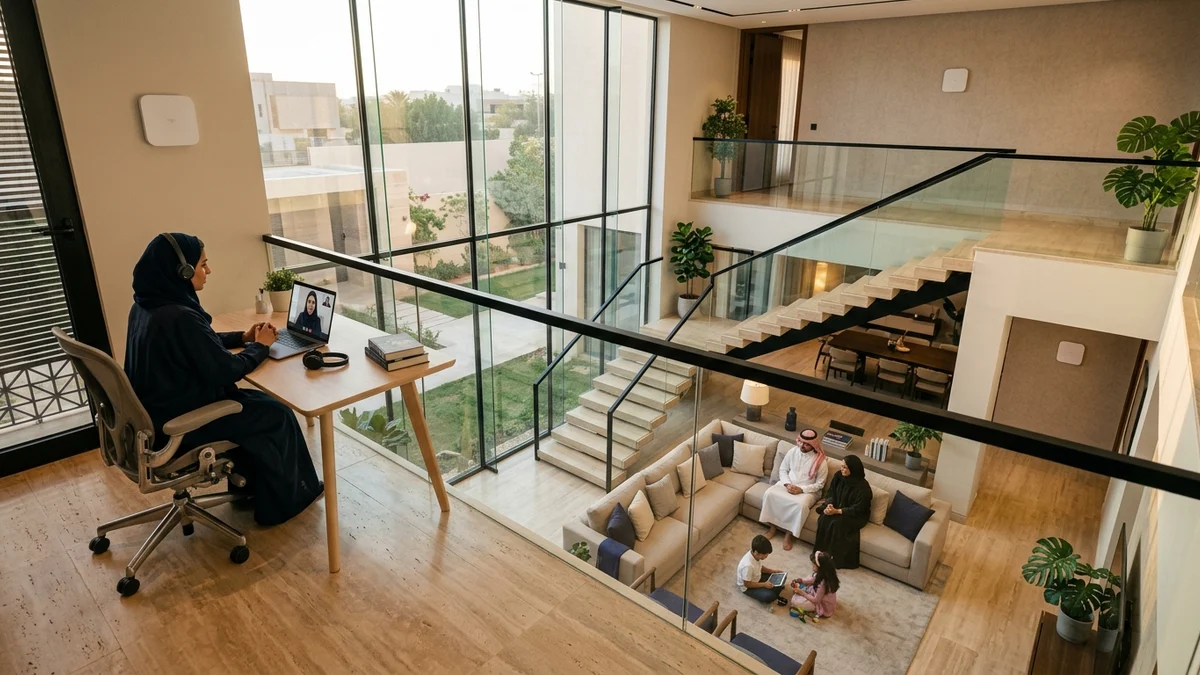
- 1. FTTH vs. FTTR Architecture: Where Does the Optical Glass Stop?
- 2. The Physics of Saudi Villa Construction: Why Concrete and Hordi Slabs Defeat Wireless Mesh
- 3. How Transparent Micro-Fiber Is Installed Inside Finished Villas Without Drilling Distortion
- 4. Three-Way Engineering Comparison: FTTR vs. Wired Cat6 Mesh vs. Wireless Mesh
- 5. Verified 2026 Saudi FTTR Pricing: Salam vs. Mobily vs. STC Cost Math
- 6. Decision Checklist: Floor-by-Floor Villa Planning & When FTTR Is Worth Every Riyal
- Frequently Asked Questions About FTTR in Saudi Arabia
- Is the transparent FTTR micro-fiber cable visible on walls or damaged by floor mopping?
- Do the room Slave Optical Access Points require electrical power outlets?
- Can I plug a PlayStation 5 or gaming PC via Ethernet into an upstairs FTTR room unit?
- How many rooms does a standard FTTR package cover and can I add more units?
- Can I upgrade an existing standard FTTH subscription to FTTR with the same provider?
If you live in a multi-story Saudi villa or large duplex and are asking, "Is FTTR (Fiber-to-the-Room) genuinely worth installing in my home, or can a standard Mesh Wi-Fi system do the job?", the engineering answer hinges on one structural fact about your property: does your villa already have working in-wall Cat6 Ethernet cables running from a central patch panel to your upstairs bedrooms and majlis? If the answer is yes, buying Wi-Fi 6/7 Mesh nodes and connecting them over those existing Cat6 wall jacks (Wired Ethernet Backhaul) will deliver 100% of your fiber speed in every room without paying for an FTTR plan. If the answer is no—which is the reality in thousands of finished or rented Saudi villas built with thick reinforced concrete walls and 32 cm hordi ceilings that block wireless signals—a wireless-only Mesh system will lose 50% to 70% of its throughput between floors. In that scenario, FTTR (Fiber-to-the-Room) is the definitive architectural solution, extending hair-thin, transparent glass micro-fiber directly into each room along your baseboards with zero wall demolition.
This guide breaks down the physical and financial differences between standard FTTH, FTTR, and Mesh Wi-Fi in Saudi Arabia, explains why local reinforced concrete construction defeats wireless repeaters, and compares the verified 2026 FTTR tariffs from Salam, Mobily, and STC down to the riyal.

1. FTTH vs. FTTR Architecture: Where Does the Optical Glass Stop?
A common misconception is that FTTR is a faster outdoor internet line from the street cabinet. In reality, the outside GPON drop cable entering your property from the neighborhood Optical Distribution Box (ODB) is identical in both technologies. The difference lies entirely in how far the optical glass travels inside your house:
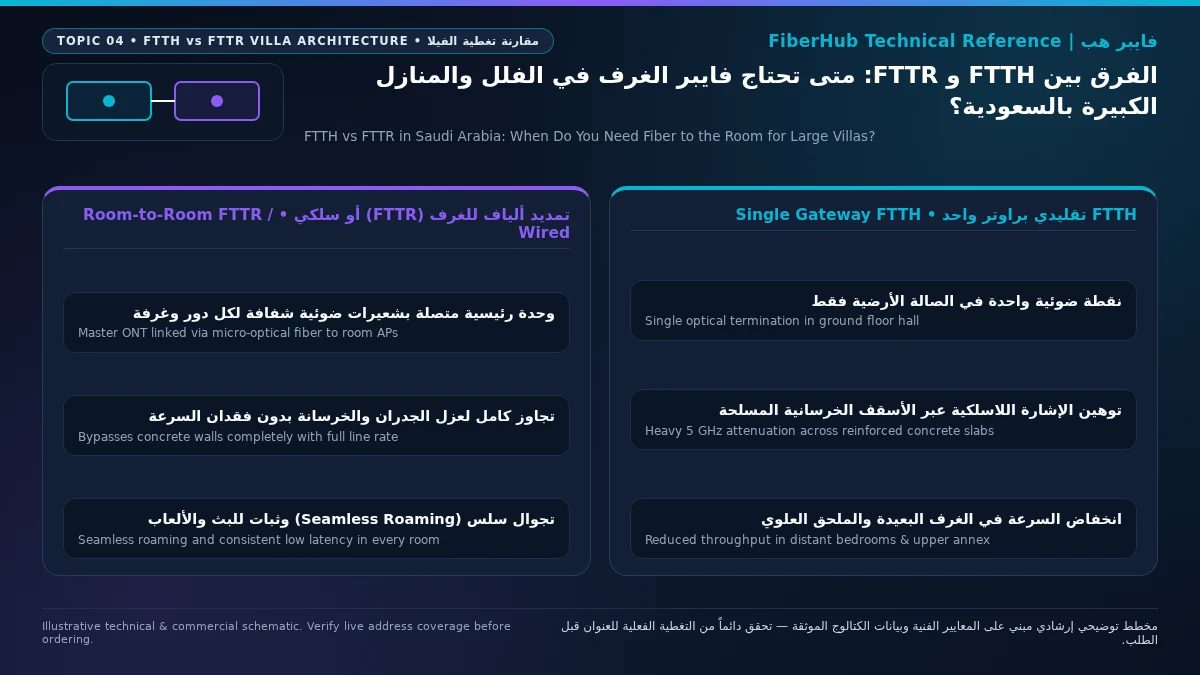
- Standard FTTH (Fiber-to-the-Home): The optical glass cable terminates at a single indoor wall rosette—usually in the ground-floor family living room—where one primary ONT/Wi-Fi 6 router is installed. From that single box, data must travel the rest of the way to upstairs bedrooms, the ground-floor majlis, and rooftop annexes as radio waves fighting through concrete walls.
- FTTR (Fiber-to-the-Room): Standardized under ITU-T G.9940 (G.fin) indoor optical networking specifications, FTTR replaces the single-router bottleneck with an all-optical indoor LAN. The primary gateway acts as a Master ONT feeding a compact passive optical splitter (
1:4or1:8Access Terminal Box), from which ultra-thin, transparent glass micro-fibers run directly to Slave Optical Access Points (Edge ONTs) inside key bedrooms and living zones. Light pulses travel all the way into each room at full gigabit speed before converting into short-range, unattenuated Wi-Fi 6 and Gigabit Ethernet right next to your devices.
At the protocol layer, the Master ONT operates an internal micro-PON optical time-division multiplexing loop across all connected room units. Unlike a conventional Wi-Fi range extender that captures a degraded wireless radio signal and re-transmits it at half bandwidth, each FTTR Slave Optical Access Point receives an unattenuated optical stream capable of up to 2.5 Gbps over glass. Inside each bedroom or majlis, your devices connect to a local optical access point just 2 to 4 meters away, achieving ideal indoor signal strength (-38 dBm to -50 dBm RSSI) and full 160 MHz Wi-Fi 6 channel utilization without inter-floor interference.
2. The Physics of Saudi Villa Construction: Why Concrete and Hordi Slabs Defeat Wireless Mesh
Why has FTTR adoption grown so rapidly across Riyadh, Jeddah, Dammam, and Khobar compared with North America or northern Europe? The answer is structural civil engineering.
Whereas suburban homes in the United States are framed with timber studs and gypsum drywall—which attenuate a 5 GHz Wi-Fi signal by only 3 to 4 dB per wall—Saudi residential villas are engineered for thermal insulation and structural longevity using heavy masonry and steel-reinforced concrete:
- 20 cm Concrete Block Walls and Structural Columns: Passing through a single plastered 20 cm cement block wall absorbs 12 to 18 dB of 5 GHz/6 GHz radio energy. Because the decibel scale is logarithmic, a 15 dB drop destroys more than 96% of the wireless signal power after just one wall.
- 30–35 cm Reinforced Hordi Floor Slabs: Multi-story Saudi villas separate the ground floor, first-floor bedrooms, and rooftop annex with thick hollow-block (hordi) slabs laced with dense steel rebar grids. Steel rebar acts as a partial Faraday shield, inflicting 22 to 28 dB of attenuation between floors.
- Steel Doors, Marble Cladding, and Low-E Thermal Glass: Heavy steel security doors, porcelain/marble feature walls, and metallic low-emissivity window coatings isolate outdoor diwaniyas and annexes from indoor routers, preventing indoor living-room Wi-Fi from reaching courtyard seating or external driver/majlis rooms.
When a homeowner installs a Wireless Mesh system (Wireless Backhaul) in a concrete villa without wired interconnects, the upstairs satellite node must use radio waves both to talk to your phone and to talk back through the concrete ceiling to the downstairs router. Even if your phone displays "full Wi-Fi bars" in the master bedroom, the wireless backhaul link between floors is choked to 40–70 Mbps with severe latency spikes (Ping jumping from 7 ms to 90+ ms during gaming).
3. How Transparent Micro-Fiber Is Installed Inside Finished Villas Without Drilling Distortion
Homeowners who have invested heavily in interior gypsum ceilings, marble skirting boards, and custom wall paint naturally refuse any networking solution that requires chiseling walls or stapling thick gray plastic cables across rooms. FTTR installation crews use two non-invasive routing techniques:
- Method A (Concealed In-Wall Conduit Pulling): Whenever existing low-voltage telephone or coaxial conduits between floors are clear, the technician pulls the micro-fiber strand invisibly inside the wall ducts to emerge neatly at each room's wall plate via a palm-sized optical Access Terminal Box (ATB).
- Method B (Invisible Surface Routing Along Baseboards): Where wall conduits are blocked or absent, technicians deploy ITU-T G.657.B3 bend-insensitive transparent micro-fiber measuring just 1.2 mm to 2.0 mm in diameter. Using a specialized low-temperature hot-melt thermal adhesive tool, the technician bonds the clear fiber along the top lip of your ceramic/marble baseboard (
نعلة الجدار) and around door architraves. Once cooled (within seconds), the transparent jacket blends invisibly into the wall edge without nails, plastic clips, or paint damage.
Engineered specifically for tight architectural corners, G.657.B3 optical fiber tolerates a 5 mm minimum bend radius around door frames and staircase trims with near-zero macro-bending light loss, while its Kevlar/aramid-reinforced polymer jacket withstands up to 100 N of tensile pull force and resists household floor cleaners. All Slave Optical APs are centrally managed by the Master ONT under a unified network name (Single SSID) with hardware-assisted IEEE 802.11k/v/r fast roaming. Walking upstairs during a Microsoft Teams call or online game hands your device over to the room's optical unit in under 50 milliseconds with zero dropped packets.
Verify fiber box readiness at your address first
Fiber availability depends on your building ODB plate and port status. Check your address to see eligible operators.
4. Three-Way Engineering Comparison: FTTR vs. Wired Cat6 Mesh vs. Wireless Mesh
The matrix below compares the three multi-room coverage architectures across real-world Saudi villa conditions:
| Evaluation Metric | FTTR (Fiber-to-the-Room) | Wired Cat6 Ethernet Backhaul Mesh | Wireless-Only Mesh / Wi-Fi Extenders |
|---|---|---|---|
| Inter-Floor Backhaul Medium | Transparent G.657.B3 optical glass micro-fiber to each room | In-wall copper Cat6 / Cat6A Ethernet cables | 5 GHz / 6 GHz radio waves through concrete slabs |
| Real Speed Delivered in Upstairs Rooms | 100% of subscribed plan (300 to 1000+ Mbps) | 100% of subscribed plan (up to 1000 Mbps on Gigabit ports) | 25% to 55% of plan speed (heavily degraded by concrete) |
| Gaming Latency (Ping) & Jitter Stability | Deterministic (< 1–2 ms indoor optical overhead) | Deterministic (< 1 ms indoor wired overhead) | Unstable (+15 to 60 ms latency spikes under load) |
| Requires Pre-Existing Wall Ethernet Wiring? | No (routes invisibly along baseboards or through conduits) | Yes (mandatory working Cat6 wall sockets per room) | No (plugs into AC power outlets only) |
| Hardware Maintenance & Support | 100% managed and warranted by your telecom ISP | Self-purchased and self-maintained by homeowner | Self-purchased and self-maintained by homeowner |
| Best Architectural Fit | Finished/rented multi-floor villas without Cat6 wiring | New villas pre-wired with working Cat6 wall ports | Single-floor apartments or open-plan layouts |
Beyond raw throughput, both FTTR and wired Cat6 Mesh eliminate wireless backhaul spectrum contention. In a wireless-only Mesh system, up to half of your indoor radio airtime is consumed simply relaying packets between the upstairs and downstairs nodes, causing severe airtime congestion when 25 to 40 smart home devices, 4K TVs, and laptops are active simultaneously. Because FTTR offloads all inter-room traffic onto passive optical glass, 100% of the Wi-Fi 6 radio airtime in every bedroom is dedicated exclusively to serving your end-user devices.
5. Verified 2026 Saudi FTTR Pricing: Salam vs. Mobily vs. STC Cost Math
In the verified 2026 Saudi broadband catalog—regulated by the Communications, Space and Technology Commission (CST) and inclusive of 15% VAT under ZATCA rules—three national operators offer dedicated postpaid FTTR (is_fttr: true) packages on a 12-month commitment. Comparing each FTTR plan against the same operator's standard FTTH plan in our verified fiber plans directory reveals the exact monthly premium you pay for room-to-room optical hardware and installation:
- Salam (Salam Home FTTR) — Broadest Lineup & Lowest Monthly Entry:
- Salam Home FTTR 300 (300/100 Mbps): 345.00 SAR/month (just +57.50 SAR/month above standard Salam Fiber 300 at 287.50 SAR, with free installation on a 12-month contract).
- Salam Home FTTR 500 (500/125 Mbps): 402.50 SAR/month (just +57.50 SAR/month above standard Salam Fiber 500 at 345.00 SAR).
- Salam Home FTTR 1000 (1000/300 Mbps): 575.00 SAR/month (+115.00 SAR/month above standard Salam Fiber 1000 at 460.00 SAR).
- Mobily (Mobily Home FTTR) — Zero Monthly Premium Over Postpaid 400/500 Tiers:
- Mobily Home FTTR 400 (400/100 Mbps): 402.50 SAR/month (the exact same monthly price as standard Mobily Fiber Postpaid 400 at 402.50 SAR!).
- Mobily Home FTTR 500 (500/125 Mbps): 460.00 SAR/month (the exact same monthly price as standard Mobily Fiber Postpaid 500 at 460.00 SAR!).
- Mobily Home FTTR 1 Gbps (1000/300 Mbps): 920.00 SAR/month (matching Mobily Fiber Postpaid 1GB at 920.00 SAR).
- STC (Baity Fiber Plus FTTR):
- STC Baity Fiber Plus FTTR 500 (500/125 Mbps): 488.75 SAR/month (+86.25 SAR/month above Baity Fiber Stream 500 at 402.50 SAR, or just +28.75 SAR/month above Baity Fiber Entertainment 500 at 460.00 SAR).
The financial takeaway is compelling: across Salam, Mobily, and STC, upgrading from standard FTTH to a full FTTR package adds between 0 SAR and 86.25 SAR per month (0 to 1,035 SAR per year), while saving you 1,500 to 2,800 SAR in upfront retail tri-band Mesh hardware purchases. You can compare all FTTR and standard fiber tiers side by side on our broadband comparison page and verify cabinet eligibility at your address via our coverage checker.
6. Decision Checklist: Floor-by-Floor Villa Planning & When FTTR Is Worth Every Riyal
When planning an FTTR deployment across a typical three-level Saudi villa (Ground Floor + First Floor + Rooftop Annex), optimal optical node placement follows a clear architectural blueprint:
- Ground Floor (Living Room & Majlis): Place the Master ONT in the central family living area where the street fiber enters, and run the first transparent micro-fiber branch to the formal guests' Majlis or external Diwaniya if separated by heavy steel doors or long corridors.
- First Floor (Master & Children's Bedrooms): Route the second transparent micro-fiber strand up the stairwell conduit or along the marble skirting board into the upstairs family hall or Master Bedroom, giving all first-floor bedrooms full-speed Wi-Fi 6 coverage.
- Rooftop Annex (
الملحق العلوي): If the rooftop annex houses a gaming setup or home office, extend a third optical branch upstairs so consoles and workstations can plug directly into the Slave Optical AP's Gigabit Ethernet port.
Before the installation team arrives, walk through your villa to identify the two or three rooms where low latency and maximum throughput matter most—typically the upstairs master suite, a gaming bedroom, or the ground-floor majlis—and verify that each target spot has an accessible 220V wall outlet and a clear baseboard path free of built-in cabinetry so the technician can bond the transparent micro-fiber cleanly in a single visit.
Use this three-point engineering rule to make the final call for your property:
- Choose FTTR Immediately If: You live in a 2- or 3-story villa, duplex, or large floorplan (> 250 m²) that lacks working in-wall Cat6 Ethernet ports, and family members suffer from dead zones or high gaming latency in upstairs bedrooms or the majlis.
- Stick with Standard FTTH + Wired Cat6 Mesh If: Your villa already has tested Cat6 Ethernet wall sockets in every key room terminating at a central distribution panel. Order a standard FTTH home fiber plan (such as 300 Mbps at 279–287.50 SAR or 500 Mbps at 345–402.50 SAR) and plug Wi-Fi 6 access points into your wall Ethernet ports.
- Skip FTTR Completely If: You live in a single-floor apartment under 180 m²; the single Wi-Fi 6 Gigabit router included free with every standard FTTH plan will cover your home without extra hardware.
Frequently Asked Questions About FTTR in Saudi Arabia
Is the transparent FTTR micro-fiber cable visible on walls or damaged by floor mopping?
No. The ITU-T G.657.B3 transparent indoor fiber cable is only 1.2 to 2.0 mm thick and encased in a water-resistant, chemical-resistant clear polymer sheath. When thermally bonded along the upper edge of ceramic or marble baseboards, it is virtually invisible to the naked eye and completely unaffected by daily floor mopping.
Match fiber speed and upload tiers to your household
Review published FTTH plans and compare download/upload speeds, commitment terms, and hardware conditions.
Do the room Slave Optical Access Points require electrical power outlets?
Yes. While the transparent micro-fiber carries data purely as passive infrared light without electricity, each Slave Optical Access Point inside a bedroom or majlis requires a standard 220V power socket to power its internal Wi-Fi 6 radio transmitters and Gigabit Ethernet ports.
Can I plug a PlayStation 5 or gaming PC via Ethernet into an upstairs FTTR room unit?
Yes. Every FTTR Slave Optical Access Point includes built-in Gigabit Ethernet LAN ports. Plugging a PS5 or PC in an upstairs bedroom into the room's FTTR unit via a short Ethernet patch cord gives you full optical line speed and sub-10 ms domestic ping, identical to plugging directly into the main ground-floor ONT.
How many rooms does a standard FTTR package cover and can I add more units?
A base operator FTTR installation typically includes the Master ONT for the main living area plus 1 to 2 Slave Optical Access Points for priority rooms or floors, and the indoor optical splitter architecture supports expanding up to 4, 8, or 16 room units for large compounds and palaces according to operator add-on schedules.
Can I upgrade an existing standard FTTH subscription to FTTR with the same provider?
Yes. If you already have an active FTTH line with STC, Mobily, or Salam, you can request a plan upgrade to FTTR through your provider or via our verified fiber plans catalog. The outdoor fiber drop cable from the street cabinet remains unchanged; the technician simply replaces your primary indoor ONT with an FTTR Master ONT and routes the transparent micro-fiber strands to your target rooms, completing the entire indoor optical upgrade in approximately 90 to 120 minutes without interrupting your existing landline or static IP configuration.
Ready to verify coverage and request home fiber?
Submit your address or ODB plate details so we can confirm availability and walk you through eligible plans.
Editorial Transparency & Neutrality Notice:
This guide is provided for comparison and decision support. It does not constitute final address coverage confirmation, binding operator pricing, or regulatory accreditation. Always verify final plan terms and box readiness before completing your subscription request.