
- Stages 1 and 2: Automated GIS Qualification, Open Access Coordination, and SMS Scheduling
- Stage 3: Technician Arrival and the Pre-Installation Conduit Walkthrough
- Stages 4 and 5: Exterior ODB Patching, Bend-Radius Protection, and Indoor OTB Splicing
- Stage 6: Optical Power (`dBm`) Verification, ONT Provisioning, and Live Speed Testing
- Pre-Departure Handover Checklist Before Sharing Your Completion OTP
- Frequently Asked Questions About Home Fiber Installation in Saudi Arabia
- How long does a home fiber installation visit take from start to finish?
- Do I have to pay the technician extra cash for the fiber cable, wall box, or ONT router?
- What happens if the technician discovers my home's internal conduit pipe is blocked during the visit?
- Why does the technician ask for an SMS verification code (OTP) from my phone at the end of the visit?
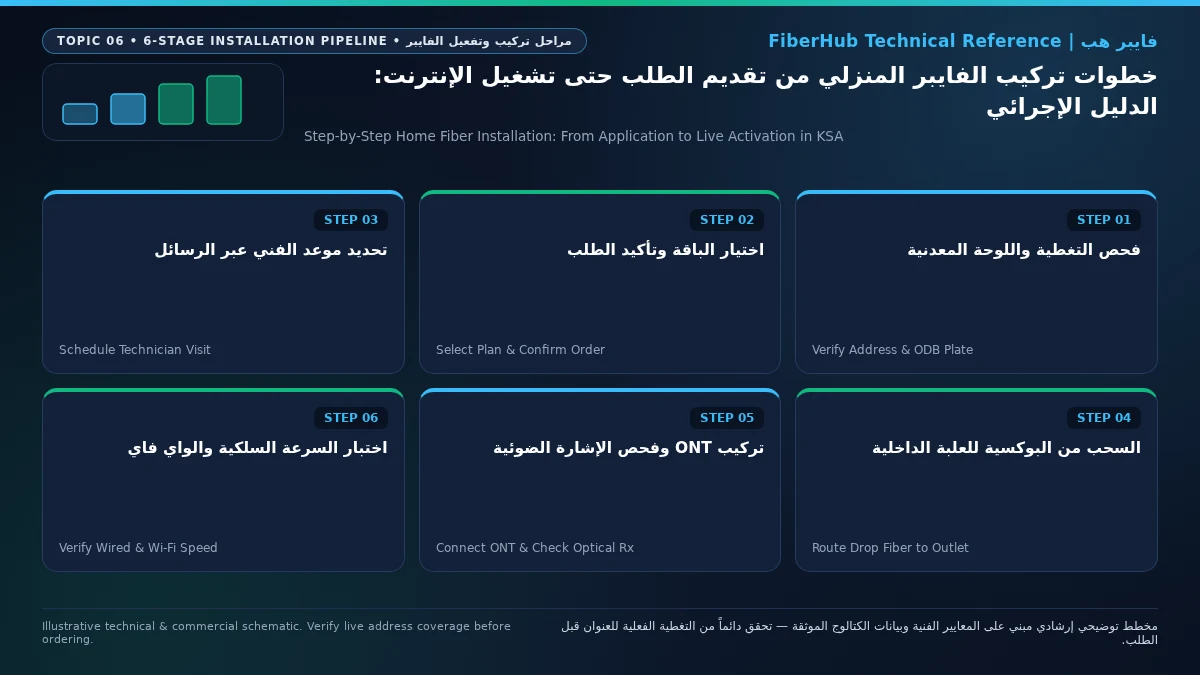
Once you submit a home fiber-to-the-home (FTTH) broadband order in Saudi Arabia, your installation follows a structured six-stage operational workflow that typically takes 24 to 72 business hours from digital submission to live Wi-Fi activation: first, automated GIS port qualification and wholesale work-order creation; second, an SMS scheduling prompt to lock in your appointment window; third, the field technician's arrival and pre-installation conduit walkthrough; fourth, patching the outdoor drop cable inside your exterior Optical Distribution Box (ODB) and pulling it into your residence; fifth, mounting and fusion-splicing the indoor Optical Termination Box (OTB) wall outlet; and sixth, verifying optical receive power on a calibrated meter (targeting -15 dBm to -25 dBm), provisioning the Optical Network Terminal (ONT), and running a live speed and latency check before you share the final completion OTP code.
Knowing exactly what happens during each stage puts you in full control of the installation quality inside your villa or apartment. It allows you to prepare internal conduit pathways ahead of time so no unnecessary holes are drilled through decorative walls, ensures your router is placed where your household actually works and streams, and prevents a rushed handover on an optically weak line. This step-by-step operational guide walks you through the entire Saudi fiber installation journey from the moment you click "Order" to the final handover test.
Stages 1 and 2: Automated GIS Qualification, Open Access Coordination, and SMS Scheduling
The moment you select a fiber plan and submit your Saudi National Address alongside your exterior ODB box details, automated backend systems initiate a technical validation sequence governed by the Wholesale Open Access framework of the Communications, Space and Technology Commission (CST):
- Automated Port Assignment in the Network GIS: The ordering platform queries the neighborhood Fiber Distribution Hub (
FDH) and your building's exteriorODBenclosure to reserve a specific passive splitter port (P1throughP8orP16) and bind it to an upstreamOLTblade at the central exchange. If you have not checked your building's status yet, start with our Saudi home fiber coverage and box checker to verify immediate eligibility. - Wholesale FNP vs. Retail ISP Work-Order Routing: If your chosen retail provider also owns the physical fiber network on your street (for example, ordering an STC Fiber plan on an STC ODB, or Mobily Fiber on a Mobily ODB), a single internal work order is dispatched directly to that operator's field crew. If you order across networks under CST Open Access (such as ordering Salam, Zain, or Mobily over a Dawiyat Integrated or STC wholesale box), the Open Access gateway automatically synchronizes the physical port activation with your retail ISP's ONT provisioning credentials behind the scenes.
- Appointment Confirmation SMS and Pre-Arrival Call: Once the port reservation clears, you receive an official SMS containing your work-order reference number and a link or prompt to select a morning or afternoon installation slot. On the day of the appointment, the assigned field technician calls your mobile 30 to 60 minutes before arrival to confirm someone over 18 is present at the property and to request a live WhatsApp/map location pin if needed.
Depending on your property's existing wiring state, your installation work order will follow one of three operational paths summarized in the table below:
| Property Fiber Readiness State | Work-Order Classification | On-Site Field Work Required | Typical End-to-End Turnaround |
|---|---|---|---|
New installation on same operator's box (On-Net Greenfield) |
Full physical drop pull + ONT activation | Patch exterior ODB port, pull drop cable through conduit, fusion-splice indoor OTB, provision ONT |
24 to 48 business hours (60–90 min on-site visit) |
New installation across operators (CST Open Access Bitstream) |
Coordinated wholesale FNP + retail ISP order | Connect wholesale ODB splitter port, route indoor fiber drop, authenticate retail ISP VLAN/PPPoE profile |
48 to 72 business hours (60–90 min on-site visit) |
Existing intact indoor fiber wall outlet (Pre-Wired OTB) |
Fast optical port activation / ISP switch | Test optical dBm level at existing indoor OTB socket, connect and provision new ONT gateway without pulling new cable |
Within 24 business hours (20–35 min on-site visit) |

Before the technician arrives, it is good practice to double-check your chosen speed tier and included hardware on our Saudi FTTH fiber plans overview so you can confirm the work order matches your subscription package.
Stage 3: Technician Arrival and the Pre-Installation Conduit Walkthrough
When the technician arrives at your home, never rush straight into drilling or cable pulling. Spend the first five minutes conducting a joint walkthrough to agree on two critical decisions: where the indoor Optical Network Terminal (ONT) router will sit, and which physical pathway the fiber drop cable will follow from the exterior boundary wall into that room:
- Pathway Option A (Preferred — Pulling Through Existing Concealed Conduits): Most Saudi villas, duplexes, and apartments constructed over the past 15 years include a corrugated flexible PVC telecom conduit (
jarjour) running underground from the exterior boundary wall beside the ODB straight to a central indoor telecom junction box in the ground-floor living hall or beneath the main stairwell. The technician feeds a fiberglass fish tape (sousta) through this concealed duct and pulls the fiber drop cable straight into your living area with zero exterior drilling or visible wiring. - Pathway Option B (Blocked Duct or Older Building Workaround): If construction debris, tile mortar, or a crushed pipe blocks the underground conduit, the technician will propose an alternative surface route—typically running UV-armored outdoor drop cable neatly along a shaded setback wall or utility shaft (
manwar) enclosed inside paintable PVC micro-trunking, then entering through a clean, sealed micro-bore directly behind the indoor wall outlet. - Apartment Riser vs. Multi-Floor Villa Routing: In multi-unit apartment buildings, the technician pulls the drop cable from the ground-floor telecom room up through the vertical building riser shaft into your apartment's low-voltage media panel near the entrance door. In multi-storey Saudi villas that already have internal
Cat6Ethernet wall sockets converging at a central patch panel, ask the technician to install the fiberONTright beside that panel so you can plug its Gigabit LAN ports directly into the wall jacks feeding your majlis and upstairs bedrooms. - Selecting the Optimal ONT Location: Choose a central, ventilated shelf or table in your main family living room or home office with an accessible AC power socket nearby. Avoid locking the fiber ONT inside a recessed metal distribution cabinet by the front entrance door—enclosing a Wi-Fi router inside a steel utility box attenuates 5 GHz wireless signals by more than half before they ever reach bedrooms or upstairs floors.
Stages 4 and 5: Exterior ODB Patching, Bend-Radius Protection, and Indoor OTB Splicing
Once you approve the cable route and router placement, the technician executes the physical optical installation in two coordinated phases—outside at the boundary wall and inside at your chosen room:
- Exterior ODB Port Cleaning and Connection: Using a standard telecom enclosure key, the technician opens your exterior Optical Distribution Box, identifies the exact splitter port assigned on the work order, cleans the green
SC/APCoptical adapter with a lint-free one-click optical cleaner, and connects the reinforced outdoor drop cable (FTTH Drop Cable). The cable is secured through the bottom weatherproof rubber grommet so desert dust and rain cannot enter the housing. - Pulling the Drop Cable Within ITU-T Bend-Radius Limits: Residential installations in Saudi Arabia use bend-insensitive single-mode fiber compliant with ITU-T G.657 optical fiber recommendations. Even so, glass fiber strands must never be bent at a sharp 90-degree crease or crushed with tight metal staples; the technician maintains a smooth minimum curvature radius (typically 15 mm to 30 mm) around corners so light signals travel through the core without micro-bending attenuation.
- Mounting and Fusion-Splicing the Indoor Wall Outlet (
OTB / Rosette): Inside your room, the stiff black outdoor drop cable is never plugged directly into the router. Instead, the technician mounts a compact white wall box called an Optical Termination Box (OTB) or fiber rosette. Inside this protective outlet, the technician strips the outer jacket, cleaves the bare glass fiber with a precision diamond blade, and uses an automated arc fusion splicer to weld the incoming strand to a factory-polished greenSC/APCpigtail—sealing the splice inside a heat-shrink steel sleeve. A flexible yellow or white indoor optical patch cord then connects the wall outlet to your ONT router.
Verify fiber box readiness at your address first
Fiber availability depends on your building ODB plate and port status. Check your address to see eligible operators.
Stage 6: Optical Power (dBm) Verification, ONT Provisioning, and Live Speed Testing
Stage 6 is the single most important quality gate of the entire installation—and one you should observe firsthand before signing off. On GPON and XGS-PON fiber networks, a green power light on the router is not enough; the received optical power level (Rx Optical Power) measured at the end of your indoor patch cord must fall within strict engineering tolerances so your connection stays rock-solid through peak summer heat.
Before plugging the patch cord into the router, the technician attaches it to a handheld Optical Power Meter calibrated to the 1490 nm downstream wavelength. Optical power is measured in negative decibel-milliwatts (dBm)—meaning a number closer to zero represents a stronger light signal (-18 dBm is significantly stronger and cleaner than -26 dBm). Use the reference table below to evaluate the reading on the technician's meter screen:
Measured Optical Power (Rx dBm) |
Engineering Line Grade | Real-World Impact on Your Home Internet | What You Should Do Before Handover |
|---|---|---|---|
-15.0 dBm to -23.0 dBm |
Optimal / Prime Grade | Full subscribed download/upload speeds with maximum stability margin | Approve the optical link and proceed to ONT provisioning and Wi-Fi setup |
-23.1 dBm to -25.0 dBm |
Acceptable / Borderline | Operates normally today, but leaves a smaller buffer against future cable bends | Ask the technician to clean the SC/APC ferrules and check the OTB splice tray |
-25.1 dBm to -27.0 dBm |
Weak / High Attenuation | Prone to intermittent packet loss, evening slowdowns, or random ONT re-syncs | Request immediate re-splicing or exterior ODB port inspection before accepting |
Worse than -27.0 dBm (or No Signal) |
Failing (LOS Red Alarm) |
Router displays a flashing or solid red LOS (Loss of Signal) LED; no internet |
Do not share the completion OTP; technician must repair the splice or feeder path |
Once the meter confirms a healthy optical signal (for example, -19.2 dBm), the technician plugs the green SC/APC connector into the underside of the ONT and completes three activation checks:
- Verifying ONT Status LEDs: The technician scans the ONT's serial number (
S/N) and MAC address into the provisioning app. Within two to five minutes, thePON(orAuth) indicator transitions from blinking green to solid green, theLOSindicator remains completely off, and theInternetLED lights up green as the central office pushes yourVLANandPPPoEcredentials automatically. - Configuring Dual-Band / Tri-Band Wi-Fi Security: Customize your wireless network name (
SSID) and set a strongWPA2/WPA3password. Ensure the5 GHzband (and6 GHzon Wi-Fi 6E/7 gateways) is enabled with an 80/160 MHz channel width so modern laptops and phones can reach full multi-hundred-megabit speeds, while2.4 GHzhandles smart-home appliances and distant rooms. - Running a Live Speed and Latency Verification: Before reading out the SMS completion code, connect a laptop via a
Cat6Ethernet cable—or stand two meters from the router connected to the5 GHzWi-Fi band—and run an official speed test (such as CST's Meqyas broadband test). Always test on5 GHzWi-Fi or wired Gigabit Ethernet rather than2.4 GHz, because legacy2.4 GHzchannels naturally bottleneck around 70 to 100 Mbps even on a 500 Mbps or 1 Gbps fiber line. Verify that both download speed, upload speed, and local ping (typically 2 ms to 8 msto local Saudi servers) match your subscribed tier.
If you ever want to benchmark how your installed package stacks up against other market tiers or multi-room FTTR upgrades, visit our home broadband comparison tool or review all current Saudi fiber internet plans and prices.
Pre-Departure Handover Checklist Before Sharing Your Completion OTP
Before the technician packs up their tools, take sixty seconds to verify these four practical details:
- Strain-Free Indoor Patch Cord: Confirm the indoor Optical Termination Box (
OTB) is firmly screwed or industrial-bonded to the wall, and any excess length of the thin yellow/white optical patch cord is neatly coiled away from floor walkways, vacuum cleaners, and moving furniture. - Photograph the ONT Bottom Label: Snap a quick smartphone photo of the sticker underneath your new
ONTgateway showing the device serial number, default admin login IP (192.168.1.1or192.168.100.1), and factory Wi-Fi credentials for future reference. - Test Bundled Voice or IPTV Services (If Subscribed): If your fiber plan includes a fixed landline voice number (
VoIP) or an operatorIPTVreceiver box, verify that theTELindicator LED is lit and test a quick call or stream before closing the visit. - Verify Mesh Wi-Fi Extenders (If Included): If your plan includes one or more
Mesh Wi-Finodes for upstairs villa floors, confirm the technician has paired them with the primary gateway and verified backhaul signal strength before closing the ticket.
Frequently Asked Questions About Home Fiber Installation in Saudi Arabia
How long does a home fiber installation visit take from start to finish?
A standard residential fiber installation in Saudi Arabia takes 45 to 90 minutes when the internal telecom conduit (jarjour) running from the exterior boundary wall to the living room is clear and unobstructed. If you live in a multi-storey villa where the underground duct is blocked and the technician needs to route protective exterior micro-trunking along a setback wall, drill a discrete entry point, fusion-splice the indoor wall box, and pair upstairs Mesh Wi-Fi nodes, expect the visit to take roughly 90 to 120 minutes.
Match fiber speed and upload tiers to your household
Review published FTTH plans and compare download/upload speeds, commitment terms, and hardware conditions.
Do I have to pay the technician extra cash for the fiber cable, wall box, or ONT router?
No. Standard residential FTTH subscriptions in Saudi Arabia include free standard installation, the primary Optical Network Terminal (ONT) gateway, the indoor Optical Termination Box (OTB), and the standard run of outdoor/indoor fiber drop cable (typically up to 30–50 meters as specified in operator terms). You should never pay unreceipted cash directly to a field technician; any authorized charges for optional hardware add-ons or non-standard civil work are billed transparently through your official operator account invoice.
What happens if the technician discovers my home's internal conduit pipe is blocked during the visit?
If the technician pushes the fiberglass fish tape into your wall conduit and hits solid cement or a crushed pipe beneath the courtyard tiles, your order does not have to be canceled. The technician will walk you through two immediate options: either routing a weatherproof, UV-shielded drop cable along an unobtrusive exterior wall crease inside neat PVC trunking into the target room on the spot, or placing the work order on temporary hold (Pending Customer Civil Readiness) while your private electrician clears the blocked conduit so the fiber crew can return and complete a fully concealed pull at no extra charge.
Why does the technician ask for an SMS verification code (OTP) from my phone at the end of the visit?
Saudi telecom operators use a mandatory Work-Order Completion OTP sent to the subscriber's registered mobile number as a consumer-protection safeguard. The technician cannot mark the installation complete in their dispatch tablet—or trigger billing activation on your contract—without entering that code. Never share the completion OTP over the phone before the technician arrives, and only hand it over once the indoor OTB is mounted, optical power is verified within the -15 dBm to -25 dBm range, and you have confirmed live internet connectivity on your own device.
Ready to verify coverage and request home fiber?
Submit your address or ODB plate details so we can confirm availability and walk you through eligible plans.
Editorial Transparency & Neutrality Notice:
This guide is provided for comparison and decision support. It does not constitute final address coverage confirmation, binding operator pricing, or regulatory accreditation. Always verify final plan terms and box readiness before completing your subscription request.