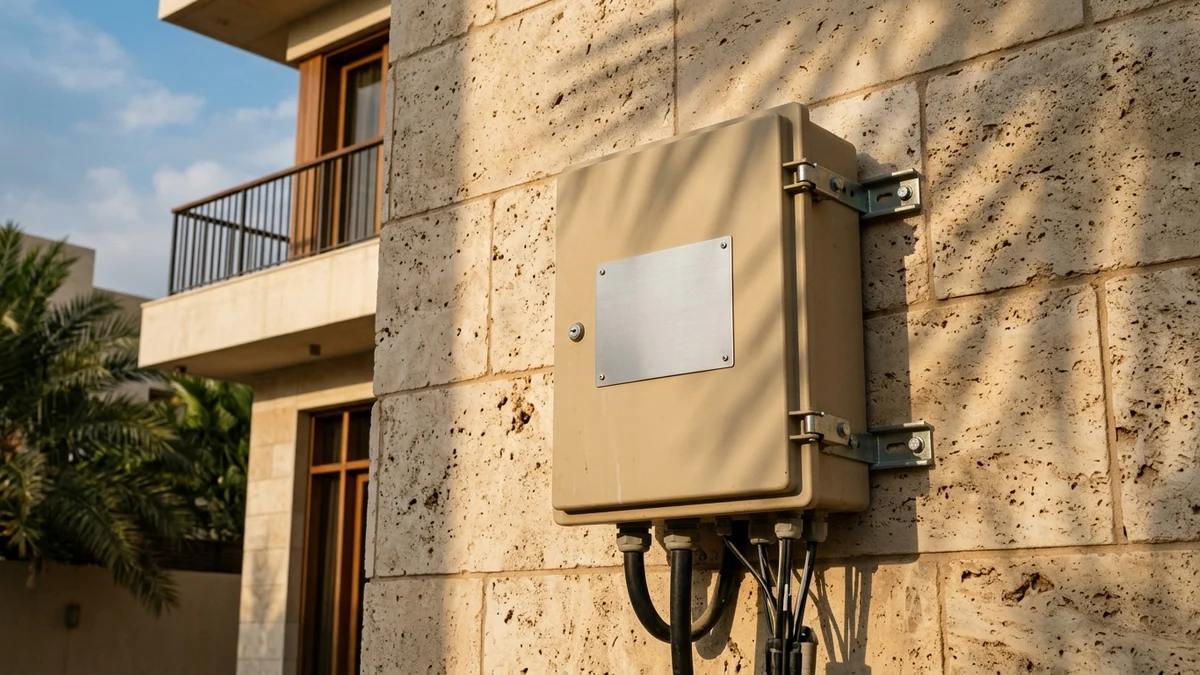
- Where to Find the Optical Distribution Box (ODB) on a Saudi Villa or Apartment Building
- Anatomy of a Saudi Fiber Box Plate and Its Stamped Alphanumeric Segments
- Identifying the Infrastructure Owner and Optical Splitter Capacity Under CST Open Access
- Safe Photography Protocol for Capturing a Clear Plate Without Exposing Personal Data
- Why Your Fiber Box Plate May Still Show Not Active in Provider Systems
- Frequently Asked Questions About Reading Saudi Fiber ODB Plates
- Can I open the exterior fiber box cover myself to check for an internal label or free ports?
- What should I do if house painters or facade contractors removed or painted over my ODB metal plate?
- Why are there two separate fiber boxes with different plates mounted on my wall?
- Why does the agent ask for both my ODB plate photo and a live GPS pin when I already gave my National Address?
When a broadband customer care agent or field technician asks for your "fiber box number" or a photo of your Optical Distribution Box (ODB) metal plate in Saudi Arabia, they are referring to the weatherproof gray or off-white telecom enclosure mounted on your exterior boundary wall next to your Saudi Electricity Company (SEC) meter—or inside your apartment building's ground-floor utility room—and specifically the stamped aluminum strip or laser-etched serial tag riveted to its front cover. To give the provider everything needed for instant line qualification, take two clear photos in natural shade: first, a sharp close-up showing every letter, slash, and digit stamped on the metal plate without camera flash glare; second, a medium framing shot showing the entire box mounted on the wall together with the conduit pipe entering your property, while cropping out your green National Address plaque and utility meter serial numbers if you ever share the image publicly.
That small metal tag serves as the physical network identity of your property on Saudi Arabia's national fiber-to-the-home (FTTH) grid. While your Saudi National Address identifies your building for municipal records and parcel delivery, the alphanumeric string stamped onto your ODB plate maps the exact optical strand running from the district central office, through the neighborhood street cabinet, down to the specific passive splitter port assigned to your home. In this field guide, we explain exactly where to locate the ODB across different Saudi residential property types, how to decode each segment of the stamped plate, how to photograph it clearly and privately, and why a box physically bolted to your wall may still require port-activation verification before a technician can be dispatched.
Where to Find the Optical Distribution Box (ODB) on a Saudi Villa or Apartment Building
The exact mounting location of a fiber distribution box depends on your property's architectural layout and when the neighborhood fiber network was trenched, but infrastructure contractors across the Kingdom follow standardized civil-engineering placement rules so field engineers can inspect and patch lines without entering private family courtyards:
- Detached Villas and Duplexes: Across fiber-served districts in Riyadh, Jeddah, Dammam, Khobar, Makkah, Madinah, and regional cities, the ODB is almost always bolted to the exterior boundary wall looking onto the street. Look directly adjacent to the Saudi Electricity Company (SEC) smart meter cabinet—typically within one to two meters of the meter box and mounted 140 cm to 180 cm above pavement level. In contemporary villa designs that recess utility boxes into a masonry niche, check the service pillar beside the main garage door or just inside the side setback corridor.
- Multi-Unit Apartment Buildings (
Tamleekand Rental Flats): Multi-storey residential buildings do not mount a separate exterior box on the front facade for every flat. Instead, high-capacity distribution enclosures are installed inside the ground-floor common utility zone. Check the main electrical switchgear room, the wall beneath the ground-floor staircase, the service shaft (manwar) corridor, or the inner courtyard wall next to the communal water pumps and electricity meter bank. - Gated Compounds and Master-Planned Communities: In modern master-planned developments where all telecom cabling runs through concealed conduits, the ODB may sit inside a flush-mounted metal telecom cabinet recessed into the exterior boundary wall or inside a curbside concrete handhole paired with a low-profile wall termination panel.

When visually inspecting the box, look at its bottom edge: an active ODB will have a rigid PVC or corrugated protection conduit rising from the sidewalk trench into the base of the enclosure (carrying the underground feeder fiber), alongside one or more thinner customer drop conduits routing into the building wall.
Anatomy of a Saudi Fiber Box Plate and Its Stamped Alphanumeric Segments
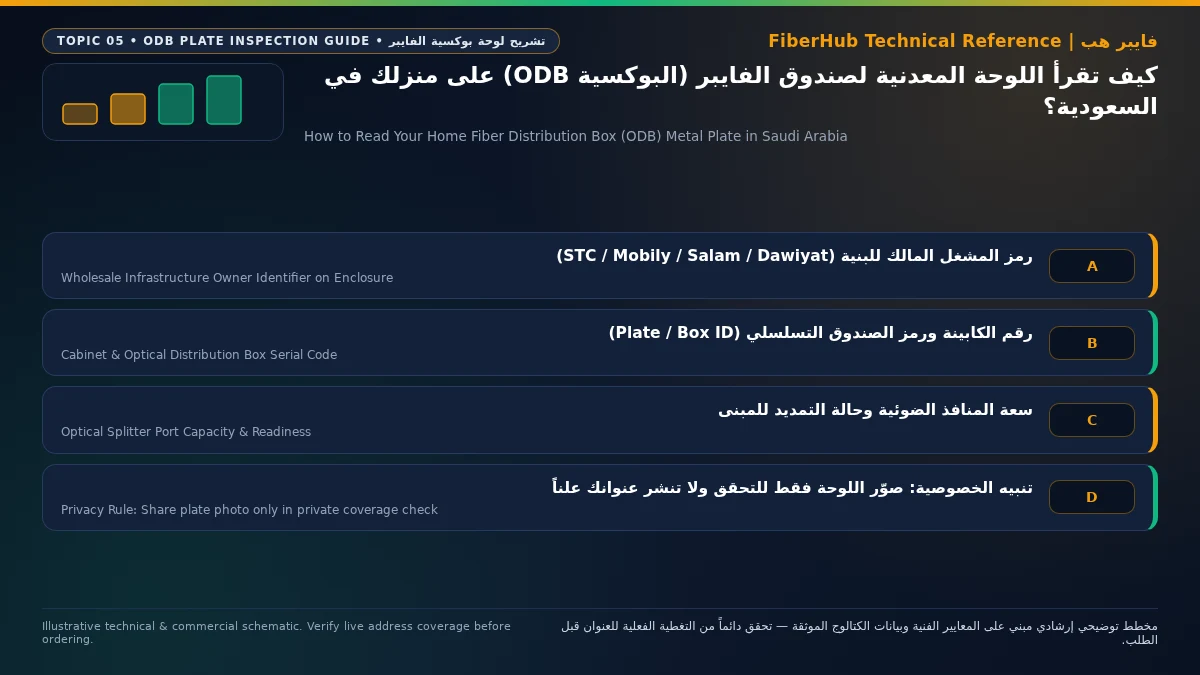
Because exterior telecom enclosures in Saudi Arabia must endure summer surface temperatures exceeding 50°C, intense ultraviolet radiation, and abrasive sandstorms for decades, operators attach anodized aluminum strips, stainless-steel tags, or UV-stabilized laser-engraved polycarbonate plates to the front cover. Although exact formatting varies slightly across Wholesale Fixed Network Providers (FNPs) such as STC (TAWAL / Center3), Mobily, Salam (ITC), and Dawiyat Integrated Telecommunications & Information Technology, every plate follows a strict hierarchical topology that traces your connection back to the central office.
To read the plate like a field engineer, break the stamped code into five functional segments from left to right (or top to bottom on multi-line plates):
- District or Central Office Exchange Code (OLT Identifier): Usually two to four letters or a regional prefix at the start of the string indicating the city, district sector, or central office housing the Optical Line Terminal (OLT).
- Neighborhood Street Cabinet Code (FDH / Cabinet ID): The most critical identifier for network qualification. It points to the large metal Fiber Distribution Hub (FDH) cabinet standing on a main neighborhood sidewalk that feeds dozens of surrounding residential streets.
- Feeder Branch or Optical Splitter Identifier: Indicates which secondary distribution cable or passive splitter module inside the street cabinet feeds your specific street block.
- Optical Distribution Box Serial Number (ODB / DP Number): The unique terminal identifier assigned to the box mounted on your wall, distinguishing your enclosure from the ones on your left- and right-hand neighbors' walls. It typically appears after a forward slash (
/) or hyphen (-) at the end of the code. - Port Range or Splitter Capacity Notation: Some plates stamp the port allocation range (such as
P1-P8or1:8) or include a laser-etched barcode/QR code that field technicians scan with their handheld provisioning terminals.
The table below illustrates representative structural patterns (anonymized for educational reference) showing how each segment on a Saudi ODB plate maps to live network engineering records:
| Plate Code Segment | Illustrative Example | Engineering Meaning in the FTTH Network | How Provisioning Teams Use This Segment |
|---|---|---|---|
| Exchange / Sector Prefix | RYD-N or JED-04 |
Identifies the city zone and central office hosting the active OLT chassis | Routes the qualification query to the correct regional network database |
| Street Cabinet Code (FDH) | FDH-218 or CAB-1042 |
Identifies the roadside Fiber Distribution Hub feeding your residential block | Checks upstream feeder health and cabinet-level optical capacity |
| Distribution Branch / Splitter | F02 or SP-03 |
Identifies the specific feeder ribbon or optical splitter cassette | Locates the exact optical path during attenuation diagnostics |
| Box Serial Number (ODB / DP) | ODB-14 or DP-07 |
Uniquely identifies the specific enclosure bolted to your property wall | Matches your building coordinates and reserves a dedicated customer drop port |
| Port Allocation / Ratio | P1-P8 or 1:8 |
Indicates an 8-port internal passive optical splitter inside the box | Confirms whether spare physical ports remain available for new orders |
When you enter your location details on our Saudi fiber coverage and box verification page or attach a photo of this plate to an order inquiry, engineering support uses the FDH cabinet code and ODB serial number to query the network Geographic Information System (GIS) directly—eliminating days of manual address guessing.
Identifying the Infrastructure Owner and Optical Splitter Capacity Under CST Open Access
In Saudi Arabia, the Communications, Space and Technology Commission (CST) enforces the Wholesale Open Access regulatory framework for fixed broadband networks. Under this mandate, the company that trenched your street and bolted the ODB to your wall acts as the Fixed Network Provider (FNP), while any licensed Retail Service Provider (RSP) integrated into the Open Access platform can deliver your home internet subscription over that exact physical box:
- Dawiyat Integrated Enclosures: Widely deployed across residential districts covered by national broadband initiatives, Dawiyat boxes are typically mounted right beside the Saudi Electricity Company meter box and feature a structured alphanumeric string separated by hyphens, accompanied by a barcode or QR tag.
- STC Infrastructure Enclosures: Commonly housed in light-gray reinforced polycarbonate enclosures featuring a riveted metallic aluminum strip across the upper or lower face with mechanically embossed high-relief lettering.
- Mobily and Salam (ITC) Enclosures: Typically use weather-sealed outdoor cabinets with laser-etched metallic or industrial tags displaying the regional zone, cabinet number, and
ODBorFDBterminal sequence.
Regardless of which infrastructure owner's plate hangs on your wall, you can browse verified Saudi FTTH fiber plans to see which retail providers and speed tiers are available on your neighborhood network.
Inside the weatherproof cover, passive optical networks operate under international ITU-T G.984 and G.9807 standards for GPON and XGS-PON architectures. An exterior ODB contains no electrical power supply; instead, it houses a precision glass Passive Optical Splitter and green SC/APC optical adapter ports:
- 8-Port Enclosures (
1:8Optical Splitter): The standard deployment for detached villas, duplexes, and smaller apartment buildings, splitting one incoming fiber strand into eight customer drop ports. - 16-Port Enclosures (
1:16Optical Splitter) or Dual Boxes: Installed in medium-to-large apartment buildings to serve more residential units from a single utility riser. - Estimating Port Availability Externally: Look underneath the bottom edge of the ODB where rubber weather grommets seal the cable entry points. Alongside the thicker round black feeder cable entering from the ground, count the thinner flat customer drop cables exiting toward the building. If an 8-port apartment box already has eight drop cables exiting into apartment conduits, all ports may be occupied, requiring either port reclamation from a canceled tenant line or a splitter expansion request.
Verify fiber box readiness at your address first
Fiber availability depends on your building ODB plate and port status. Check your address to see eligible operators.
Safe Photography Protocol for Capturing a Clear Plate Without Exposing Personal Data
When a customer care specialist or online qualification form asks for a photo of your ODB plate, submitting a blurry or overexposed picture is the number-one cause of stalled verification tickets. Conversely, posting unedited exterior house photos in public forums can expose sensitive household identifiers. Follow this field-tested protocol:
- Turn Off Direct Smartphone Flash: Because ODB plates are made of brushed aluminum or stainless steel, firing an LED flash from close range creates a blinding reflection that washes out the stamped digits completely.
- Use Side-Shading and the Damp-Cloth Trick: Under harsh midday Saudi sunlight, hold one hand above the box to cast soft shade over the metal strip and angle your phone roughly 15 degrees so micro-shadows form inside the stamped grooves. If dust fills the indentations, gently wipe the metal strip with a damp tissue to restore contrast.
- Capture Two Complementary Shots: First, take a tight macro shot where the metal plate fills at least 60% of the frame so slashes (
/) and hyphens (-) are unmistakable. Second, step back two paces for a medium context shot showing the entire box and its conduit entry on the wall. - Privacy Rules for Public Sharing: If you ever post your photo in public community forums or neighborhood social groups, always crop or blur your green Saudi National Address plaque, your adjacent Saudi Electricity Company (SEC) meter serial number and barcode, and any handwritten mobile phone numbers written in marker on the enclosure lid.
Why Your Fiber Box Plate May Still Show Not Active in Provider Systems
Standing in front of a real metal-plated ODB bolted to your villa wall while an online coverage checker reports "Unavailable" is a common experience in newly trenched districts. Five distinct engineering or administrative conditions explain this gap:
- Civil Installation Completed Ahead of Optical Splicing (
Civil Done, Splicing Pending): Civil contractors trench the street and mount ODB enclosures with stamped plates first. Specialized splicing crews arrive in a subsequent wave to fusion-splice fibers inside the roadsideFDHcabinet and test upstreamOLToptical levels. - Pending Wholesale GIS Database Handover: Even after optical testing passes, the wholesale infrastructure operator (
FNP) must publish the commissioned ODB serial numbers and GPS coordinates into the shared Open Access database before retail ISPs can book orders. - 100% Splitter Port Occupancy (
Port Exhaustion): If all internal ports are assigned to active circuits or held by uncleaned work orders from previous tenants, the system blocks new orders until a port audit is completed. - National Address vs. Network GIS Coordinate Mismatch: On corner villas bordering two streets or plots subdivided into duplexes (
Villa AandVilla B), the ODB GPS pin may be registered under the side street or pre-subdivision plot number, preventing automated postal matching.
Use the troubleshooting matrix below to resolve whichever scenario applies to your address:
| What You Observe | Most Likely Engineering Cause | Recommended Action to Unlock Activation |
|---|---|---|
| Box was recently installed and every house on your street shows "Unavailable" | Street cabinet (FDH) is awaiting final fusion splicing or commercial handover |
Submit your ODB plate code to register for priority activation alerts once the cabinet goes live |
| Your immediate next-door neighbor has active fiber, but your address shows "Uncovered" | GIS coordinate drift between your National Address pin and the recorded ODB location | Provide clear photos of both your ODB plate and your neighbor's adjacent ODB plate for manual GIS binding |
| System reports "No Free Ports Available" on your building box | All internal 1:8 or 1:16 splitter ports are occupied or tied to stale records |
Request a field port audit to reclaim disconnected tenant lines or trigger a secondary splitter expansion |
| Corner villa fails lookup or the metal plate was painted over during renovation | ODB is indexed on the side street or exterior paint obscured the stamped code | Share the adjacent left and right neighbors' ODB plate photos plus a live GPS pin standing beside your box |
While your box status is being verified, you can use our home internet and fiber comparison tool to evaluate download/upload ratios and router hardware across operators, or explore current Saudi home broadband plans and pricing so you are ready to select the right tier as soon as your port clears.
Frequently Asked Questions About Reading Saudi Fiber ODB Plates
Can I open the exterior fiber box cover myself to check for an internal label or free ports?
No—you should never attempt to force open or unlock an exterior Optical Distribution Box yourself. Inside the weatherproof cover are bare glass fiber pigtails as thin as a human hair and precision green SC/APC optical connectors that are highly sensitive to dust and skin oils. Furthermore, active fiber strands carry invisible infrared laser light (1310 nm to 1550 nm wavelengths) that can harm the retina if viewed directly at close range, and accidentally disturbing the internal passive splitter can knock out live internet service for neighboring homes sharing the same enclosure. Always photograph the exterior plate only and leave internal inspection to certified telecom technicians.
Match fiber speed and upload tiers to your household
Review published FTTH plans and compare download/upload speeds, commitment terms, and hardware conditions.
What should I do if house painters or facade contractors removed or painted over my ODB metal plate?
If the metal strip is still riveted to the box and uses mechanically embossed lettering that was rolled over with wall paint, gently wiping the metal strip alone with a plastic scraper or damp cloth often reveals the raised digits. If contractors pried off and discarded the plate while installing stone cladding (hajar), do not guess the number: photograph your unlabeled box, photograph the readable ODB plates on the two properties immediately adjacent to yours on the same street line (which follow sequential numbering under the same FDH cabinet), and submit them with a live GPS pin so the GIS team can identify your terminal from the street splice map.
Why are there two separate fiber boxes with different plates mounted on my wall?
Finding two distinct ODB enclosures on a single residential boundary wall happens for one of two reasons. First, in large villas with multiple electricity meters or multi-unit apartment buildings, the infrastructure provider may mount a second enclosure to expand available customer drop ports from 8 to 16. Second, in prime urban districts across Riyadh, Jeddah, and the Eastern Province, two separate infrastructure operators may have trenched parallel networks during different rollout phases. Photograph both plates separately when inquiring about service, as having two boxes gives you fallback port capacity and supports independent fiber lines.
Why does the agent ask for both my ODB plate photo and a live GPS pin when I already gave my National Address?
Your Saudi National Address is designed for postal and municipal identification, whereas telecom fiber networks are engineered around underground duct routes, roadside FDH cabinets, and optical splitter trees (GIS). Whenever a large land plot is subdivided into multiple duplexes, or when a corner villa's ODB is mounted on a side street while its front entrance faces a main avenue, automated postal-to-telecom database matching can fail. Supplying both the stamped ODB plate photo and a precise GPS pin removes all ambiguity, ensuring the installation work order is bound to the exact physical terminal on your wall.
Ready to verify coverage and request home fiber?
Submit your address or ODB plate details so we can confirm availability and walk you through eligible plans.
Editorial Transparency & Neutrality Notice:
This guide is provided for comparison and decision support. It does not constitute final address coverage confirmation, binding operator pricing, or regulatory accreditation. Always verify final plan terms and box readiness before completing your subscription request.