- 1. The Physics of FTTH: How Silica Glass Carries Gigabit Data at the Speed of Light
- 2. How Download and Upload Travel Inside One Glass Strand: GPON and XGS-PON Explained
- 3. End-to-End Physical Anatomy: The 6 Hardware Stages From Exchange to Living Room
- 4. Inside Your Living Room: Green SC/APC vs. Blue SC/UPC Connectors and Optical Power (`dBm`)
- 5. Why Optical Fiber Beats 5G Wireless and Copper—And Where Indoor Wi-Fi Takes Over
- 6. Homeowner Pre-Installation Checklist: 5 Things to Prepare Before the Technician Arrives
- Frequently Asked Questions About FTTH Home Fiber in Saudi Arabia
- Does the FTTH optical fiber cable carry electricity or pose a shock hazard?
- What is the difference between the wall fiber outlet (Rosette) and the ONT router?
- Why does my speed test show full fiber speed near the router but slower speed upstairs?
- Will the physical fiber cable in my wall support future 1 Gbps or 10 Gbps upgrades?
- Can I replace the ISP's ONT with my own third-party Wi-Fi router directly?
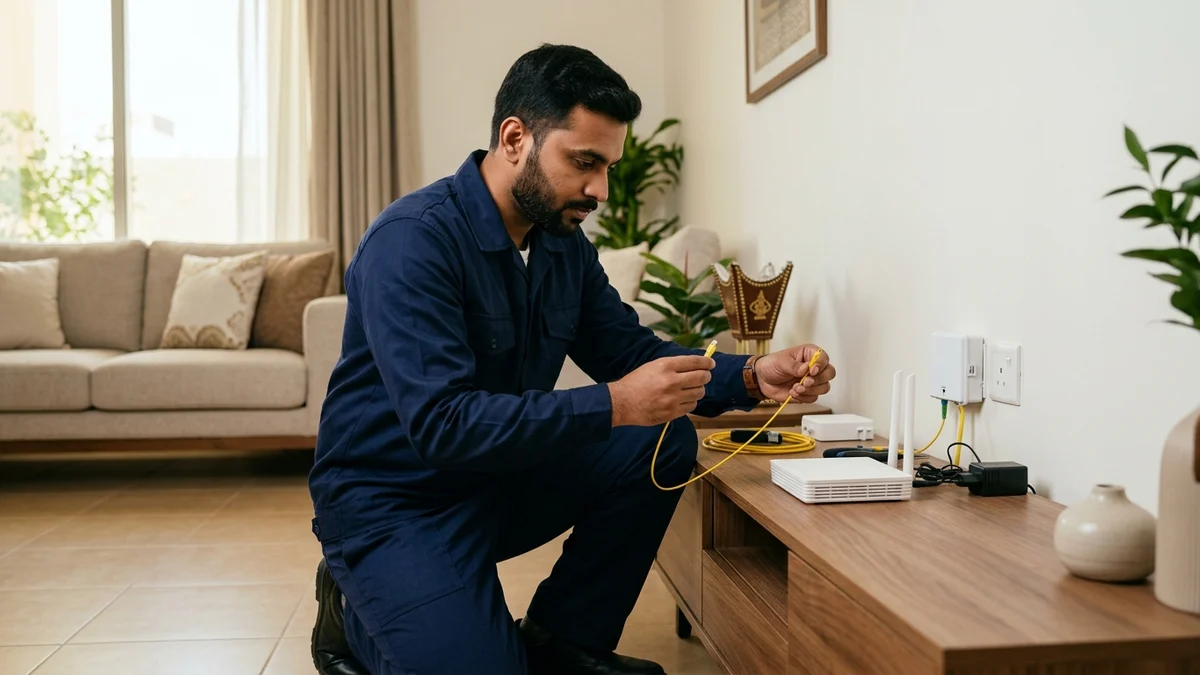
If you are preparing to install fiber broadband in your residence and asking, "What physically enters my home during an FTTH installation and what equipment must I prepare beforehand?", here is the exact physical chain: a thin, non-conductive bend-insensitive glass drop cable is pulled from the exterior Optical Distribution Box (ODB) mounted on your building's outer wall through your existing underground or in-wall telephone conduit into a compact indoor optical wall outlet (Rosette / OTB). From that wall outlet, a short, flexible optical patch cord (typically fitted with a green SC/APC connector) plugs into the Optical Network Terminal (ONT) / Wi-Fi 6 Gateway supplied by your telecom provider. Before the technician arrives, you only need to prepare three things: clear physical access to your home's internal telecom pull-box (junction panel), ensure a reliable 220V electrical socket is available near the planned router location, and choose an open, central living-area shelf outside metal enclosures so indoor Wi-Fi can radiate freely.
Behind that clean wall socket lies a sophisticated optical transmission system engineered to carry gigabits of data as infrared laser pulses through ultra-pure silica glass rather than electrical currents over copper or congested radio waves from cell towers. This engineering guide walks through the physical anatomy of FTTH (Fiber-to-the-Home) networks in Saudi Arabia, explains how downstream and upstream laser wavelengths share a single strand of glass, decodes connector colors and optical power levels (dBm), and shows where optical fiber hands off to your indoor home network.

1. The Physics of FTTH: How Silica Glass Carries Gigabit Data at the Speed of Light
FTTH stands for Fiber-to-the-Home, meaning the communication medium remains 100% optical glass all the way from the operator's central exchange through the neighborhood street cabinet and straight through your living-room wall. Unlike legacy copper technologies such as ADSL or VDSL—where optical fiber stopped at a street cabinet (FTTC) and relied on aging twisted-pair telephone wires that lost significant bandwidth beyond 300 meters—FTTH eliminates copper bottlenecks entirely.
A residential single-mode optical fiber strand deployed across Saudi Arabia (standardized under ITU-T G.652.D for outside plant ducts and G.657.A2 for bend-insensitive indoor drop cabling) is constructed from three concentric layers:
- The Silica Glass Core (9 Micrometers): Measuring just 9 µm in diameter—roughly one-tenth the thickness of a human hair (~100 µm)—this ultra-pure silicon dioxide core is the highway through which modulated infrared laser pulses travel.
- The Optical Cladding (125 Micrometers): Surrounding the core is a glass cladding layer engineered with a slightly lower refractive index. By Snell's Law of optics, this refractive step creates Total Internal Reflection: light pulses launched into the core bounce continuously off the cladding boundary at roughly 200,000 kilometers per second, traveling up to 20 kilometers from the neighborhood exchange to your home with minimal attenuation.
- Primary Buffer Coating, Aramid Strength Yarn, and Jacket: Protective acrylate coatings, Kevlar/aramid tensile fibers, and either a UV-stabilized polyethylene outer sheath (for exterior runs) or a Low-Smoke Zero-Halogen (LSZH) flame-retardant jacket (for indoor conduits) shield the glass strand from pulling tension and tight corner bends.
All residential FTTH networks in Saudi Arabia exclusively deploy Single-Mode Fiber (OS2, 9/125 µm) rather than the wider-core Multi-Mode Fiber (OM3/OM4, 50/125 µm) used inside short-range data centers. By restricting light propagation to a single fundamental spatial mode, single-mode glass eliminates modal dispersion and achieves an ultra-low attenuation rate of just 0.20 to 0.35 dB per kilometer, enabling multi-gigabit laser transmission across entire city districts without signal repeaters.
2. How Download and Upload Travel Inside One Glass Strand: GPON and XGS-PON Explained
Homeowners examining the slender yellow or white patch cord behind their router often ask a great physics question: "If there is only a single glass fiber inside this cable, how do download traffic and upload traffic travel at the exact same time without colliding?"
Saudi residential fiber networks run primarily on GPON (Gigabit Passive Optical Network, ITU-T G.984) alongside next-generation XGS-PON (10-Gigabit Symmetric Passive Optical Network, ITU-T G.9807) in newly upgraded districts. Both standards solve bidirectional transmission over a single fiber strand using Wavelength Division Multiplexing (WDM)—transmitting downstream and upstream data using two completely different colors (wavelengths) of invisible infrared light:
- Downstream Channel (ISP Exchange to Your Home ONT): In GPON, the central office laser transmits downstream data at a wavelength of 1490 nanometers (nm) with a shared line capacity of 2.488 Gbps (or 1577 nm at 9.953 Gbps in XGS-PON). Downstream frames are encrypted using AES-128 so your household ONT only decodes packets addressed to your subscription.
- Upstream Channel (Your Home ONT to the ISP Exchange): Your home ONT transmits upstream data back through the exact same glass core at a separate wavelength of 1310 nanometers (nm) with a line capacity of 1.244 Gbps in GPON (or 1270 nm in XGS-PON). Because two different wavelengths of light do not interfere with one another in linear silica glass, download and upload streams pass through each other effortlessly. To prevent upstream light from neighboring homes on the same street splitter from overlapping, the central exchange assigns microsecond time slots to each ONT using TDMA (Time Division Multiple Access).
The word "Passive" in GPON is equally important for Saudi climate resilience: between the operator's air-conditioned central exchange and your home ONT, there are zero powered electronics in the street. Street cabinets and building boxes use passive optical glass prisms (Planar Lightwave Circuit splitters with 1:8, 1:16, or 1:32 split ratios) that require no electricity and generate no heat, allowing Saudi fiber networks to run with 99.99% stability even when summer ambient temperatures exceed 48°C.
Furthermore, GPON and XGS-PON links incorporate Forward Error Correction (FEC) and the OMCI (ONT Management and Control Interface) protocol. OMCI enables the operator's central OLT to monitor your home's optical power levels in real time, push firmware security updates, and provision speed tier upgrades remotely within seconds without rolling a technician truck to your neighborhood.
3. End-to-End Physical Anatomy: The 6 Hardware Stages From Exchange to Living Room
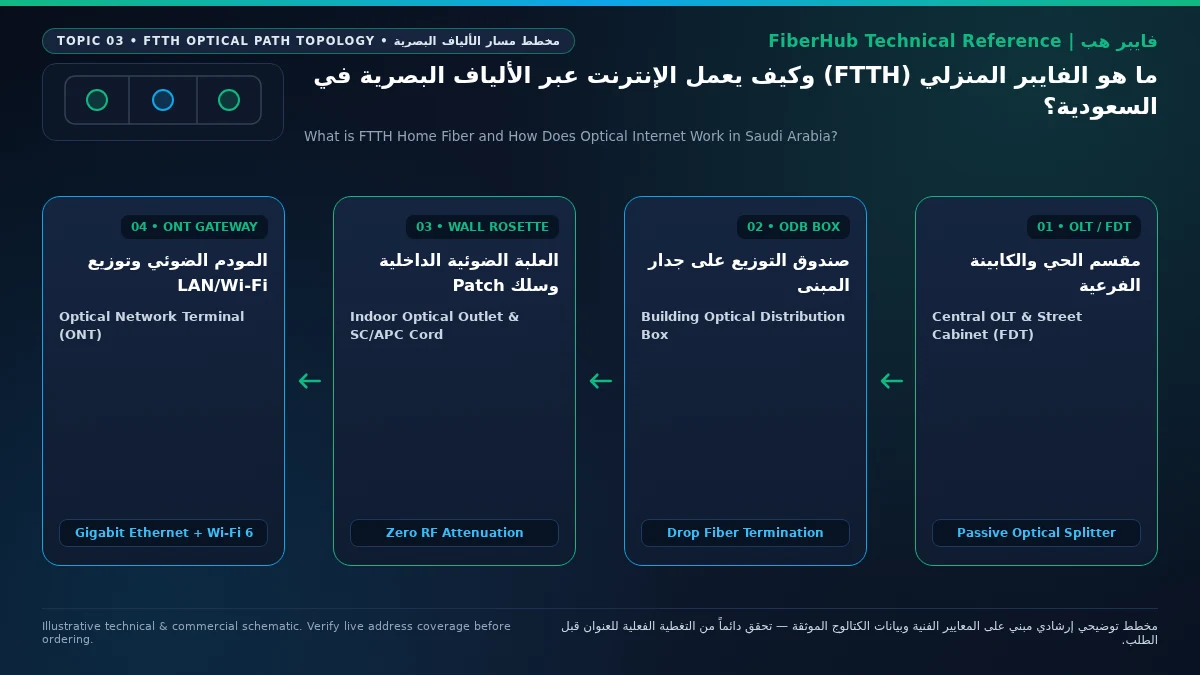
To understand what each box and cable on your property actually does, the engineering table below maps the six physical components of a Saudi FTTH deployment:
| Stage | Network Component | Physical Location | Engineering Role in Data Delivery | Ownership & Maintenance Boundary |
|---|---|---|---|---|
| 1. Central OLT | Optical Line Terminal (OLT) | Operator central office / district exchange | Launches 1490 nm downstream laser, schedules upstream TDMA slots, links to ISP core network | Infrastructure operator / Retail ISP |
| 2. Street Cabinet (FDT) | Fiber Distribution Terminal | Sidewalk or neighborhood utility pad | Houses primary optical patch panels and distributes feeder cables across residential blocks | Wholesale infrastructure owner (regulated by CST) |
| 3. Building Wall Box (ODB) | Optical Distribution Box (البوكسية) | Exterior boundary wall of villa or apartment building | Contains passive 1:8 or 1:16 PLC optical splitter and numbered subscriber drop ports | Wholesale infrastructure owner (technician access only) |
| 4. Subscriber Drop Cable | Bend-insensitive G.657.A2 single-mode fiber cable | Pulled through conduit from exterior ODB into the residence | Carries optical light safely through tight 90-degree wall conduit bends into the home | Routed and fusion-spliced during installation |
| 5. Indoor Wall Rosette & Patch Cord | Optical Termination Box (OTB / Rosette) + Fiber Patch Cord | Interior wall near living area / media center | Terminates the in-wall drop cable safely; connects to ONT via a flexible green SC/APC patch cord | Inside subscriber premises (must be protected from sharp kinks) |
| 6. Optical Network Terminal (ONT) | Integrated ONT + Wi-Fi 6 Gigabit Router | Shelf or table next to the indoor optical wall rosette | Converts 1490/1310 nm optical light into Gigabit Ethernet LAN ports and dual-band Wi-Fi 6 | Provided by your chosen retail fiber ISP |
You can verify whether Stages 1 through 3 are already live at your National Address using our Saudi fiber coverage checker.
Verify fiber box readiness at your address first
Fiber availability depends on your building ODB plate and port status. Check your address to see eligible operators.
4. Inside Your Living Room: Green SC/APC vs. Blue SC/UPC Connectors and Optical Power (dBm)
Once the optical cable enters your home and terminates inside the small plastic Optical Wall Rosette, a detachable fiber patch cord links the wall outlet to the optical port (PON or OPTICAL) on your ONT router. Looking closely at the plastic tip of that patch cord reveals an essential engineering color code:
- Green Connector (
SC/APC— Angled Physical Contact): Standard across modern Saudi residential FTTH deployments. The ceramic ferrule tip inside a green SC/APC plug is precision-polished at an 8-degree angle. That slight angle deflects any back-reflected laser light into the cladding rather than straight back toward the central OLT laser, achieving superior Optical Return Loss (ORLbetter than -60 dB). - Blue Connector (
SC/UPC— Ultra Physical Contact): Polished with a flat (0-degree) end-face. - Critical Hardware Rule: Never plug a green SC/APC connector into a blue SC/UPC adapter or vice versa. Mating an 8-degree angled tip against a flat 0-degree tip creates an air gap that causes severe signal loss (4 to 5+ dB of attenuation) and can physically crack or scratch the microscopic glass core.
- Reading Your ONT Optical Signal Power (
dBm): Unlike cellular 5G routers that measure radio signal in RSRP/SINR, a fiber ONT measures incoming laser light intensity in decibel-milliwatts (dBm). An Optimal Operating Range (-15.0 dBmto-24.5 dBm) indicates clean fusion splices, dust-free connector ferrules, and gentle cable routing. A Marginal Warning Zone (-25.0 dBmto-27.0 dBm) means the link still syncs, but excessive light is being lost—most commonly because furniture is pinching the patch cord against the wall. At Loss of Signal (-28.0 dBmor lower), the optical photodiode can no longer lock onto the laser signal, triggering a blinking redLOSLED. - Decoding ONT Front-Panel LED Indicators: Every home fiber gateway includes four primary diagnostic LEDs:
POWER(solid green confirms 12V DC adapter power),PON/AUTH(solid green confirms the ONT serial number is authenticated and registered with the neighborhood OLT; blinking green means it is negotiating optical ranging),LOS(off during normal operation; blinking red indicates physical optical beam interruption or patch cord damage), andINTERNET(solid or flickering green confirms an active PPPoE/IPoE WAN session with your ISP).
5. Why Optical Fiber Beats 5G Wireless and Copper—And Where Indoor Wi-Fi Takes Over
Why does a physical FTTH connection remain the undisputed gold standard for Saudi households even in neighborhoods with strong 5G coverage? Three physical principles explain the difference:
- Zero Electromagnetic Interference (EMI) and Thermal Immunity: Glass conducts photons, not electricity. High-voltage power cables, elevator motors, and summer heatwaves above 48°C have zero impact on optical bit error rates, whereas wireless radio links suffer from thermal noise, rain/dust scatter, and low-emissivity (Low-E) window glass attenuation.
- Dedicated Passive Budget vs. Shared Airwaves: On a 5G tower sector, evening congestion fluctuates depending on how many neighbors are streaming simultaneously. On GPON/XGS-PON fiber, optical bandwidth profiles and sub-10 ms domestic ping remain rock-steady at 9:00 PM just as at 6:00 AM.
- The Handoff Boundary Between FTTH and Indoor Wi-Fi: Homeowners must remember that FTTH ends at the ONT router. From the ONT outward to your smartphones and laptops, data travels over local Wi-Fi radio waves (2.4 GHz / 5 GHz) or Cat6 Ethernet cables. If reinforced concrete villa walls block Wi-Fi in distant bedrooms, the optical line is not at fault—you simply need wired Ethernet access points or an FTTR room-fiber setup. Explore our FTTH technology overview or compare retail operator options on our Saudi fiber plans page and comparison engine.
6. Homeowner Pre-Installation Checklist: 5 Things to Prepare Before the Technician Arrives
To ensure a fast, concealed installation with zero exposed surface wiring inside your home, complete these five preparation steps before your appointment:
- Uncover Your Internal Telecom Junction Box (Pull-Box): In most Saudi villas and apartments, exterior telephone conduits converge at a metal or plastic wall panel near the main entrance or hallway. Move mirrors, shoe cabinets, or decorative panels blocking this box so the technician can feed the fiberglass pull-rod through.
- Pick a Central Open Location for the ONT Router: Ask the technician to route the indoor fiber through the conduit leading to your central family living room rather than a corner storage room or inside a recessed metal weak-current cabinet (which acts as a Faraday cage and blocks Wi-Fi).
- Provide a Dedicated 220V Power Outlet (and Consider a Mini DC UPS): Ensure at least one grounded 3-pin electrical socket is available within 1.5 meters of the optical wall rosette. Because the passive GPON laser signal from the operator's exchange stays live even during a neighborhood power outage, plugging your 12V DC ONT router into a compact Mini DC UPS battery pack keeps your home internet, Wi-Fi, and smart security cameras running uninterrupted for hours during brief power flickers.
- Leave 7 cm of Rear Clearance for Bend-Radius Protection: Never push a sofa or TV cabinet flush against the optical wall rosette. The fiber patch cord requires a minimum bend radius of 15 to 30 mm so the glass core is never kinked.
- Identify Existing Cat6 Ethernet Wall Cables: If your villa has structured Cat6 network ports going to upstairs bedrooms or a gaming room, show the technician where those cables terminate so the ONT's Gigabit LAN ports can feed your entire house.
Frequently Asked Questions About FTTH Home Fiber in Saudi Arabia
Does the FTTH optical fiber cable carry electricity or pose a shock hazard?
No. The indoor optical fiber cable is made of dielectric silica glass and protective polymer jackets with zero metallic wires. It carries only low-power infrared light pulses, making it completely immune to electrical short circuits or lightning surges. However, you should never look directly into an unplugged live fiber tip with the naked eye, as 1310/1490 nm laser light is invisible.
Match fiber speed and upload tiers to your household
Review published FTTH plans and compare download/upload speeds, commitment terms, and hardware conditions.
What is the difference between the wall fiber outlet (Rosette) and the ONT router?
The Optical Wall Rosette is a small, unpowered plastic termination box mounted on your interior wall that safely houses the fusion splice where the street drop cable ends. The ONT (Optical Network Terminal) is the powered electronic device (usually combined with a Wi-Fi 6 Gigabit router) that plugs into the wall rosette via a short patch cord and converts laser light into Ethernet and Wi-Fi.
Why does my speed test show full fiber speed near the router but slower speed upstairs?
Because FTTH guarantees optical speed up to the ONT router inside your home. Once data leaves the ONT over wireless Wi-Fi, 5 GHz radio signals must pass through thick reinforced concrete walls and hordi ceilings, which absorb radio energy. Connecting consoles via Cat6 Ethernet or adding wired Mesh/FTTR nodes restores full speed in every room.
Will the physical fiber cable in my wall support future 1 Gbps or 10 Gbps upgrades?
Yes. The single-mode silica glass strand installed in Saudi FTTH deployments has massive optical bandwidth headroom capable of carrying 10 Gbps (XGS-PON) and even 40/50 Gbps PON in the future simply by swapping the endpoint optics, without ever needing to pull a new cable through your walls.
Can I replace the ISP's ONT with my own third-party Wi-Fi router directly?
You cannot plug the glass fiber patch cord directly into a standard retail router because the neighborhood OLT authenticates the hardware GPON Serial Number embedded inside the operator-issued ONT. Instead, keep the ISP's ONT connected to the wall rosette and connect your own third-party router or Mesh system to LAN 1 via a Cat6 Ethernet cable in Access Point mode or Bridge mode.
Ready to verify coverage and request home fiber?
Submit your address or ODB plate details so we can confirm availability and walk you through eligible plans.
Editorial Transparency & Neutrality Notice:
This guide is provided for comparison and decision support. It does not constitute final address coverage confirmation, binding operator pricing, or regulatory accreditation. Always verify final plan terms and box readiness before completing your subscription request.