
- 1. How Recursive DNS Resolution Works: From Stub Resolver to Authoritative Nameserver
- 2. Comparing Default Saudi ISP DNS vs Public Anycast DNS Resolvers
- 3. Encrypted DNS Protocols: Plaintext UDP/53 vs DoT (RFC 7858) and DoH (RFC 8484)
- 4. Engineering Reality vs Myth: What Changing DNS Actually Improves (and What It Cannot Change)
- 5. How to Benchmark DNS Resolvers Locally from Your Saudi Connection (`nslookup` & `dig`)
- 6. Frequently Asked Questions About DNS Servers in Saudi Arabia
- Does changing DNS on PS5, Xbox, or PC lower my in-game ping in Saudi Arabia?
- Which is better for Saudi fiber users: Cloudflare (`1.1.1.1`), Google (`8.8.8.8`), or my ISP's default DNS?
- Does changing DNS settings void my ISP router warranty or violate telecom regulations?
- What should I do if websites fail to open after I manually change my DNS?
Configuring your home router or device to use a low-latency public Domain Name System (DNS) resolver with Anycast points of presence (PoPs) in or directly peering with Saudi Arabia—such as Cloudflare (1.1.1.1), Google Public DNS (8.8.8.8), or Quad9 (9.9.9.9)—significantly accelerates initial web page opening and app authentication by cutting domain lookup times (DNS Lookup Time) from 45–90 ms down to 3–12 ms, while also protecting query privacy via encrypted protocols (DoH and DoT). However, it is essential to separate network engineering reality from internet myth: changing your DNS server does not increase your raw fiber download or upload bandwidth (Mbps) defined by your subscription on our residential fiber services page, nor does it alter physical BGP packet routing or reduce in-game match ping (UDP latency) once a game server connection is already active. DNS operates strictly as the internet's directory lookup before a connection starts; once your device resolves a server's IPv4 or IPv6 address, all subsequent data packets travel directly between your router and that IP address across your ISP's optical backbone.
When Saudi fiber subscribers experience a noticeable 1-to-2-second pause before a new website begins loading, or encounter sign-in timeouts on PlayStation Network, Xbox Live, Steam, or corporate VPN gateways despite having a high-speed FTTH line, the culprit is almost always an overloaded default DNS forwarder or slow uncached recursive lookups. In this technical guide, we break down how recursive DNS resolution and TTL caching actually work, benchmark ISP default resolvers against major global Anycast DNS servers serving Saudi Arabia, explain encrypted DNS standards (IETF RFC 8484 and RFC 7858), and provide step-by-step configuration and nslookup/dig benchmarking instructions for routers, PCs, smartphones, and consoles.
1. How Recursive DNS Resolution Works: From Stub Resolver to Authoritative Nameserver
Every time you click a web link, open a mobile banking app, or launch an online game, your device must translate a human-readable domain name (such as fiberhubsa.com) into a machine-routable IP address (IPv4 A record or IPv6 AAAA record). That translation follows a four-stage hierarchy known as Recursive DNS Resolution:

- Stage 1 — Operating System Stub Resolver & Local Cache: Before sending a single packet onto your Wi-Fi or Ethernet cable, your operating system (
Windows,macOS,iOS, orAndroid) checks its internal memory (Local DNS Cache). If you visited that domain recently and the record's Time-To-Live (TTL) timer has not expired, the OS returns the IP address in under1 mswith zero network traffic. - Stage 2 — Home Router Forwarder & Recursive Resolver (
Cache Hit): On a local cache miss, your device sends a DNS query (traditionally overUDP Port 53, or over encryptedTCP Port 443/853) to your home ONT/router, which forwards it to your configured Recursive Resolver (either your Saudi ISP's DNS cluster or a public Anycast node like1.1.1.1). If another user in Riyadh, Jeddah, or Dammam recently queried that same domain, the regional Anycast resolver serves the answer immediately from its shared RAM cache (Cache Hit) in3 to 10 ms. - Stage 3 — Full Iterative Traversal (
Cache Miss): If the domain is not cached at the recursive resolver, the resolver traverses the global DNS tree on your behalf: querying a Root Nameserver (.), following the referral to the Top-Level Domain (TLD) Nameserver (such as.samanaged nationally under Communications, Space and Technology Commission CST oversight, or.com), and finally querying the domain's Authoritative Nameserver to retrieve the definitive IP record and cache it for the duration of itsTTL. - Stage 4 — EDNS Client Subnet (
ECS — RFC 7871) and CDN Node Selection: Major content delivery networks (CDNslike Akamai, Cloudflare, Fastly, and Google Edge) host local cache servers inside Saudi Arabia. When a recursive resolver supports EDNS Client Subnet (ECS), it passes a truncated prefix of your Saudi IP subnet (e.g.,/24for IPv4) to the authoritative CDN nameserver so the CDN returns a local Riyadh, Jeddah, or Dammam edge server IP rather than routing your download to a distant European server.
2. Comparing Default Saudi ISP DNS vs Public Anycast DNS Resolvers
Every fiber provider in the Kingdom (whose neighborhood availability you can inspect via the National Address fiber coverage map) automatically assigns its own primary and secondary DNS servers to your home ONT via DHCP or PPPoE. An ISP's native DNS has one distinct advantage: it sits directly inside the carrier's autonomous system (ASN), guaranteeing accurate steering to on-net caching appliances (Google Global Cache, Netflix Open Connect, and local game patch mirrors).
Conversely, leading public Anycast DNS providers operate high-performance edge clusters peered at Saudi and regional internet exchanges (SAIX, JedIX, and Gulf regional PoPs), delivering faster resolution on uncached international domains, built-in cryptographic validation (DNSSEC), encrypted transport (DoH/DoT), and optional malware or parental filtering.
| DNS Provider Name | Primary IPv4 | Secondary IPv4 | IPv6 Addresses (Primary / Secondary) | Key Engineering Strengths & Best Use Case in Saudi Arabia |
|---|---|---|---|---|
| Cloudflare DNS | 1.1.1.1 |
1.0.0.1 |
2606:4700:4700::1111 <br> 2606:4700:4700::1001 |
Fastest raw query response (3–8 ms on local Anycast PoPs), strict no-user-logging privacy policy, full DoH/DoT and DNSSEC support |
| Google Public DNS | 8.8.8.8 |
8.8.4.4 |
2001:4860:4860::8888 <br> 2001:4860:4860::8844 |
Supports EDNS Client Subnet (ECS) to accurately map Saudi users to the closest domestic CDN edge node for fast game updates and video |
| Quad9 Security DNS | 9.9.9.9 |
149.112.112.112 |
2620:fe::fe <br> 2620:fe::9 |
Real-time threat-intelligence blocking of phishing, ransomware, and botnet command domains at the DNS layer with strict DNSSEC enforcement |
| AdGuard Public DNS | 94.140.14.14 |
94.140.15.15 |
2a10:50c0::ad1:ff <br> 2a10:50c0::ad2:ff |
Blocks advertising domains, telemetry, and third-party web trackers network-wide across Smart TVs and mobile apps without client software |
| OpenDNS FamilyShield | 208.67.222.123 |
208.67.220.123 |
2620:119:35::123 <br> 2620:119:53::123 |
Pre-configured household parental control resolver that automatically blocks adult domains across all home Wi-Fi devices |
| Control D (Free) | 76.76.2.0 |
76.76.10.0 |
2606:1a40:: <br> 2606:1a40:1:: |
Modern customizable Anycast resolver offering unfiltered, malware-blocking, and ad-blocking profiles over IPv4, DoH, and DoT |
3. Encrypted DNS Protocols: Plaintext UDP/53 vs DoT (RFC 7858) and DoH (RFC 8484)
Traditional DNS queries designed in the 1980s travel over unencrypted UDP Port 53. In plaintext mode, every domain name your household looks up is visible on the wire and vulnerable to on-path interception, packet injection, or captive-portal hijacking on public Wi-Fi networks. Modern operating systems and routers solve this using two IETF encryption standards:
- DNS over TLS (
DoT— IETF RFC 7858): Wraps standard DNS wire-format messages inside a dedicated Transport Layer Security (TLS 1.3) session overTCP Port 853.DoTis natively built into Android's Private DNS setting and advanced home gateways (AsusWRT-Merlin,UniFi OS,pfSense,OPNsense, andOpenWrt). Because it uses a dedicated port (853), network administrators can audit connection health while keeping query payloads completely encrypted and authenticated via X.509 certificates. - DNS over HTTPS (
DoH— IETF RFC 8484): Encapsulates DNS queries inside standardHTTPSGET/POSTrequests overTCP/UDP Port 443(HTTP/2andHTTP/3). BecauseDoHshares port443with ordinary encrypted web traffic, intermediate firewalls cannot downgrade or selectively block DNS lookups without blocking HTTPS web browsing itself.DoHis natively supported in Windows 11, macOS / iOS encrypted configuration profiles, and desktop browsers (Chrome,Edge,Firefox,Brave). - Choosing the Right Protocol for Each Device: Enable
DoHorDoTon laptops, desktops, phones, and supported Mesh routers for end-to-end cryptographic verification. On gaming consoles (PlayStation 5,Xbox Series X|S,Nintendo Switch) that only accept legacyIPv4fields, configure standard Anycast IPs (8.8.8.8/1.1.1.1) or let your router handle upstreamDoT/DoHencryption transparently for the entire LAN.
Separate indoor Wi-Fi bottlenecks from line capacity issues
If slow speeds or high ping persist over direct Ethernet, check whether fiber or a higher upload tier is available at your address.
4. Engineering Reality vs Myth: What Changing DNS Actually Improves (and What It Cannot Change)
Countless gaming forums claim that typing a "secret DNS code" into your console will double your fiber download speed or cut your in-game ping in half. Understanding the exact packet lifecycle separates real performance gains from placebo claims:
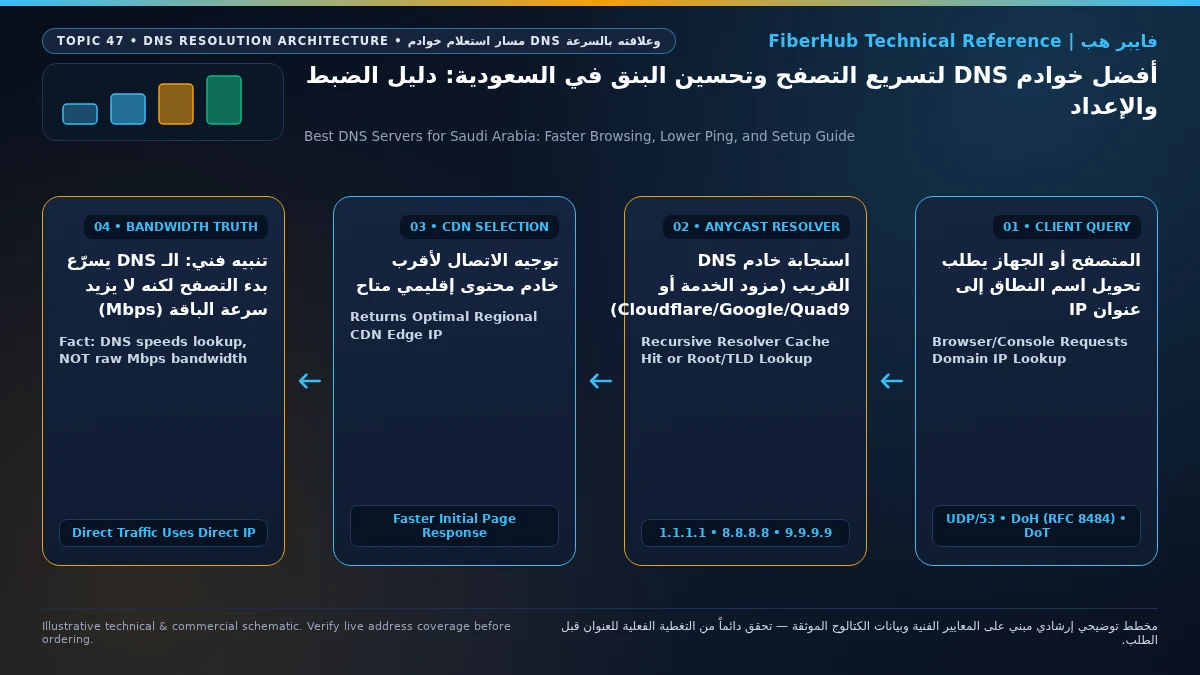
- What a Fast, Well-Peered DNS Resolver Actually Improves:
- Faster Initial Web Page & App Rendering (
Lower TTFB): A single modern webpage triggers 15 to 40 distinct domain lookups for scripts, stylesheets, fonts, payment gateways, and APIs. Shaving40 msoff each uncached lookup eliminates the "waiting for host..." pause and makes browsing feel noticeably snappier. - Eliminating Console Sign-In & Party Chat Timeouts: When
PSN,Xbox Live,Battle.net, orEpic Gamesauthentication domains fail to resolve quickly on a congested default forwarder, party voice chat drops or store pages fail to load. Switching to8.8.8.8or1.1.1.1resolves authentication hostnames reliably on the first packet. - Optimal Local CDN Server Selection for Game Patches: If an improperly configured third-party DNS lacks
ECSsupport and resolvesPlayStationorSteamdownload domains to a European mirror instead of a Saudi edge cache, your download speeds will crawl. Using anECS-aware resolver (8.8.8.8or your ISP's native DNS) ensures your console pulls 80 GB game updates from the nearest Saudi CDN node at your full subscribed fiber plan speed.
- Faster Initial Web Page & App Rendering (
- What Changing DNS Can NEVER Change:
- Your Provisioned Fiber Bandwidth (
Mbps): If your optical line is provisioned at300 Mbpsor500 Mbps, no DNS server can increase your physical GPON/XGS-PON throughput ceiling. - In-Game Match Ping (
UDP Tick-Rate Latency): DNS is queried once when the game client resolves the matchmaking or lobby server hostname into an IP address. Once the match starts, your PC or console exchanges hundreds ofUDPpackets per second directly with that numeric IP address. If your in-game ping to Bahrain, UAE, or Europe is high, or if you experience packet loss, the bottleneck is either local Wi-Fi interference or carrier international routing—which you can evaluate on our Saudi fiber operator comparison page.
- Your Provisioned Fiber Bandwidth (
5. How to Benchmark DNS Resolvers Locally from Your Saudi Connection (nslookup & dig)
Because network peering varies by city (Riyadh, Jeddah, Dammam, Mecca, Medina) and by fiber operator, you should measure actual query latency from your own home connection before locking in a primary DNS server:
- Method 1 — Windows 11 PowerShell (
Measure-Command+Resolve-DnsName): OpenPowerShellon a PC connected to your router via Ethernet and run these three one-line benchmarks to measure exact query resolution time in milliseconds (bypassing the local OS cache with-DnsOnly):- Test Cloudflare (
1.1.1.1):Measure-Command { Resolve-DnsName -Name www.cst.gov.sa -Server 1.1.1.1 -DnsOnly } - Test Google (
8.8.8.8):Measure-Command { Resolve-DnsName -Name www.cst.gov.sa -Server 8.8.8.8 -DnsOnly } - Test Quad9 (
9.9.9.9):Measure-Command { Resolve-DnsName -Name www.cst.gov.sa -Server 9.9.9.9 -DnsOnly }Compare theTotalMillisecondsoutput across 3 runs per server. The resolver that consistently returns the lowest millisecond value (typically 3 ms to 12 mson Saudi FTTH) with zero timeouts should be your Primary DNS.
- Test Cloudflare (
- Method 2 — macOS & Linux Terminal (
dig): OpenTerminaland executedigagainst each candidate resolver, inspecting theQuery time: XX msecline at the bottom of the response:dig @1.1.1.1 fiberhubsa.comdig @8.8.8.8 fiberhubsa.comdig @9.9.9.9 fiberhubsa.comRun each command twice: the first query tests uncached or refreshed resolution, while the second immediate query measures pure Anycast PoP round-trip cache latency (Cache Hit).
Step-by-Step DNS Configuration Guide for Routers, Windows, macOS, Consoles & Mobile:
You can configure custom DNS either globally on your home router (protecting every connected device automatically) or individually on specific work or gaming devices:
- Whole-Home Router / Mesh Wi-Fi Configuration:
- Log into your fiber ONT admin page (
192.168.1.1or192.168.100.1) or open your Mesh router app (TP-Link Deco,Asus Router,Eero,Netgear Orbi). - Navigate to
LAN -> DHCP Server(orWAN / Internet DNS Settings). - Enter your fastest benchmarked resolver in Primary DNS (e.g.,
1.1.1.1) and a different provider in Secondary DNS (e.g.,8.8.8.8). Mixing two independent providers (Cloudflare + Google) provides automatic multi-vendor redundancy if one network ever experiences a regional outage. - Save settings and toggle Wi-Fi off/on on client devices to renew their
DHCPlease.
- Log into your fiber ONT admin page (
- Windows 11 Encrypted DNS (
DoH) Setup:- Open Settings > Network & internet > select Ethernet or Wi-Fi > click Edit next to DNS server assignment.
- Switch from
Automatic (DHCP)to Manual, toggle IPv4 On, set Preferred DNS to1.1.1.1with DNS over HTTPS set to On (automatic template), and set Alternate DNS to8.8.8.8with DNS over HTTPS also enabled. Runipconfig /flushdnsin Command Prompt to clear stale cache entries.
- PlayStation 5 & Xbox Series X|S Setup:
- On PS5: Go to
Settings>Network>Settings>Set Up Internet Connection> press theOptionsbutton on your active network >Advanced Settings> set DNS Settings to Manual, enter8.8.8.8as Primary DNS and1.1.1.1as Secondary DNS, and selectOK. - On Xbox Series X|S: Go to
Settings>General>Network settings>Advanced settings>DNS settings> select Manual, enter your Primary and Secondary IPv4 addresses, and verify connectivity.
- On PS5: Go to
- Android & iOS Encrypted DNS Setup:
- On Android: Open
Settings>Network & internet>Private DNS, select Private DNS provider hostname, and enterone.one.one.one(Cloudflare),dns.google(Google), ordns.quad9.net(Quad9) to enforceDoTacross both Wi-Fi and mobile data.
- On Android: Open
6. Frequently Asked Questions About DNS Servers in Saudi Arabia
Does changing DNS on PS5, Xbox, or PC lower my in-game ping in Saudi Arabia?
No, changing DNS does not reduce live in-game ping. Once your console or PC resolves the game server's IP address before the match starts, all real-time gameplay traffic (UDP packets) travels directly to that IP address without consulting the DNS server again. However, using a fast DNS server like 8.8.8.8 or 1.1.1.1 fixes slow PSN/Xbox Live sign-ins, prevents lobby matchmaking lookup timeouts, and ensures game patches download from nearby Middle East CDN servers.
Does your current plan support your device count and upload needs?
Compare download/upload ratios and Wi-Fi 6 or FTTR hardware options across plans available at your address.
Which is better for Saudi fiber users: Cloudflare (1.1.1.1), Google (8.8.8.8), or my ISP's default DNS?
For raw domain lookup speed and strict privacy, Cloudflare (1.1.1.1) typically posts the lowest query latency (3–8 ms) across major Saudi cities. For massive game downloads and 4K video streaming, Google (8.8.8.8) and your ISP's default DNS excel because Google supports EDNS Client Subnet (ECS) to steer traffic to the closest Saudi CDN cache. Pairing 1.1.1.1 and 8.8.8.8 as Primary/Secondary gives you the best balance of speed, CDN locality, and uptime redundancy.
Does changing DNS settings void my ISP router warranty or violate telecom regulations?
Not at all. Customizing DNS resolver addresses on your personal devices or inside your home router's LAN/DHCP settings is a standard networking feature supported across all operating systems and Saudi broadband providers. It has zero impact on your hardware warranty or service contract, and you can revert to Automatic (DHCP) at any time with a single click.
What should I do if websites fail to open after I manually change my DNS?
If web pages stop resolving after a manual edit, check first for a typo in the IP address (such as typing 8.8.8.88 instead of 8.8.8.8) or check whether a corporate VPN/firewall on your work laptop is blocking external DNS traffic. Simply switch your device's DNS setting back to Automatic (DHCP) and flush your local resolver cache (ipconfig /flushdns on Windows or sudo dscacheutil -flushcache; sudo killall -HUP mDNSResponder on macOS) to restore default resolution immediately.
Technical Standards and References:
- Internet Engineering Task Force (IETF RFC 8484): Specification for DNS Queries over HTTPS (
DoHstandard:https://datatracker.ietf.org/doc/html/rfc8484). - Internet Engineering Task Force (IETF RFC 7858 & RFC 7871): Specification for DNS over Transport Layer Security (
DoTover port 853) and Client Subnet in DNS Queries (EDNS Client Subnet — ECS). - Communications, Space and Technology Commission (CST): Saudi Internet Exchange (
SAIX / JedIX) peering infrastructure and national domain/broadband performance reports (https://www.cst.gov.sa).
Completed tuning and ready for a more stable fiber line?
Check fiber availability at your address and compare low-latency plans for gaming, telework, and multi-floor homes.
Editorial Transparency & Neutrality Notice:
This guide is provided for comparison and decision support. It does not constitute final address coverage confirmation, binding operator pricing, or regulatory accreditation. Always verify final plan terms and box readiness before completing your subscription request.