- The Classic Misconception: Confusing Fiber Line Speed with Wi-Fi Reach
- How Much Bandwidth Does a Busy Saudi Household Actually Consume?
- The 3-Point Diagnostic Protocol: Isolate Your Bottleneck in 10 Minutes
- Point A: Wired Gigabit Test Directly at the ONT (Testing the ISP WAN Line)
- Point B: Close-Range Wireless Test 2 Meters from the Router (Testing Router Radio Health)
- Point C: Distant Room Test in the Problem Zone (Testing Indoor Path Loss)
- The 4 Indoor Culprits That Strangle Fast Fiber Connections
- The Least-Cost Remediation Ladder: Fix Your Network Step by Step
- Tier 1: Zero-Cost Configuration & Placement Fixes (Cost: 0 SAR)
- Tier 2: Direct Cat6 Ethernet for Stationary Heavy Users (One-Time Cost: 30 to 80 SAR)
- Tier 3: Wired Access Points or Wi-Fi 6 Mesh Systems (One-Time Cost: 250 to 750 SAR)
- Tier 4: Fiber-to-the-Room (FTTR) Packages for Large Multi-Story Villas
- When Should You Genuinely Upgrade Your Fiber Plan Speed?
- Frequently Asked Questions: Fiber Speed Upgrades vs Home Wi-Fi
- If I upgrade my fiber plan from 300 Mbps to 500 Mbps, will the Wi-Fi signal reach my far bedrooms better?
- Why do I get 300 Mbps on a speed test next to the router, but videos still buffer in the next room?
- Why does my wired PC or upstairs access point always stop at exactly 94 Mbps on a 300 Mbps fiber plan?
- Will switching to a different telecom provider fix weak Wi-Fi inside my house?
- What is the cheapest way to get full fiber speed on the second floor of a Saudi villa?
No—in more than 80% of Saudi households experiencing video buffering, dead bedrooms, or unstable gaming ping, paying for a faster monthly fiber plan will not fix the problem at all; fixing your indoor router placement, wireless channels, or local distribution points is the correct and far more economical solution. The engineering distinction is fundamental: your broadband subscription plan dictates the capacity of the external fiber pipe arriving at your wall (WAN bandwidth), whereas your indoor experience is governed by how effectively radio waves and Ethernet cables distribute that data through reinforced concrete walls and Hordi ceilings (LAN distribution capacity). If an upstairs bedroom only receives 15 Mbps today because two concrete walls attenuate your router's signal down to -78 dBm, upgrading your fiber plan from 300 Mbps to 500 Mbps or 1 Gbps will leave that bedroom stuck at the exact same 15 Mbps—while adding 700 to 2,000 SAR per year to your telecom bills.
Before calling your provider to upgrade your monthly tariff or browsing high-tier fiber optic broadband packages in Saudi Arabia, you need to determine whether your home suffers from external line saturation (WAN bottleneck) or indoor wireless attenuation (LAN bottleneck). This technical and financial diagnostic guide walks you through a 10-minute, three-point speed test protocol to pinpoint the exact culprit, followed by a least-cost remediation ladder that fixes slow home Wi-Fi without wasting money on unused bandwidth.

The Classic Misconception: Confusing Fiber Line Speed with Wi-Fi Reach
When a family notices live football streams buffering in the majlis, children complain of rubber-banding lag on PlayStation 5, or Zoom video calls freeze in the home office, the most common reaction is to assume that the household has "outgrown" its current internet speed tier. Telecom advertising naturally reinforces this instinct by associating 500 Mbps and 1 Gbps plans with effortless whole-home coverage.
To understand why buying a faster plan rarely cures indoor slowdowns, consider a municipal water analogy: the Fiber-to-the-Home (FTTH) optical line terminating at your Optical Network Terminal (ONT) is the high-pressure main water pipe entering your property boundary. Your indoor Wi-Fi signals and in-wall Ethernet cables are the internal plumbing pipes feeding every bathroom and kitchen tap. If the internal pipe leading to the second floor is corroded and pinched shut so only a trickle comes out of the shower, replacing the street main with a pipe twice as wide will not increase upstairs water pressure by a single drop.
That exact scenario plays out whenever a subscriber upgrades from a 300 Mbps plan—such as STC Baity Fiber Basic 300, Salam Fiber 300, or Zain Fiber 300 at 287.5 SAR/month (inclusive of 15% VAT regulated by ZATCA)—to a 500 Mbps plan at 402.5 or 460 SAR/month while leaving the ISP router locked inside a metal distribution cabinet by the front door.
How Much Bandwidth Does a Busy Saudi Household Actually Consume?
To verify whether your current fiber speed tier is genuinely saturated, let us calculate the real-time megabits per second (Mbps) consumed simultaneously by modern household applications:
- 4K Ultra HD Video Streaming (Netflix, Shahid VIP, YouTube 4K60): consumes 15 to 25 Mbps per active screen.
- Full HD (1080p) Video Streaming: consumes 5 to 8 Mbps per screen.
- HD Video Conferencing (Microsoft Teams, Zoom, Webex): consumes 3 to 4 Mbps download and upload per active call.
- Online Multiplayer Gaming (active gameplay on PS5, Xbox, or PC—excluding initial game downloads): consumes only 1 to 3 Mbps! Online games depend on low latency (ping) and zero packet loss, not massive megabit throughput.
- Social Media Feeds (TikTok, Instagram Reels, X) & Cloud Security Cameras: consume 2 to 6 Mbps per active device.
Now add up a heavy peak-evening workload for a large family: three televisions streaming 4K Ultra HD simultaneously (3 × 25 = 75 Mbps), two remote work or study video calls (2 × 4 = 8 Mbps), two PlayStation 5 consoles in online matches (2 × 3 = 6 Mbps), and ten smartphones scrolling high-definition social video feeds (10 × 5 = 50 Mbps). The combined simultaneous bandwidth demand of all seventeen active streams is just 139 Mbps! A standard 300 Mbps fiber plan handles that entire peak load while still leaving 161 Mbps of unused headroom. Therefore, if a household on a 300 Mbps fiber plan experiences buffering during normal streaming or browsing, the bottleneck is almost certainly inside the local home network rather than the ISP's optical fiber.
The 3-Point Diagnostic Protocol: Isolate Your Bottleneck in 10 Minutes
Before spending a single riyal on a plan upgrade or new hardware, run three sequential speed tests using the official Meqyas platform operated by the Communications, Space and Technology Commission (CST). Comparing these three measurements reveals the exact source of your slowdown:
Point A: Wired Gigabit Test Directly at the ONT (Testing the ISP WAN Line)
Connect a laptop equipped with a Gigabit Ethernet port (1000BASE-T) directly into the primary LAN 1 port on the back of your fiber ONT using a certified Cat6 patch cable, and temporarily turn off the laptop's Wi-Fi. Run a speed test:
- If Point A delivers 90% to 100% of your contracted speed (for example, 285–300 Mbps download and 95–100 Mbps upload on a 300 Mbps plan) with low ping (< 10 ms): your external fiber line and ISP profile are 100% healthy. Upgrading your fiber plan will not fix any indoor dead zones.
- If Point A delivers far below your contracted speed when no other devices are downloading: first verify that your Ethernet cable is not an old 4-wire Cat5 cable (which caps speed at 94 Mbps). If a certified Cat6 cable still yields low speeds directly at the ONT, open a free technical fault ticket with your ISP rather than paying for a higher plan.
Point B: Close-Range Wireless Test 2 Meters from the Router (Testing Router Radio Health)
Unplug the Ethernet cable, stand two meters away from the fiber router in the same room with a modern smartphone, confirm that you are connected to the 5 GHz Wi-Fi band (not 2.4 GHz), and run the second test:
- If Point B matches or nearly matches Point A (e.g., 270–300 Mbps): your router's wireless transmitter and your phone's antenna are working properly.
- If Point A was 300 Mbps, but Point B drops to 80–130 Mbps right next to the router: your bottleneck is router configuration or outdated gateway hardware—most commonly a phone stuck on the congested 2.4 GHz band, a 5 GHz channel width restricted to 20/40 MHz instead of 80 MHz, or an aging Wi-Fi 4/Wi-Fi 5 router.
Point C: Distant Room Test in the Problem Zone (Testing Indoor Path Loss)
Walk to the bedroom, majlis, or upstairs living area where buffering occurs and run the third test:
- If Point A and Point B both scored 290+ Mbps, but Point C collapses to 8–25 Mbps with high jitter: you have proven beyond doubt that concrete wall attenuation and indoor distance are choking your Wi-Fi. Subscribing to a 500 Mbps or 1 Gbps plan will do nothing to help Point C because the radio signal from the main router cannot physically reach that room.
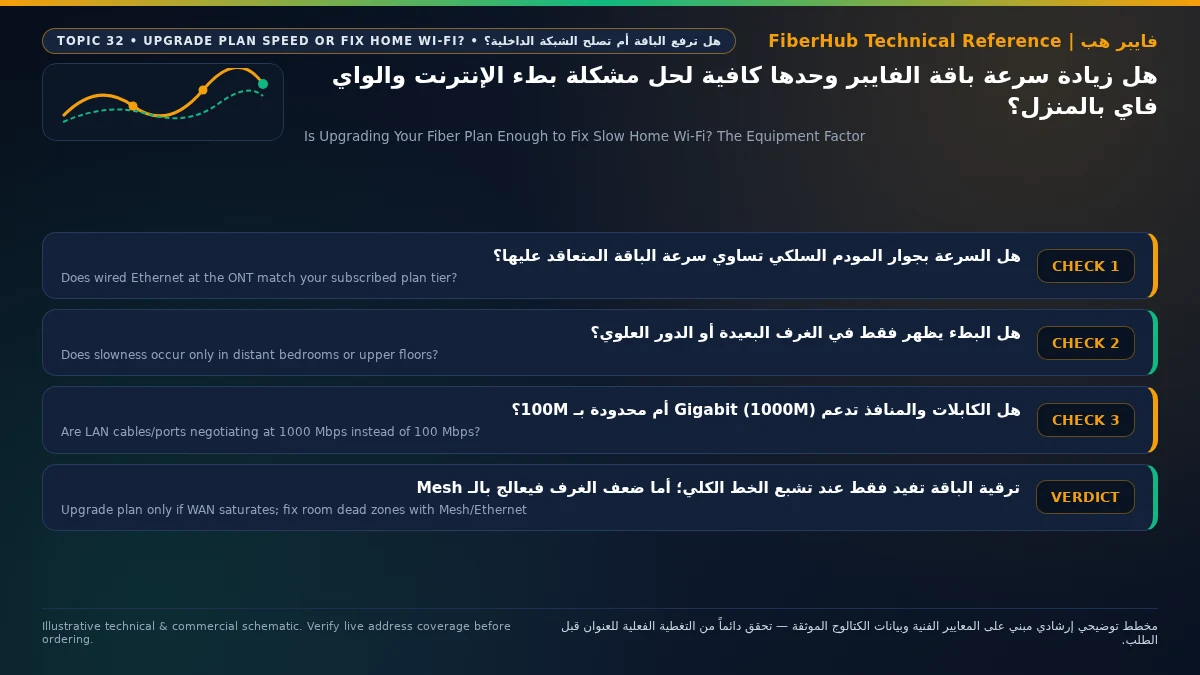
Separate indoor Wi-Fi bottlenecks from line capacity issues
If slow speeds or high ping persist over direct Ethernet, check whether fiber or a higher upload tier is available at your address.
The 4 Indoor Culprits That Strangle Fast Fiber Connections
When Point C fails while Point A passes, one of four physical bottlenecks inside the residence is almost always responsible:
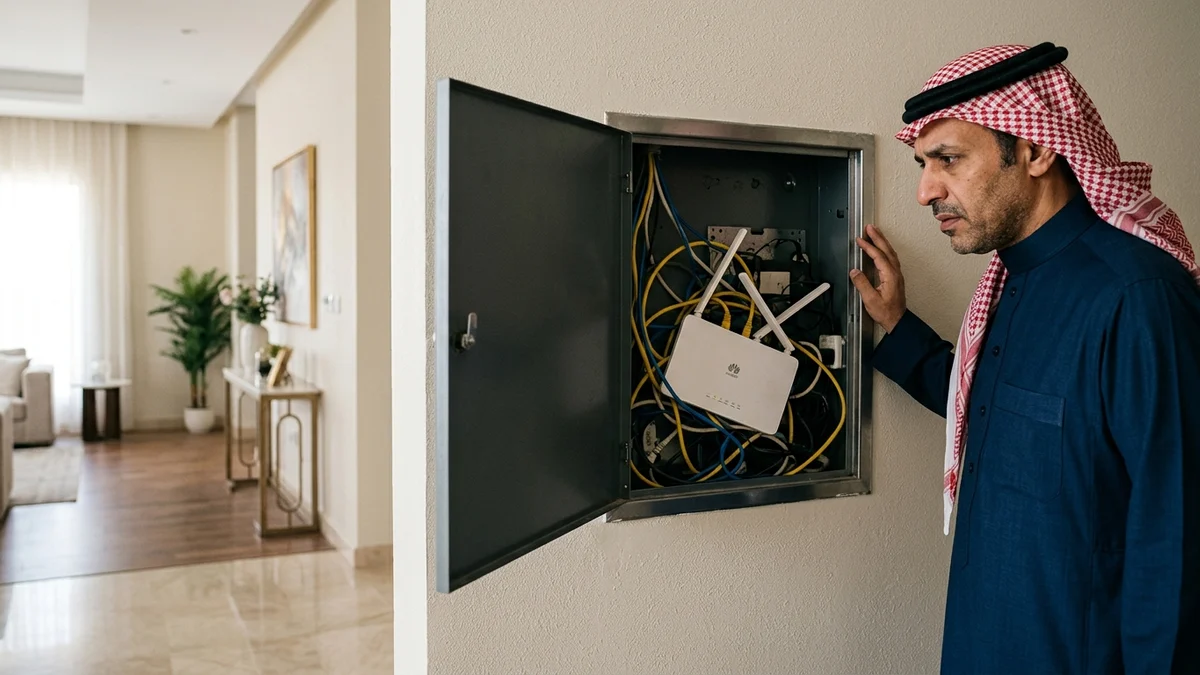
- Trapping the Fiber ONT Inside a Metal Wall Box: In many Saudi apartments and villas, the fiber termination point is inside a recessed steel distribution box near the entrance door. Closing a metal door over a wireless router creates a partial Faraday cage that absorbs or reflects up to 70% of the radio signal before it ever reaches your rooms.
- Silent Fallback to the Congested 2.4 GHz Band: When a dual-band router uses a single merged Wi-Fi name (SSID), moving behind two reinforced concrete walls causes your phone or smart TV to drop from the fast 5 GHz band onto the 2.4 GHz band. While 2.4 GHz travels farther, it suffers from narrow channel widths and heavy interference from neighbor apartments, Bluetooth devices, and microwaves—capping real speeds at 15 to 45 Mbps.
- Cheap Plug-In Wireless Repeaters (Extenders): Single-radio wall-plug repeaters receive packets from the main router and re-transmit them on the same radio channel, which instantly cuts available wireless throughput in half (50% airtime penalty) and doubles latency jitter. Worse yet, users often plug repeaters directly into dead zones where there is no clean signal left to amplify.
- Hidden 100 Mbps Fast Ethernet Cables or Switches: Sometimes a homeowner wires an access point upstairs but notices speed never exceeds 94 Mbps even on a 500 Mbps fiber plan. This classic ceiling occurs when an in-wall cable has a faulty wire pair (causing the port to negotiate 100BASE-TX instead of 1000BASE-T Gigabit) or when an old 10/100 Mbps network switch sits between the ONT and the access point.
| Symptom Observed by Subscriber | Actual Engineering Root Cause | Will a Faster Fiber Plan Fix It? | Correct Least-Cost Engineering Fix |
|---|---|---|---|
| Full speed near router, severe buffering in bedrooms | Concrete wall RF attenuation and single-router placement | No (0% improvement in distant rooms) | Relocate router centrally or add a wired Access Point / Mesh node |
| High ping spikes and packet loss in online games over Wi-Fi | Airtime contention on 2.4 GHz or half-duplex wireless repeater | No (Games use < 3 Mbps of bandwidth) | Connect console via Cat6 Ethernet or upgrade to Wi-Fi 6 OFDMA |
| Speed hard-caps at 90–94 Mbps on wired PC or upstairs AP | Damaged 4-wire Ethernet cable or legacy 100 Mbps switch port | No (Port physically truncates anything >100 Mbps) | Replace patch cord with Cat6 and verify Gigabit (1000 Mbps) ports |
| Speed drops across the house during 100 GB game downloads | Genuine WAN bandwidth saturation by heavy bulk transfer | Yes | Upgrade from 100/300 Mbps to 500 Mbps or 1 Gbps fiber |
The Least-Cost Remediation Ladder: Fix Your Network Step by Step
Follow this strict financial hierarchy so you never overspend on recurring monthly bills for a problem that can be solved once:
Tier 1: Zero-Cost Configuration & Placement Fixes (Cost: 0 SAR)
- Free the Router from Enclosures: Take the ONT out of any metal wall cabinet or cramped TV shelf and place it in an open, elevated central hallway location.
- Separate the 5 GHz Network Name (SSID): Log into your router admin page, give the 5 GHz band a dedicated name (
Home-5G), set its channel width to80 MHz, and connect all nearby TVs, laptops, and consoles exclusively to 5 GHz.
Tier 2: Direct Cat6 Ethernet for Stationary Heavy Users (One-Time Cost: 30 to 80 SAR)
Run a quality Cat6 Ethernet cable to stationary devices that demand zero jitter or heavy throughput—specifically PlayStation 5, gaming PCs, and the main living room 4K TV. A one-time 45 SAR cable guarantees 100% of your fiber speed with sub-5ms local latency and frees up wireless airtime for every smartphone in the house.
Tier 3: Wired Access Points or Wi-Fi 6 Mesh Systems (One-Time Cost: 250 to 750 SAR)
Instead of paying an extra 115 SAR every single month (1,380 SAR per year, or 2,760 SAR over two years) to jump from a 300 Mbps plan to a 500 Mbps plan that still won't reach upstairs, invest a one-time amount in a two-node or three-node Wi-Fi 6 Mesh system or ceiling/wall Access Points connected via your home's in-wall Ethernet ports (Wired Backhaul). Placing a wired Wi-Fi 6 node on each floor delivers the full 300 Mbps to every corner of the villa.
Tier 4: Fiber-to-the-Room (FTTR) Packages for Large Multi-Story Villas
If your villa lacks internal Cat6 Ethernet conduits and you want a turnkey carrier-maintained solution, upgrade your distribution architecture rather than raw speed alone by choosing an FTTR (Fiber-to-the-Room) plan—such as Salam Home FTTR 300 (345 SAR/month), Salam Home FTTR 500 (402.5 SAR/month), Mobily Home FTTR 400 Mbps (402.5 SAR/month), or STC Baity Fiber Plus FTTR 500 Mbps (488.75 SAR/month, all inclusive of 15% VAT)—where technicians route transparent optical fibers directly into multiple rooms.
When Should You Genuinely Upgrade Your Fiber Plan Speed?
Once your indoor coverage is solid, there are four legitimate scenarios where using our broadband plan comparison tool to step up to a faster fiber tier delivers immediate value:
- You Are Still on a Legacy 50 Mbps or 100 Mbps Plan: For example, STC Baity Fiber 100 costs 287.5 SAR/month (VAT-inclusive), which is the exact same monthly price as STC Baity Fiber Basic (300 Mbps), Salam Fiber 300, and Zain Fiber 300 (287.5 SAR/month VAT-inclusive). Moving from 100 Mbps to 300 Mbps triples your speed for zero extra monthly cost!
- Frequent 100+ GB Game Patches and 4K Media Downloads: A 120 GB PlayStation 5 or Steam game takes roughly 55 minutes to download on a 300 Mbps line, drops to 32 minutes on a 500 Mbps plan (such as Salam Fiber 500 at 345 SAR/month or STC Baity Fiber Stream 500 at 402.5 SAR/month), and finishes in just 16 minutes on a 1 Gbps Gigabit plan (such as Salam Fiber 1000 at 460 SAR/month).
- Heavy Cloud Uploads and Content Creation: Stepping up from 100/200 Mbps plans (which offer 25–50 Mbps upload) to 300 Mbps, 500 Mbps, or 1 Gbps fiber unlocks 100 Mbps to 300 Mbps of symmetric-grade upload speed, slashing upload times for 4K video creators, software engineers, and cloud backups.
- Large Multi-User Households with Existing Mesh/Wired Coverage: When 8 to 12 people already enjoy strong Wi-Fi 6 coverage across every floor and simultaneously run heavy downloads alongside 4K streams. You can always verify fiber availability at your address and inspect full tariff details on our Saudi home broadband plans page.
Does your current plan support your device count and upload needs?
Compare download/upload ratios and Wi-Fi 6 or FTTR hardware options across plans available at your address.
Frequently Asked Questions: Fiber Speed Upgrades vs Home Wi-Fi
If I upgrade my fiber plan from 300 Mbps to 500 Mbps, will the Wi-Fi signal reach my far bedrooms better?
No, not by a single meter. Upgrading your plan increases the data rate arriving through the underground fiber optic cable to your ONT, but it does not increase the radio transmit power (measured in milliwatts/dBm) of your router's antennas. To reach distant bedrooms behind concrete walls, you need an additional Access Point, Mesh node, or FTTR extension.
Why do I get 300 Mbps on a speed test next to the router, but videos still buffer in the next room?
This happens when your phone or TV automatically drops from the fast 5 GHz band onto the crowded 2.4 GHz band, or when a reinforced concrete pillar or metal door causes severe packet loss. Splitting your 5 GHz and 2.4 GHz network names and moving the router out of any enclosed cabinet usually resolves this immediately.
Why does my wired PC or upstairs access point always stop at exactly 94 Mbps on a 300 Mbps fiber plan?
A hard speed ceiling between 90 and 95 Mbps is the unmistakable signature of a 100 Mbps Fast Ethernet bottleneck. Either one of the eight copper pins inside your in-wall Ethernet cable is loose (forcing the link down from 8-wire Gigabit to 4-wire 100 Mbps), or you are using an old network switch/router with 10/100 Mbps ports. Replacing the cable with Cat6 or re-terminating the wall jack unlocks the full 300 to 1000 Mbps immediately.
Will switching to a different telecom provider fix weak Wi-Fi inside my house?
If your current fiber line delivers 100% of its contracted speed when tested via Ethernet cable at the ONT (Point A), switching to another ISP and placing their router in the exact same corner will face the exact same concrete walls and wireless path loss. Only switch providers if your wired line itself is unstable, if you want a better monthly price, or if you are upgrading to a multi-room FTTR package.
What is the cheapest way to get full fiber speed on the second floor of a Saudi villa?
The most cost-effective engineering solution is to run a single Cat6 Ethernet cable from a Gigabit LAN port on your ground-floor fiber ONT through existing internal wall conduits to the second floor, and connect a Wi-Fi 6 router configured in Access Point (AP) Mode. For a one-time hardware cost of 200 to 300 SAR and zero recurring monthly fees, the second floor will enjoy the exact same full fiber speed as the ground floor.
Completed tuning and ready for a more stable fiber line?
Check fiber availability at your address and compare low-latency plans for gaming, telework, and multi-floor homes.
Editorial Transparency & Neutrality Notice:
This guide is provided for comparison and decision support. It does not constitute final address coverage confirmation, binding operator pricing, or regulatory accreditation. Always verify final plan terms and box readiness before completing your subscription request.