- The RF Physics of Saudi Construction: How Many Decibels Does Each Obstacle Absorb?
- The #1 Mistake in Modern Saudi Flats and Villas: Locking the ONT Inside the Metal Wall Cabinet
- How to Free Your Router from the Metal Box Without Ruining Your Decor
- The 5 Engineering Rules for Optimal Router Positioning
- 1. Geometric Centrality and Hallway Line-of-Sight
- 2. The 1.2 to 1.6 Meter Elevation Rule
- 3. Clear the "Interference & Shadow Triangle" (Kitchens, Mirrors, and Large TVs)
- 4. Dipole Antenna Orientation: Single-Floor Flats vs. Two-Story Villas
- 5. Special Positioning Rules for 5G Home Wireless Routers (5G CPE)
- Room-by-Room Layout Blueprints: Saudi Apartments, Duplex Villas, and Outdoor Majlis Annexes
- When Placement Alone Cannot Beat Physics: Multi-Node & FTTR Solutions
- Frequently Asked Questions About Home Wi-Fi Router Placement
- Is hiding the router inside a false gypsum ceiling a good way to get central coverage?
- Does closing bedroom doors at night noticeably reduce Wi-Fi speed?
- How can I move my Wi-Fi router to the living room if the fiber cable enters at the front door?
- In a two-story Saudi villa, should the main router sit on the ground floor or the first floor?
- Why does my 5G home router get weak cellular signal even when placed right behind a window?
If you are wondering where your Wi-Fi router belongs inside a Saudi apartment or villa for the strongest possible coverage without buying extra hardware, the engineering rule is to position it at the geometric center of your living space (such as the main family living hall or central hallway junction), elevated 1.2 to 1.6 meters off the floor on an open shelf or console, with clear line-of-sight down corridors, and completely outside metal wall distribution cabinets, away from silver-backed mirrors, reinforced concrete pillars, and kitchen appliances. Conversely, if your household uses a 5G Fixed Wireless router rather than fiber, optimal placement flips: a 5G CPE must sit next to an exterior window facing the serving cell tower (avoiding metallic Low-E window tinting), handing off indoor coverage via Ethernet or a secondary central node if the house is deep.
Residential construction across Saudi Arabia—whether modern freehold apartments in Riyadh and Jeddah or multi-story concrete villas in Dammam and Al Khobar—relies heavily on steel-reinforced concrete columns, double-walled insulated cement blocks, and dense porcelain or marble finishes. While this structural density excels at keeping 45°C summer heat outside, it acts as a formidable barrier against high-frequency radio waves. When an installer leaves your router tucked inside a metal utility box by the front entrance door, more than half of your wireless energy radiates out into the street or gets absorbed by structural rebar before ever reaching your bedrooms.
The RF Physics of Saudi Construction: How Many Decibels Does Each Obstacle Absorb?
A standard omnidirectional home router radiates electromagnetic energy outward in a 360-degree horizontal doughnut shape (a toroidal radiation pattern) around its vertical antennas. In open air, 2.4 GHz and 5 GHz waves travel effortlessly; indoors, however, every partition causes three physical losses simultaneously: dielectric absorption inside concrete and water pipes, scattering and refraction off sharp masonry edges, and total reflection off metallic surfaces.
Radio engineers measure path loss in decibels (dB). Because the decibel scale is logarithmic (as standardized by the International Telecommunication Union ITU-R), losing just 3 dB cuts your signal power in half (50% loss), losing 10 dB destroys 90% of signal power, and losing 20 dB wipes out 99% of transmitted radio energy!
The architectural reference table below details actual measured signal attenuation across common building materials and fixtures inside Saudi homes:
| Architectural Obstacle or Household Fixture in KSA | Signal Loss at 2.4 GHz | Signal Loss at 5 GHz | Practical Impact on Indoor Wi-Fi Speed & Stability |
|---|---|---|---|
| Closed interior wooden door or gypsum board partition | 3 – 5 dB | 4 – 8 dB | Minor drop; 5 GHz waves pass through with high throughput intact |
| Plastered cement block interior wall (15–20 cm thick) | 8 – 12 dB | 12 – 18 dB | One wall halves 5 GHz speed; two consecutive walls sever 5 GHz links |
| Steel-reinforced concrete column or Hordi floor slab | 15 – 22 dB | 20 – 32 dB | Heavy steel rebar scatters waves; blocks inter-floor 5 GHz coverage |
| Large decorative wall mirror (silver metallic backing) | 12 – 18 dB | 15 – 22 dB | Acts as a radio shield, reflecting signals and creating a shadow dead zone |
| Bathroom/kitchen porcelain tiles & internal water piping | 10 – 15 dB | 14 – 22 dB | Dense ceramic plus water (which absorbs 2.4 GHz energy) kills signal |
| Metal weak-current wall cabinet door (DB Box) | 18 – 28 dB | 22 – 35 dB | Creates a Faraday cage that traps 90%–98% of Wi-Fi radiation inside the wall |
| Double-glazed exterior window with metallic Low-E tint | 10 – 20 dB | 15 – 30 dB | Blocks outdoor 3.5 GHz 5G cellular signals from reaching a 5G home router |
This decibel math explains why a smartphone gets 300 Mbps in the living room, yet drops to one bar of slow 2.4 GHz connectivity in a bedroom situated just ten meters away behind a tiled bathroom wall or hallway mirror.
The #1 Mistake in Modern Saudi Flats and Villas: Locking the ONT Inside the Metal Wall Cabinet
In newly built Saudi apartments and villas, electrical contractors terminate the external fiber-optic conduit and internal room Ethernet cables inside a recessed steel wall box known as the weak-current distribution cabinet (صندوق التيار الخفيف), typically mounted behind the main entrance door or underneath the staircase. When the ISP technician arrives to activate your Saudi fiber broadband connection, the quickest installation method is placing the combined Optical Network Terminal (ONT) and Wi-Fi router inside that recessed steel box and latching the metal door shut.

From a radio frequency engineering standpoint, locking your primary Wi-Fi router inside a recessed steel cabinet is catastrophic for three reasons:
- The Faraday Cage Effect: The grounded sheet-steel door reflects and grounds electromagnetic waves, stripping 20 dB to 30 dB of signal strength before the radio wave even enters the hallway.
- Extreme Perimeter Asymmetry: Because the utility cabinet sits at the outermost boundary of the home near the street door or elevator shaft, half of the router's 360-degree horizontal radiation pattern is wasted outside your living quarters, while the remaining indoor half must punch through three or four sequential cement walls to reach rear bedrooms.
- Severe Thermal Throttling: Sealed recessed wall boxes lack airflow, causing the optical laser transceiver and Wi-Fi 6 processor to overheat during Saudi summer months—leading to packet drops and random reboots.
How to Free Your Router from the Metal Box Without Ruining Your Decor
You do not need to drill walls or run exposed cables down hallways. Instead, use the structured cabling already sitting inside that utility box:
- Method A (Patch the Living Room Wall Jack): Leave the ISP fiber ONT inside the cabinet (with its internal Wi-Fi radio turned off to reduce heat), connect a short Cat6 patch cord from
LAN 1on the ONT to the internal wall cable leading to your central living room RJ45 wall socket, and place your main Wi-Fi 6 router out in the open on the living room console. - Method B (External Shelf Mounting): If your apartment lacks room-to-room Ethernet jacks, feed the power and optical jumper carefully through the cabinet's bottom cable grommet and place the router on an open wooden floating shelf mounted outside the metal door.
The 5 Engineering Rules for Optimal Router Positioning
To maximize indoor signal distribution under IEEE 802.11 propagation physics without spending a single riyal on extra hardware, apply these five placement rules:
1. Geometric Centrality and Hallway Line-of-Sight
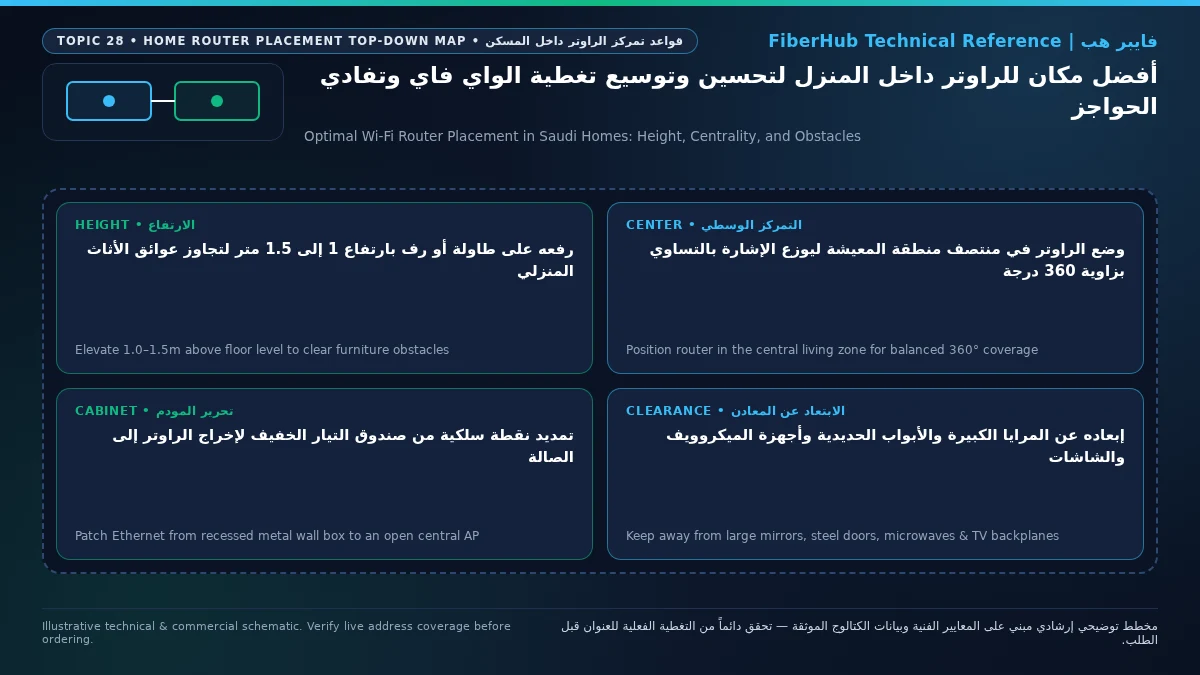
Treat your router like a bare light bulb: if you want one bulb to illuminate as many rooms as possible, you hang it in the middle of the house where doorways converge—never in a dark corner closet. Placing the router in the central family sitting hall (الصالة) with direct line-of-sight down the bedroom corridor allows radio waves to travel down the open air of the hallway and enter bedrooms through thin wooden doors (4–8 dB loss) rather than cutting diagonally through reinforced concrete pillars (25+ dB loss).
Separate indoor Wi-Fi bottlenecks from line capacity issues
If slow speeds or high ping persist over direct Ethernet, check whether fiber or a higher upload tier is available at your address.
2. The 1.2 to 1.6 Meter Elevation Rule
Never place a router directly on ceramic floor tiles or tucked on the bottom shelf of a low TV stand. Floor-level placement causes immediate ground-plane absorption into the concrete slab and forces horizontal waves straight into dense sofa frames, dining tables, and human bodies. Elevating the router 1.2 to 1.6 meters above the floor (chest-to-eye level on an open bookshelf, wall bracket, or high console) clears furniture obstructions and aligns the horizontal radiation lobe directly with handheld phones and laptops.
3. Clear the "Interference & Shadow Triangle" (Kitchens, Mirrors, and Large TVs)
Maintain at least 2 to 3 meters of separation from three notorious indoor signal killers:
- Microwave Ovens and Refrigerators: Residential microwave ovens operate at
2.45 GHzat roughly 1,000 Watts of magnetron power (compared to a router's 0.1 Watt transmit power), leaking electromagnetic noise that completely jams the 2.4 GHz Wi-Fi band whenever food is heating. - Directly Behind 65-Inch+ Smart TVs: Modern large-screen televisions contain a solid internal metal chassis and EMI shield across the entire back panel. Hiding the router behind the TV screen creates a total radio shadow in front of the television. Always place the router beside the screen, never behind it.
- Mirrors and Aquariums: Silvered hallway mirrors reflect 5 GHz waves like a metal shield, while water tanks absorb 2.4 GHz radio energy.
4. Dipole Antenna Orientation: Single-Floor Flats vs. Two-Story Villas
If your router features adjustable external dipole antennas, their angle controls wave polarization and vertical beam tilt:
- In Single-Floor Apartments: Point all antennas strictly vertical at 90 degrees (
| | | |). Vertical dipoles project the widest, strongest horizontal coverage disk across a single floor level. - In Two-Story Duplexes or Villas: Set half of the antennas vertical at 90 degrees and tilt the remaining antennas at a 45-degree angle (
| / | \). Cross-polarizing and tilting part of the array directs a portion of the radiation pattern upward and downward through the stairwell opening.
5. Special Positioning Rules for 5G Home Wireless Routers (5G CPE)
If your household relies on 5G home wireless broadband instead of fiber, placement priorities reverse. A 5G router must first capture an outdoor 3.5 GHz (Band n78) cellular beam from your provider's street tower before broadcasting Wi-Fi indoors. Placing a 5G router in a windowless interior hallway starves it of cellular signal!
- Optimal 5G CPE Placement: Position the 5G router right beside an upper-floor or street-facing window with the cleanest line-of-sight toward the cell tower, using the router's signal indicator or admin app to maximize
SINRandRSRP. Crucially, test with the window open vs. closed: many modern Saudi windows feature metallic heat-reflective tinting (Low-E glass) or aluminum roller shutters that block 90%+ of 5G signals. Once you find the strongest window spot, connect a Cat6 cable from the 5G router's LAN port to a central indoor Wi-Fi node to cover deep interior rooms.
Room-by-Room Layout Blueprints: Saudi Apartments, Duplex Villas, and Outdoor Majlis Annexes
Because Saudi residential architecture separates formal guest reception zones (مجلس الرجال ومجلس النساء والمقلط) from private family living spaces and bedrooms, applying the geometric center rule requires tailoring placement to your specific property layout:
- Linear Freehold Apartments (140 to 190 Square Meters): In most modern Saudi apartments, the guest majlis sits near the main entrance while the family sitting hall and three bedrooms sit deeper inside along a corridor. Leaving the router in the front majlis starves the back bedrooms. Instead, place the primary router at the junction where the family sitting hall meets the bedroom hallway, allowing 5 GHz waves to cover the family hall directly while traveling down the open corridor into all bedrooms.
- Two-Story Duplex Villas (Ground Floor + First Floor + Rooftop Annex): A 30-centimeter steel-reinforced Hordi floor slab attenuates 5 GHz signals by 20 dB to 32 dB, preventing a ground-floor router from delivering high speeds upstairs. Position the ground-floor router near the open interior stairwell (
بئر الدرج), and use the pre-installed wall Ethernet conduit to place a wired access point or secondary mesh node in the upstairs family living hall between the bedrooms. - Outdoor Courtyard Annexes (
الملحق الخارجي / المشب): Because an insulated exterior structural wall and courtyard separate the main villa from the outdoor majlis, indoor Wi-Fi rarely reaches the annex reliably. Run an outdoor-rated Cat6 cable through the electrical conduit to the annex wall socket, or mount a dedicated access point inside the annex. - Decorative Marble-Alternative TV Walls (
بديل الرخام): Avoid tucking your router inside closed drawers beneath wall-mounted TVs right next to LED strip power transformers, which generate electromagnetic noise and trap heat; always place the router on an open upper shelf.
When Placement Alone Cannot Beat Physics: Multi-Node & FTTR Solutions
Even when a single router is positioned at the exact geometric center of a home at 1.5 meters elevation, regulatory transmit power limits enforced globally and by the Communications, Space and Technology Commission (CST) (capping indoor consumer Wi-Fi EIRP at 100–200 milliwatts for spectrum safety) establish a hard physical boundary on single-router coverage:
- Where One Centrally Placed Router Succeeds: Open-plan apartments and compact single-floor homes measuring 110 to 170 square meters, with no more than two masonry walls between the central hall and the farthest bedroom.
- Where One Router Can Never Suffice Alone: Large apartments exceeding 200 square meters with L-shaped corridors, two-and-three-story Saudi villas with reinforced concrete Hordi slabs, and isolated ground-floor majlis rooms or rooftop annexes (
الملحق).
When your floorplan exceeds single-router physics, check the optical and multi-room packages available at your national address via the FiberHub coverage tool. Verified Saudi catalog plans include modern Wi-Fi 6 hardware and dedicated Fiber-to-the-Room (FTTR) villa solutions (all monthly prices below include 15% VAT):
- Standard Fiber Plans (Including Wi-Fi 6 Gigabit Router): Includes Mobily Fiber Postpaid 200 at 230 SAR/month, and STC Baity Fiber Basic (300 Mbps), Salam Fiber 300, and Zain Fiber 300 at 287.5 SAR/month.
- Optical Fiber-to-the-Room (FTTR) Villa Plans: Extends transparent optical fiber directly past concrete walls into secondary rooms, including Mobily Home FTTR 400 Mbps at 402.5 SAR/month, Mobily Home FTTR 500 Mbps at 460 SAR/month, and STC Baity Fiber Plus FTTR (500 Mbps) at 488.75 SAR/month.
Compare included equipment and monthly pricing side by side on our broadband plan comparison table or explore all options in the Saudi home broadband plans directory.
Does your current plan support your device count and upload needs?
Compare download/upload ratios and Wi-Fi 6 or FTTR hardware options across plans available at your address.
Frequently Asked Questions About Home Wi-Fi Router Placement
Is hiding the router inside a false gypsum ceiling a good way to get central coverage?
No, placing a standard desktop router inside an enclosed gypsum ceiling cavity is strongly discouraged. The metal suspension grid and air-conditioning ducts inside the ceiling reflect and scatter radio waves, while trapped summer heat inside the unventilated cavity degrades electronics and makes resetting the device difficult. If you want ceiling coverage, install a dedicated PoE Ceiling-Mount Access Point mounted flush on the underside of the gypsum board.
Does closing bedroom doors at night noticeably reduce Wi-Fi speed?
Yes. When your router sits in a central hallway, radio waves travel down the open corridor and enter rooms primarily through the doorway rather than through thick concrete walls. Closing a heavy solid-core wooden door adds 4 dB to 8 dB of extra attenuation on the 5 GHz band, which is often enough to push a borderline bedroom signal down to the slower 2.4 GHz band.
How can I move my Wi-Fi router to the living room if the fiber cable enters at the front door?
Never yank or bend the thin yellow/white glass fiber patch cable yourself, as glass cores snap easily. Instead, leave the ISP fiber ONT modem inside the entrance cabinet, plug a standard Cat6 Ethernet jumper from the ONT's LAN 1 port into the internal wall conduit leading to your living room's RJ45 wall socket, and connect a primary Wi-Fi 6 router or Mesh main unit in the center of the living room.
In a two-story Saudi villa, should the main router sit on the ground floor or the first floor?
If you have a central open stairwell (بئر الدرج), placing the primary router on the ground floor or first-floor landing with direct line-of-sight into the open stairwell cavity allows radio waves to travel between floors through open air rather than attempting to punch through a 30-centimeter steel-reinforced concrete floor slab. For complete villa coverage, however, every floor should have its own wired access point or mesh node.
Why does my 5G home router get weak cellular signal even when placed right behind a window?
Many modern residential windows in Saudi Arabia use double-glazed glass treated with an invisible metallic oxide coating (Low-E thermal tinting) or exterior aluminum roller shutters to block solar heat. That metallic coating reflects 3.5 GHz 5G cellular waves just like a mirror. Test your speed with the window slid open; if speed doubles with the glass open, move the 5G router to an untinted window or use an external antenna solution.
Completed tuning and ready for a more stable fiber line?
Check fiber availability at your address and compare low-latency plans for gaming, telework, and multi-floor homes.
Editorial Transparency & Neutrality Notice:
This guide is provided for comparison and decision support. It does not constitute final address coverage confirmation, binding operator pricing, or regulatory accreditation. Always verify final plan terms and box readiness before completing your subscription request.