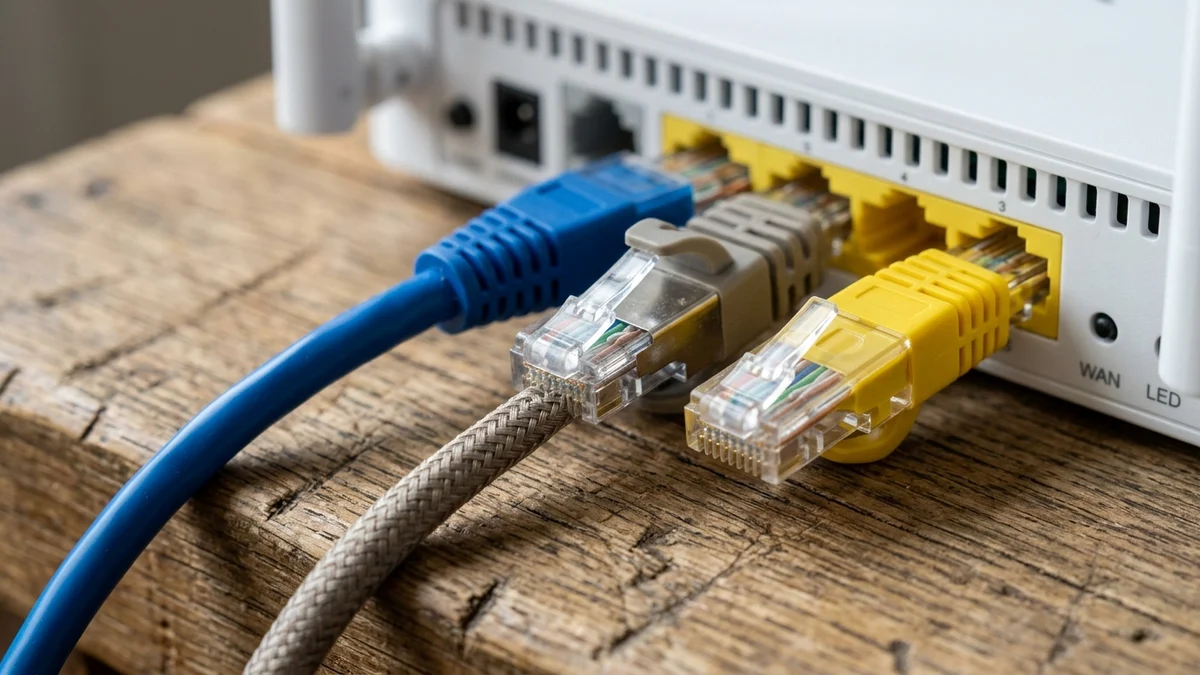
- Engineering Comparison: Cat5e vs Cat6 vs Cat6a vs Cat7 vs Cat8 Specifications
- Why Marketing "Cat7" and "Cat8" Cables Are Misleading for Home Broadband
- The Real Threat to Your Speed: Pure Bare Copper vs Counterfeit CCA Cables
- UTP vs Shielded (STP / S/FTP) Cables: The "Floating Ground" Trap in Homes
- Structured Cabling Blueprint for Saudi Apartments and Villas
- Frequently Asked Questions About Home Ethernet Cables (Cat6 vs Cat7 vs Cat8)
- Why is my Cat6 Ethernet cable stuck at 100 Mbps instead of my 500 Mbps fiber speed?
- Are flat Ethernet cables safe to use under carpets and doors?
- Why does my 4K Smart TV only get 95 Mbps when plugged in with a Cat6 cable?
- Should I install Cat6 or Cat6a when building a new villa in Saudi Arabia?
No—for 99% of Saudi apartments and villas subscribing to residential fiber broadband, spending extra money on Cat7 or Cat8 Ethernet cables is completely unnecessary and frequently counterproductive. A genuine Category 6 (Cat6) or Category 6A (Cat6a) cable manufactured from 100% Pure Bare Copper (23 AWG or 24 AWG) is the optimal engineering choice for residential networking. Standard Cat6 effortlessly delivers 1 Gbps (1000BASE-T), 2.5 Gbps, and 5 Gbps up to a full 100-meter channel length, and supports 10 Gbps (10GBASE-T) up to 55 meters (while Cat6a sustains 10 Gbps across the full 100 meters). Because every residential Fiber-to-the-Home (FTTH) Optical Network Terminal (ONT), Mesh Wi-Fi satellite, gaming PC, and PlayStation 5 or Xbox Series X console connects via 1 Gbps, 2.5 Gbps, or at most 10 Gbps RJ45 ports, pure copper Cat6 or Cat6a already exceeds the physical hardware limits of your home equipment.
Conversely, many cables marketed on e-commerce platforms as "ultra-fast Gaming Cat7 or Cat8" either rely on data-center shielding specifications that are too rigid for residential wall conduits, or worse, conceal cheap Copper-Clad Aluminum (CCA) conductors inside flashy braided sleeves that degrade signal integrity and fail Power over Ethernet (PoE) safety standards. Grounded in international cabling standards from IEEE 802.3, ANSI/TIA-568, and ISO/IEC 11801, this engineering guide compares copper Ethernet categories, exposes counterfeit cable traps, explains UTP versus STP grounding physics, and provides a practical structured cabling blueprint for Saudi homes so your wired network delivers every megabit of the plans featured on our Saudi fiber broadband hub.
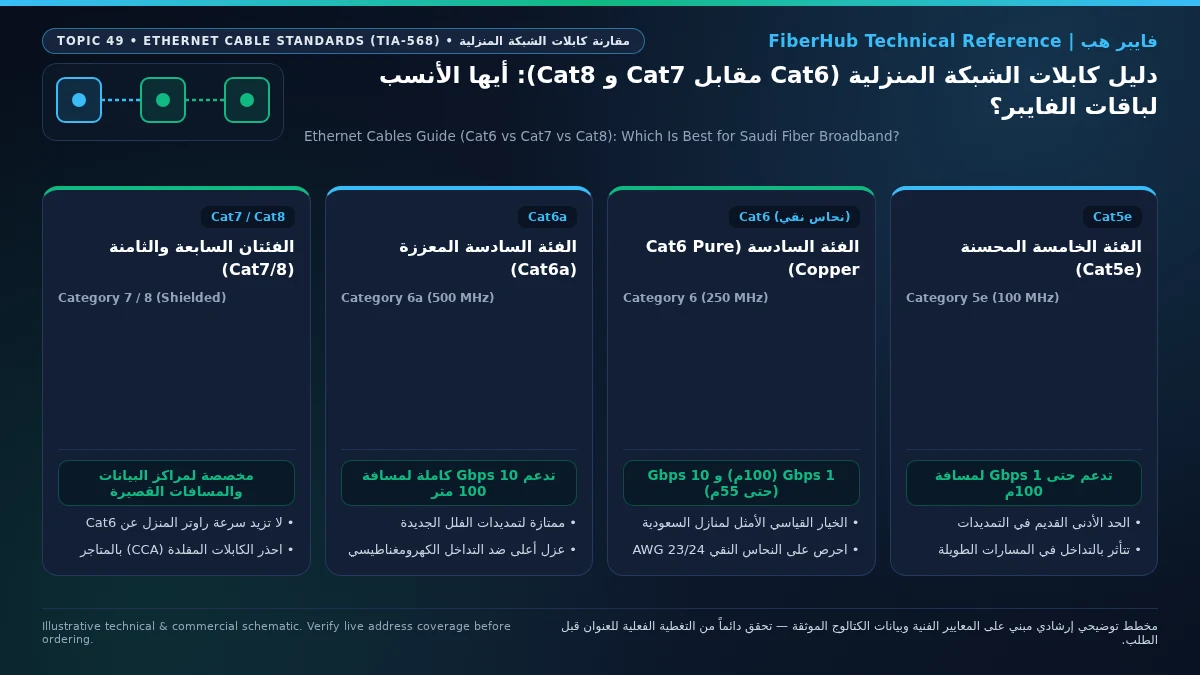
Engineering Comparison: Cat5e vs Cat6 vs Cat6a vs Cat7 vs Cat8 Specifications
Twisted-pair copper Ethernet cables are categorized by the electromagnetic frequency bandwidth (measured in megahertz, MHz) they can carry cleanly while suppressing internal wire-to-wire interference (Near-End Crosstalk, or NEXT) and external noise (Alien Crosstalk, or ANEXT). Higher categories utilize tighter pair twists per centimeter, internal plastic longitudinal separators (splines), or metallic foil shields:

The reference matrix below outlines the ratified ANSI/TIA-568 and ISO/IEC 11801 specifications for each Ethernet cable category and evaluates its real-world suitability for Saudi residential installations:
| Cable Category | Rated Bandwidth | Max Speed at 100 Meters | Short-Run Max Speed | Internal Construction & Connector | Engineering Verdict for Saudi Homes |
|---|---|---|---|---|---|
| Cat5e | 100 MHz | 1 Gbps (1000BASE-T) | 2.5 Gbps (up to 50–100m on quality copper) | Unshielded (UTP), no internal spline | Acceptable if already inside existing walls; do not install in new builds |
| Cat6 | 250 MHz | 1 Gbps / 2.5 Gbps / 5 Gbps | 10 Gbps (up to 55 meters) | UTP with central plastic cross-spline separator | Best value & performance sweet spot for apartments, villas, and gaming setups |
| Cat6a | 500 MHz | 10 Gbps (full 100 meters) | 10 Gbps | Tighter twists, thicker UTP jacket or F/UTP shield | Best future-proof choice for large multi-story Saudi villas with long conduit runs |
| Cat7 | 600 MHz | 10 Gbps (100 meters) | 10 Gbps | Individually foil-shielded pairs (S/FTP); designed for GG45/TERA plugs | Not recommended for homes; not recognized by TIA-568 for standard RJ45 ports |
| Cat8 | 2000 MHz | Not rated for 100m | 25 Gbps / 40 Gbps (strictly 30m max) | Heavy S/FTP metallic braid, thick 22 AWG wire | Data-center switch interconnects only; too stiff for wall outlets and capped at 30m |
The takeaway from these physical specifications is unmistakable: if the longest conduit run from your villa's central weak-current distribution box to the furthest bedroom or Majlis is under 50 to 55 meters, a genuine Cat6 cable provides the exact same 10 Gbps throughput ceiling as Cat7 at a fraction of the cost and with far easier termination into wall faceplates.
Why Marketing "Cat7" and "Cat8" Cables Are Misleading for Home Broadband
Online marketplace listings routinely claim that upgrading from Cat6 to Cat7 or Cat8 will "lower gaming ping, eliminate lag, and boost download speeds" on a 500 Mbps or 1 Gbps fiber connection. From an electrical engineering standpoint, three facts debunk these claims:
- Electrical Propagation Speed (Latency) Is Identical Across Copper Categories: Electrical signals travel through twisted-pair copper conductors at roughly 65% to 79% of the speed of light (Nominal Velocity of Propagation, or NVP), whether the cable is Cat5e, Cat6, or Cat8. Across a 25-meter cable run inside your home, the physical transit time of a data packet is roughly 0.00012 milliseconds (120 nanoseconds). Replacing a working Cat6 cable with a Cat8 cord cannot reduce your ping to gaming servers by even a thousandth of a millisecond.
- Cat7 Is Not Ratified by ANSI/TIA-568 for Standard RJ45 Ports: True Category 7 (ISO/IEC 11801 Class F) was engineered around proprietary industrial connectors (GG45 and TERA) rather than the standard 8P8C RJ45 plug used on every home router, PC, and game console. When consumer cable brands crimp standard RJ45 connectors onto a cable labeled "Cat7," the termination point defaults electrically to Cat6a or Cat6 specifications, rendering the Cat7 label meaningless marketing.
- Cat8 Is Capped at 30 Meters and Too Rigid for In-Wall Conduits: Ratified under ANSI/TIA-568-C.2-1 for short-reach 25GBASE-T and 40GBASE-T server rack links, genuine Cat8 uses heavy 22 AWG conductors wrapped in individual foil shields and an outer braided metallic mesh. Its thick outer diameter (8 to 9.5 mm) and strict minimum bend radius make it nearly impossible to pull through corrugated PVC wall pipes or coil neatly inside shallow Saudi electrical wall boxes without kinking the conductors.
The Real Threat to Your Speed: Pure Bare Copper vs Counterfeit CCA Cables
When purchasing bulk Ethernet cable spools for a new home or pre-made patch cords for your setup, the single biggest threat to your connection is not choosing Cat6 over Cat7—it is accidentally buying Copper-Clad Aluminum (CCA) instead of 100% Pure Bare Copper:
- High DC Resistance and Link Downgrades to 100 Mbps: Aluminum has roughly 55% higher electrical resistance than pure copper. Over in-wall runs exceeding 20 to 30 meters, CCA cables suffer severe signal attenuation and return loss, frequently forcing Gigabit Ethernet ports to fail 1000BASE-T negotiation and drop down to 100 Mbps (Fast Ethernet).
- Power over Ethernet (PoE) Overheating and Dropouts: Modern Saudi villas rely heavily on PoE (IEEE 802.3af/at/bt) switches to power ceiling-mounted Wi-Fi 6 access points, outdoor IP security cameras, and smart intercoms over a single Ethernet cable. Because CCA conductors resist DC current flow, they experience severe voltage drop—causing ceiling access points to reboot under load—and generate excess heat inside wall conduits, violating international electrical safety codes.
- Brittle Conductors and Oxidation: Aluminum is far more brittle than annealed copper. When electricians pull CCA cables through tight wall conduits or punch them down into Keystone wall jacks, the thin copper coating scrapes off or the core snaps silently, leading to intermittent packet loss within months.
How to Verify Genuine Copper Before Buying:
Always inspect the cable reel specification sheet and outer jacket print for 100% Pure Bare Copper, Solid Bare Copper, or OFC (Oxygen-Free Copper), verified to ANSI/TIA-568.2-D with 23 AWG (for Cat6/Cat6a bulk solid cable) or 24 AWG conductors. Immediately reject any cable listing CCA (Copper-Clad Aluminum), CCS (Copper-Clad Steel), or ultra-thin flat cables using 30–32 AWG wires for long runs.
Separate indoor Wi-Fi bottlenecks from line capacity issues
If slow speeds or high ping persist over direct Ethernet, check whether fiber or a higher upload tier is available at your address.
UTP vs Shielded (STP / S/FTP) Cables: The "Floating Ground" Trap in Homes
A common misconception among homeowners is that shielded Ethernet cables (STP, F/UTP, or S/FTP) wrapped in metallic foil are always superior to Unshielded Twisted Pair (UTP) cables. In residential environments, installing shielded cables without industrial grounding infrastructure can actually degrade your network:
- Why UTP Is Ideal for Residential Conduits: Unshielded Cat6 and Cat6a cables rely on precision balanced differential signaling and varied pair twist rates to cancel out electromagnetic interference naturally. As long as your data cables run through dedicated low-voltage corrugated PVC conduits separated from high-voltage 220V AC power lines, Cat6 UTP or Cat6a UTP delivers flawless gigabit and multi-gigabit performance with zero grounding complexity.
- The Floating Ground Antenna Effect on Un-grounded STP: Metallic cable shields are designed to capture external electromagnetic noise and drain it safely to earth via a grounded metallic patch panel and shielded RJ45 jacks connected to the building's earth busbar. When you plug a shielded Cat7 or STP cable into the ungrounded plastic RJ45 ports of a residential Huawei/Nokia ONT router and a home PC, the metallic foil has nowhere to drain accumulated charge. Instead, the ungrounded shield acts as a parasitic floating antenna, coupling ambient electrical noise directly onto the internal data pairs!
- When Specialized Jackets Are Required in Saudi Homes:
- Shared Pathways Near High-Voltage AC Lines: If retrofitting an older home forces you to run an Ethernet cable parallel to heavy AC compressor power lines, use Cat6a F/UTP and properly ground the central termination block.
- Outdoor Rooftop and Courtyard Runs: Standard indoor PVC or LSZH cable jackets crack and disintegrate within one or two summers when exposed to direct Saudi ultraviolet sunlight and 50°C+ ambient heat. Whenever running Ethernet across an open roof, exterior wall, or courtyard to an outdoor annex (mulhaq) or perimeter CCTV camera, use Outdoor-Rated UV-Resistant PE (Polyethylene) Cat6 Cable.
Structured Cabling Blueprint for Saudi Apartments and Villas
To guarantee that full fiber speeds—from 300 Mbps up to 1 Gbps plans detailed on our Saudi home broadband plans directory—reach every room without bottlenecks, follow this structured wiring standard:
- Match Solid-Core vs Stranded-Core to the Right Role:
- Inside Wall Conduits (Permanent Horizontal Runs): Always pull 23 AWG Solid-Core Pure Copper Cat6 or Cat6a from bulk 305-meter pull boxes. Solid copper conductors maintain low attenuation over long distances and lock securely into the Insulation Displacement Connectors (IDC blades) of wall Keystone Jacks.
- From Wall Outlet to Device (Patch Cords): Never crimp male RJ45 plugs directly onto stiff in-wall solid cables if avoidable; instead, terminate the wall cable into a female Keystone wall plate and use a factory-molded 24/26 AWG Stranded-Core Cat6 Patch Cord (1 to 3 meters) to connect your PS5, PC, Smart TV, or Mesh router. Stranded copper flexes repeatedly behind furniture without work-hardening or breaking.
- Enforce the
T568BPinout Standard and Untwist Limits: Ensure your technician terminates both ends of every run using theT568Bcolor standard (White-Orange, Orange, White-Green, Blue, White-Blue, Green, White-Brown, Brown), and keeps wire pairs twisted within 12 mm (0.5 inches) of the termination point to prevent Near-End Crosstalk. - Centralize the Weak-Current Distribution Cabinet and Size Your PoE Budget: Route all room and ceiling conduits back to a ventilated central weak-current enclosure equipped with a modular patch panel and a Gigabit or 2.5G Ethernet switch connected directly to the main LAN port of your ISP fiber ONT. When selecting a Power over Ethernet (PoE) switch for a Saudi villa, calculate total power draw across your connected devices: fixed outdoor IP security cameras typically draw 7 to 12 watts under IEEE 802.3af (PoE — up to 15.4W per port), ceiling-mounted dual-band and tri-band Wi-Fi 6/6E/7 access points require 18 to 25 watts under IEEE 802.3at (PoE+ — up to 30W per port), and motorized pan-tilt-zoom (PTZ) cameras or powered sub-switches require IEEE 802.3bt (PoE++ — 60W to 90W per port). Sustaining these wattages over 30 to 60 meters of conduit without voltage drop requires genuine 23 AWG solid bare copper conductors.
- Choose LSZH Jackets for Indoor Safety and Certify Every Termination: When purchasing bulk Cat6 or Cat6a spools for enclosed ceiling plenums and vertical risers in Saudi residences, specify LSZH (Low Smoke Zero Halogen) outer jackets rather than cheap standard PVC; in the event of an electrical fire, LSZH jackets do not emit toxic halogen acid gas or dense black smoke. Finally, once your technician punches down all Keystone wall jacks and ceiling leads, require an 8-pin wiremap and continuity test on every single port to rule out open pins, shorts, or split pairs, and verify on a laptop that each wall outlet negotiates a clean 1000 Mbps Full-Duplex or 2500 Mbps link rate.
Before finalizing your home network layout, verify which optical speeds are available at your property using our Saudi address coverage checker and compare ISP hardware offerings on the fiber plan comparison tool.
Frequently Asked Questions About Home Ethernet Cables (Cat6 vs Cat7 vs Cat8)
Why is my Cat6 Ethernet cable stuck at 100 Mbps instead of my 500 Mbps fiber speed?
When a Cat6 connection hits a hard ceiling right around 94 to 100 Mbps, the culprit is almost always a physical continuity failure on one of the eight internal copper wires. Gigabit Ethernet (1000BASE-T) requires all 8 pins (all 4 twisted pairs) to make clean electrical contact at both ends. If even a single wire (such as pin 4, 5, 7, or 8) is poorly crimped inside the RJ45 plug or imperfectly punched down inside the wall Keystone jack, the network cards automatically fall back to 100BASE-TX (Fast Ethernet), which only uses 4 wires (pins 1, 2, 3, and 6) and caps speed at 100 Mbps. Testing the line with an inexpensive 8-LED RJ45 continuity tester immediately reveals the broken pin, or check whether the cable is plugged into a legacy 100 Mbps switch or TV port.
Does your current plan support your device count and upload needs?
Compare download/upload ratios and Wi-Fi 6 or FTTR hardware options across plans available at your address.
Are flat Ethernet cables safe to use under carpets and doors?
Flat Cat6 patch cords made from genuine stranded copper are perfectly fine for short indoor runs of 1 to 10 meters when you need to slip a cable cleanly under a bedroom door or along a baseboard without drilling. However, avoid using flat cables for runs longer than 15 meters or for high-power PoE devices; because flat cables use thin 30–32 AWG conductors arranged side-by-side without a central spline, they suffer higher electrical resistance, increased thermal buildup under PoE loads, and greater susceptibility to crosstalk over long distances.
Why does my 4K Smart TV only get 95 Mbps when plugged in with a Cat6 cable?
Almost all consumer 4K and 8K Smart TVs—even flagship OLED and QLED models from major brands—are manufactured with a 100 Mbps (Fast Ethernet) LAN port rather than a 1,000 Mbps Gigabit port to reduce component costs, since streaming 4K HDR video from Netflix, Shahid, or YouTube only consumes 20 to 65 Mbps. Your Cat6 cable and fiber line are working properly; the 95 Mbps speed test result is simply the hardware limit of the television's built-in Ethernet port, while still giving your TV rock-solid, interference-free playback.
Should I install Cat6 or Cat6a when building a new villa in Saudi Arabia?
For a standard apartment or medium-sized villa where every conduit run from the central distribution box to the rooms is under 50 meters, 23 AWG Pure Copper Cat6 is more than sufficient, supporting up to 10 Gbps at a lower cost and narrower cable diameter. If you are building a large multi-story villa where conduit pathways wind across floors and exceed 50 meters—or if several cables are bundled tightly together in long trays—upgrading to Cat6a (500 MHz) guarantees full 10 Gbps performance up to 100 meters with superior Alien Crosstalk immunity. Note that while you can join two short indoor Cat6 patch cords using a gold-plated RJ45 inline coupler without losing gigabit speed (provided total length stays under 90 meters), permanent in-wall conduit runs and PoE lines should always be pulled as single continuous home-run cables without mid-span splices.
- Official References and Technical Standards: Ethernet physical layer and PoE specifications from IEEE 802.3 (1000BASE-T / 10GBASE-T / 802.3bt), structured customer premises cabling standards from ISO/IEC 11801 and ANSI/TIA-568.2-D, and residential telecom infrastructure guidelines from the Communications, Space and Technology Commission (CST).
Completed tuning and ready for a more stable fiber line?
Check fiber availability at your address and compare low-latency plans for gaming, telework, and multi-floor homes.
Editorial Transparency & Neutrality Notice:
This guide is provided for comparison and decision support. It does not constitute final address coverage confirmation, binding operator pricing, or regulatory accreditation. Always verify final plan terms and box readiness before completing your subscription request.