
- How Much Bandwidth Do Household Apps Actually Consume? Real-Time Bitrate Reference
- The FiberHub Bandwidth Worksheet: Calculate Your Exact Speed in 3 Minutes
- Profile 1: Small Apartment, Single Professional, or Couple (1 to 3 Residents)
- Profile 2: Medium Saudi Family in a Large Flat or Duplex Villa (4 to 6 Residents)
- Profile 3: Large Multi-Story Villa or Content Creator Household (7+ Residents)
- The "Download Patience Threshold": When Are You Paying for Time Savings Rather Than Active Streams?
- Why 90% of Households Bottleneck on Indoor Wi-Fi Hardware Rather Than ISP Plan Speed
- Don't Overlook Upload Speed: The Decisive Metric for Remote Work and Cloud Cameras
- Matching Your Calculated Speed to Verified Saudi Broadband Plans
- Frequently Asked Questions About Calculating Home Broadband Speed Needs
- Is 300 Mbps fast enough for a family of 6 streaming 4K video and playing online games?
- Why does my internet feel slow in bedrooms even though I pay for a 500 Mbps fiber plan?
- Do 20 or 30 smart home devices (smart bulbs, ACs, plugs) eat up my internet speed when idle?
- How can I check how many megabits my home is actually using right now?
- When is a 1,000 Mbps (1 Gbps) home internet plan genuinely worth the extra cost?
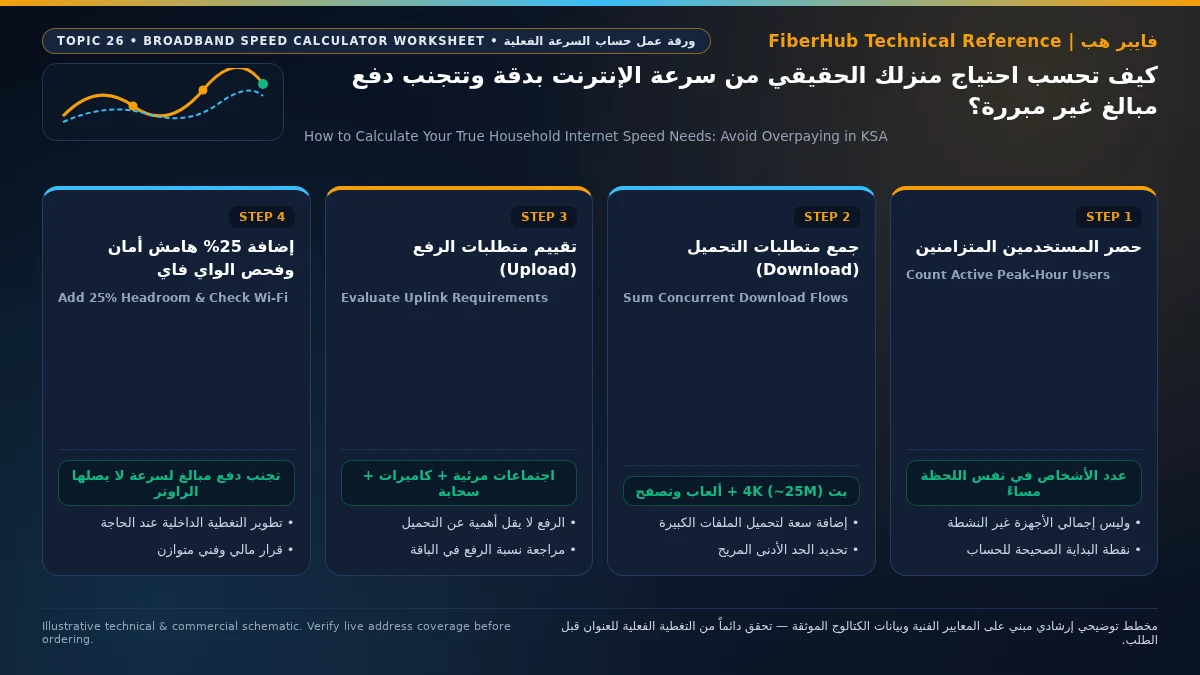
If you are wondering whether you are overpaying every month for a 500 Mbps or 1,000 Mbps (1 Gbps) broadband plan in Saudi Arabia, the mathematical reality is that over 80% of households subscribe to bandwidth tiers that exceed their peak simultaneous consumption by three to four times—often under the mistaken belief that buying a higher speed tier will fix weak Wi-Fi in distant bedrooms. In real-world network engineering, a family of five concurrently streaming two 4K UHD movies, attending a high-definition video conference, playing an online multiplayer game, and scrolling social media feeds consumes only 85 Mbps to 130 Mbps during the busiest evening hour. To calculate your home's true speed requirement without wasting thousands of riyals a year, apply a three-part capacity formula that sums: (1) active concurrent media streams, (2) continuous background cloud and security camera traffic, and (3) your burst download patience threshold, multiplied by a 25% operational headroom buffer.
Telecom marketing heavily promotes gigabit speeds as the default standard for modern family living, yet the billing gap between a practical 200–300 Mbps plan and a flagship 1 Gbps package can easily reach 2,000 to 6,500 SAR per year. Moreover, when a subscriber experiences video buffering in an upstairs bedroom or ground-floor majlis, roughly 90% of those slowdowns are caused by indoor radio signal attenuation through reinforced concrete walls rather than exhausting the external fiber WAN circuit.
How Much Bandwidth Do Household Apps Actually Consume? Real-Time Bitrate Reference
The first rule of accurate capacity planning is distinguishing between total registered devices on your router and concurrently active streams in the same second. A modern Saudi villa or large apartment may have 25 devices connected to the home network (smartphones, tablets, smart TVs, split ACs, smart plugs, and IP cameras), but rarely do more than 4 to 7 devices pull sustained, heavy data streams simultaneously. Furthermore, casual web browsing, WhatsApp messaging, and social media scrolling do not draw continuous bandwidth; they pull brief 1-to-2-second micro-bursts to pre-fetch content and then sit completely idle while you read or watch.
The engineering table below details actual sustained download and upload bitrates required by popular applications in Saudi homes, based on modern video codecs (HEVC H.265, AV1, and WebRTC):
| Household Digital Activity or Application | Sustained Download Needed | Sustained Upload Needed | Traffic Behavior Profile | Engineering Reality & Hardware Notes |
|---|---|---|---|---|
| 4K UHD HDR Video Streaming (Shahid VIP, Netflix, YouTube) | 15 – 25 Mbps | 0.5 Mbps | Buffered continuous stream | Uses H.265/AV1 compression; three 4K TVs together use ~65 Mbps |
| 1080p Full HD Live Sports & Series Streaming | 5 – 8 Mbps | 0.2 Mbps | Buffered continuous stream | A single Full HD stream consumes less than 3% of a 300 Mbps plan |
| Remote Work & School Video Calls (Zoom, MS Teams, Webex) | 3 – 4 Mbps | 3 – 4 Mbps | Real-time symmetrical UDP | Highly sensitive to upload stability rather than raw download speed |
| Short-Form Social Video (TikTok, Instagram Reels, Snapchat) | 4 – 10 Mbps | 2 – 8 Mbps | Short intermittent bursts | Pulls a brief burst to cache the next clip, then drops to zero |
| Live Multiplayer Gaming (Active Matchplay, Not Patching) | 0.5 – 1.5 Mbps | 0.5 – 1.0 Mbps | Continuous micro-packets | Requires virtually zero bandwidth; depends on low jitter |
| Large Game & OS Downloads (PlayStation, Steam, Xbox, Apple) | 100 – 800+ Mbps | 2 – 5 Mbps | Temporary bulk TCP saturation | Absorbs whatever spare pipe capacity is available to finish faster |
| Cloud Security Cameras & Smart Home (Per 2K Camera) | 0.2 Mbps | 2 – 4 Mbps | 24/7 continuous upstream | Four cloud-recording cameras consume ~12 Mbps of upload capacity |
These figures expose a critical truth: even if four family members watch four separate 4K UHD streams simultaneously, while a fifth person hosts a Microsoft Teams video call and a sixth plays an online console match, their combined demand totals roughly 110 Mbps of download and 10 Mbps of upload.
The FiberHub Bandwidth Worksheet: Calculate Your Exact Speed in 3 Minutes
Instead of guessing, network planners size residential circuits around Peak Concurrent Bandwidth (PCB)—the maximum demand during your household's busiest 60 minutes of the week (typically Thursday or Friday evening between 8:30 PM and 11:30 PM in Saudi Arabia):
$$\text{Target Speed (Mbps)} = (\text{Active Concurrent Streams} + \text{Background Cloud Load} + \text{Burst Download Allowance}) \times 1.25$$

Let us plug three realistic Saudi household profiles into this formula to see the exact numbers:
Profile 1: Small Apartment, Single Professional, or Couple (1 to 3 Residents)
- Peak Concurrent Streams: One 4K smart TV stream (25 Mbps) + two smartphones scrolling short-form video (15 Mbps) + one remote work video call (4 Mbps) = 44 Mbps.
- Background Cloud Load: Smartphone photo backups and automatic app updates (10 Mbps).
- With 25% Operational Headroom: $(44 + 10) \times 1.25 = 67.5\text{ Mbps}$.
- Engineering Verdict: A 100 Mbps to 200 Mbps plan satisfies 100% of this household's needs with generous margin. Paying for 500 Mbps or 1 Gbps here wastes money every month.
Profile 2: Medium Saudi Family in a Large Flat or Duplex Villa (4 to 6 Residents)
- Peak Concurrent Streams: Two 4K TVs in the living room and majlis (50 Mbps) + one 1080p stream in a bedroom (8 Mbps) + two active gaming consoles (3 Mbps) + five smartphones/tablets active (30 Mbps) = 91 Mbps.
- Background Cloud Load: Cloud security cameras and work file syncing (15 Mbps).
- Concurrent Bulk Download Allowance: Reserving 120 Mbps so a family member can download a game update in the background without throttling anyone else.
- With 25% Operational Headroom: $(91 + 15 + 120) \times 1.25 = 282.5\text{ Mbps}$.
- Engineering Verdict: The 300 Mbps tier is the mathematical sweet spot for the vast majority of Saudi families, balancing instant responsiveness and monthly cost.
Separate indoor Wi-Fi bottlenecks from line capacity issues
If slow speeds or high ping persist over direct Ethernet, check whether fiber or a higher upload tier is available at your address.
Profile 3: Large Multi-Story Villa or Content Creator Household (7+ Residents)
- Peak Concurrent Streams: Four simultaneous 4K UHD streams (100 Mbps) + high-bitrate live streaming or cloud video editing uploads + ten active laptops and phones (60 Mbps) = 160 Mbps.
- Concurrent Bulk Download Allowance: Multiple gaming PCs or consoles frequently pulling 100 GB patches simultaneously, requiring 250 Mbps of dedicated download headroom.
- With 25% Operational Headroom: $(160 + 250) \times 1.25 = 512.5\text{ Mbps}$.
- Engineering Verdict: Here—and only when paired with proper indoor wired access points or mesh nodes—does a 500 Mbps or 1,000 Mbps (1 Gbps) subscription deliver genuine daily value.
The "Download Patience Threshold": When Are You Paying for Time Savings Rather Than Active Streams?
There is only one scenario where a smaller household benefits from a 500 Mbps or 1 Gbps plan: reducing the wait time for massive multi-gigabyte file transfers, known as your Burst Download Patience Threshold. When a seasonal Call of Duty update or raw 4K video archive measuring 80 Gigabytes (640,000 Megabits of payload) needs to be downloaded, the wall-clock waiting time scales linearly with your line speed:
- On a 100 Mbps plan: downloading 80 GB takes roughly 1 hour and 48 minutes.
- On a 300 Mbps plan: the wait drops to 36 minutes.
- On a 500 Mbps plan: the download finishes in 21 minutes and 30 seconds.
- On a 1,000 Mbps (1 Gbps) plan: over a wired Gigabit Ethernet connection, it completes in 10 minutes and 45 seconds.
Ask yourself honestly: how often do you sit waiting for an 80 GB download to finish before you can work or play? If your consoles and PCs are configured to download updates automatically in Rest Mode overnight, paying an extra 115 to 460 SAR every month just to shave 15 minutes off an occasional patch is difficult to justify financially.
Why 90% of Households Bottleneck on Indoor Wi-Fi Hardware Rather Than ISP Plan Speed
Before upgrading your broadband subscription, understand a physical constraint that sales brochures rarely mention: if you subscribe to a 1,000 Mbps fiber plan but connect your phone or TV over Wi-Fi through two reinforced concrete walls, your device will only receive 40 Mbps to 90 Mbps.
To avoid misdiagnosing your home network, separate external WAN circuit capacity—regulated and benchmarked by the Communications, Space and Technology Commission (CST)—from indoor wireless throughput governed by IEEE 802.11 radio physics and client hardware limits:
- Smartphone and Laptop Antenna Ceilings: Nearly all consumer smartphones and tablets use a $2\times2$ MIMO antenna array. On a standard 5 GHz Wi-Fi 6 channel (80 MHz width), the real-world maximum TCP throughput standing two meters from the router is roughly 450 Mbps to 600 Mbps. Move one room away behind a concrete partition, and physical link modulation drops to 180 Mbps – 300 Mbps—meaning a single smartphone over Wi-Fi can rarely saturate even a 300 Mbps plan outside the router's room.
- The Smart TV 100 Mbps Port Limitation: Surprisingly, over 95% of premium 4K smart TVs sold today ship with a wired RJ45 port rated for 100 Mbps Fast Ethernet (not Gigabit) and a modest Wi-Fi module, because television manufacturers know 4K HDR streaming never requires more than 25–40 Mbps.
- Remote Server Rate Limiting: Even when your PC is hardwired via Cat6 Gigabit Ethernet, many commercial content delivery networks (CDNs) cap single-client download streams at 350 Mbps to 500 Mbps during peak hours to protect server fairness.
Consequently, if you already have a 300 Mbps plan and experience buffering in an upstairs bedroom, upgrading your ISP contract to 500 Mbps or 1 Gbps will do nothing to improve that bedroom's speed. Investing that money once into a wired access point or tri-band mesh node solves the real bottleneck permanently.
Don't Overlook Upload Speed: The Decisive Metric for Remote Work and Cloud Cameras
While shoppers fixate on headline download speeds, upload capacity determines how smoothly your voice and camera video reach colleagues during remote meetings, how quickly large PDFs or CAD files attach to emails, and whether home CCTV cameras can stream to the cloud without choking your network:
- On Saudi FTTH fiber plans, GPON optical networks provide generous, rock-solid upload tiers typically equal to 25% to 33% of the download rate (for example, a 300 Mbps fiber plan provides 100 Mbps upload, and a 500 Mbps plan delivers 125 Mbps to 150 Mbps upload).
- On 5G home wireless broadband plans, cellular base stations allocate most time-division (TDD) radio slots to downloading, so real-world upload speeds typically range between 25 Mbps and 50 Mbps on standard tiers and fluctuate with tower distance and indoor signal quality.
For households with multiple remote professionals, university students on live video lectures, or cloud-backed security cameras, prioritize a fiber tier offering at least 50 Mbps to 100 Mbps of guaranteed upload throughput.
Matching Your Calculated Speed to Verified Saudi Broadband Plans
Once you have calculated your household's true megabit requirement and checked which networks serve your building via the FiberHub national address coverage tool, match your target tier against verified Saudi catalog plans (all monthly prices below include 15% VAT):
- 100 Mbps to 200 Mbps Tier (Singles, Couples & Small Apartments): Ideal when your calculated PCB is under 150 Mbps. Verified catalog choices include Mobily Fiber Postpaid 200 (200 Mbps down / 50 Mbps up) at 230 SAR/month, and STC Baity Fiber 100 (100 Mbps down / 25 Mbps up) at 287.5 SAR/month.
- 300 Mbps to 400 Mbps Tier (The Sweet Spot for Most 4–6 Person Saudi Families): Easily powers multiple 4K TVs, online gaming, remote work, and smart home systems with 100 Mbps of upload capacity on fiber. Top verified plans include STC Baity Fiber Basic (300 Mbps), Salam Fiber 300, and Zain Fiber 300—all priced at 287.5 SAR/month—or Zain 5G Home Pro (400 Mbps) at 287.5 SAR/month in non-fiber districts.
- 500 Mbps to 1 Gbps Tier (Large Multi-Story Villas, Creators & Heavy Downloaders): Built for 7+ concurrent heavy users or homes wired with Gigabit Ethernet / FTTR. Verified options include Salam Fiber 500 at 345 SAR/month, STC Baity Fiber Stream (500 Mbps) or Mobily Fiber Gamers (500 Mbps) at 402.5 SAR/month, Salam Fiber 1000 (1 Gbps) at 460 SAR/month, and STC Baity Fiber Plus FTTR (500 Mbps) at 488.75 SAR/month.
Saudi households should also account for seasonal and cultural traffic patterns when choosing a tier. During the holy month of Ramadan, Eid holidays, and weekend family majlis gatherings, the number of connected guest smartphones and simultaneous post-Iftar 4K drama and football streams increases substantially. Even so, stepping up from a 100 Mbps entry tier to a 300 Mbps fiber plan provides more than enough capacity to absorb extended family gatherings without jumping all the way to an expensive 1 Gbps contract. Furthermore, Saudi telecom providers allow you to upgrade your speed tier instantly through their mobile apps at any point during your contract if your family's needs grow, whereas downgrading a postpaid tier is typically restricted during a 12-month commitment.
Compare contract durations, upload speeds, and promotional offers side by side on our broadband comparison matrix or explore all verified packages on the Saudi broadband plans directory.
Frequently Asked Questions About Calculating Home Broadband Speed Needs
Does your current plan support your device count and upload needs?
Compare download/upload ratios and Wi-Fi 6 or FTTR hardware options across plans available at your address.
Is 300 Mbps fast enough for a family of 6 streaming 4K video and playing online games?
Yes, 300 Mbps is more than sufficient. Even if three 4K HDR televisions stream simultaneously (consuming ~70 Mbps total), two consoles run live multiplayer matches (3 Mbps total), and six smartphones browse social media (35 Mbps total), your combined real-time load is roughly 108 Mbps—leaving nearly 200 Mbps of spare headroom for background updates.
Why does my internet feel slow in bedrooms even though I pay for a 500 Mbps fiber plan?
In roughly 90% of Saudi homes, bedroom slowdowns are caused by indoor Wi-Fi attenuation through reinforced concrete walls or devices getting stuck on the crowded 2.4 GHz radio band (which maxes out around 30–50 Mbps), rather than exhausting your 500 Mbps fiber line. Run a speed test standing two meters from the main router on the 5 GHz band; if it hits 480+ Mbps near the router, you need better indoor Wi-Fi distribution—not a more expensive ISP plan.
Do 20 or 30 smart home devices (smart bulbs, ACs, plugs) eat up my internet speed when idle?
No. Idle smart home appliances and phones with their screens off consume only a few kilobits per second for periodic status heartbeats, which has virtually zero impact on your megabit bandwidth. Large numbers of IoT devices only affect older Wi-Fi 4/5 routers by competing for radio airtime—an issue resolved by modern Wi-Fi 6 (OFDMA) routers included with current Saudi fiber plans.
How can I check how many megabits my home is actually using right now?
Log into your router's admin dashboard (typically 192.168.1.1) or open your router's companion mobile app during peak family usage (around 9:00 PM) and watch the Real-Time WAN Traffic Monitor for five minutes. Most families are surprised to see their live throughput hovering between 15 Mbps and 95 Mbps unless a large game or OS file is actively downloading.
When is a 1,000 Mbps (1 Gbps) home internet plan genuinely worth the extra cost?
A 1 Gbps tier is genuinely justified in three situations: first, if your villa or apartment has Cat6 Ethernet wall ports or wired access points capable of delivering gigabit speeds to multiple rooms; second, if household members regularly download or upload massive multi-gigabyte files (such as 100 GB game installs or raw 4K video projects) and want to cut wait times down to 10 minutes; or third, when a provider offers a high-value gigabit tier (such as Salam Fiber 1000 at 460 SAR/month incl. VAT) that fits comfortably within your budget.
Completed tuning and ready for a more stable fiber line?
Check fiber availability at your address and compare low-latency plans for gaming, telework, and multi-floor homes.
Editorial Transparency & Neutrality Notice:
This guide is provided for comparison and decision support. It does not constitute final address coverage confirmation, binding operator pricing, or regulatory accreditation. Always verify final plan terms and box readiness before completing your subscription request.