
- The Real Device Inventory of a Large Saudi Household: How 7 People Equal 50+ Endpoints
- The Physics of High Device Density: Why Legacy Wi-Fi Chokes and How Wi-Fi 6 Solves It
- The Three-Lane Segmentation Strategy: Organizing 50+ Devices Without Chaos
- Lane 1: Wired Ethernet Offload for Heavy Stationary Consumers (Zero Airtime Cost)
- Lane 2: Clean 5 GHz (or 6 GHz) Fast Lane Exclusively for Family Phones and Laptops
- Lane 3: Dedicated 2.4 GHz IoT Network + Bandwidth-Capped Guest Network
- Stopping the "One Console Update Chokes the Whole House" Problem
- Sizing the Right Saudi Broadband Tier for Large Families (VAT Inclusive)
- Frequently Asked Questions About Internet for Large Families and Many Devices
- How many devices can a standard ISP Wi-Fi router handle before slowing down?
- Do smart home security cameras slow down family Wi-Fi?
- Will setting a download speed cap on my kids' gaming consoles increase their in-game ping?
- Why do some phones or smart devices randomly drop off the Wi-Fi when guests visit?
- Should I enable "Smart Connect" (combining 2.4 GHz and 5 GHz into one Wi-Fi name) in a house with 50 devices?
Home internet slows down dramatically when the whole family comes online at once because of two compounding bottlenecks that go far beyond raw ISP megabits: wireless airtime contention (CSMA/CA collision queuing) when 30 to 60+ devices compete to talk to a single router simultaneously, and router queue monopolization when one bulk transfer—such as an 80 GB console game patch or cloud backup—saturates the gateway's memory buffers and upstream pipe. In large Saudi households where parents, children, extended family, and guests run dozens of smartphones, iPads, 4K smart TVs, gaming consoles, security cameras, and smart air-conditioning controllers concurrently, simply subscribing to a 500 Mbps or 1 Gbps Fiber-to-the-Home (FTTH) plan is only half the equation. To eliminate evening slowdowns completely, you must pair high-capacity fiber with a Wi-Fi 6 / Wi-Fi 6E multi-user router (OFDMA + MU-MIMO), segregate slow smart-home IoT appliances onto a dedicated 2.4 GHz band, wire stationary consoles with Ethernet, and enforce per-device Quality of Service (QoS) fairness.
When homeowners count their connected devices, they typically think of five or six smartphones and two televisions. Yet logging into the administrative dashboard of a modern Saudi family router routinely reveals 35 to 65 active IP addresses competing for bandwidth and radio time slots every evening—an operational challenge we break down with practical engineering solutions in this guide.

The Real Device Inventory of a Large Saudi Household: How 7 People Equal 50+ Endpoints
When a homeowner asks why browsing feels sluggish despite paying for a fast broadband tier, the answer almost always lies in the hidden multiplier of modern digital living. Every family member carries multiple active wireless radios, while the home itself runs dozens of autonomous background transceivers.
Auditing a typical large Saudi family residence reveals four distinct tiers of network consumers operating simultaneously during evening peak hours (7:00 PM to 1:00 AM):
- Personal Interactive Endpoints (12 to 22 Devices): Parents, teenagers, and younger children each use smartphones, school/university iPads and tablets, remote-work or gaming laptops, and smartwatches that continuously sync health telemetry and notifications.
- High-Throughput Media & Gaming Systems (5 to 9 Devices): Living-room, majlis, and bedroom 4K smart TVs, Apple TV 4K boxes, and PlayStation 5, Xbox Series X, or gaming PC rigs. These endpoints demand both massive sustained download capacity (especially during automatic game and OS updates) and sub-15 ms latency.
- Always-On Smart Home & Security IoT Fleet (15 to 28 Devices): Saudi villas and large apartments increasingly deploy outdoor and indoor cloud CCTV cameras, smart video doorbells, digital door locks, smart split/central AC thermostats, robotic vacuums, smart lighting relays, water-heater timers, and connected kitchen appliances.
- Guest & Domestic Staff Devices (4 to 10 Devices): Smartphones and tablets connected in the majlis, courtyard annex, or domestic quarters that run background cloud photo backups and video calls.
When 50 endpoints hammer a single legacy ISP gateway without traffic segmentation, the local wireless network chokes long before the external optical fiber reaches capacity.
| Household Device Category | Typical Count in Large Home | Optimal Network Band & Medium | Traffic Behavior Profile | Risk to Family Network If Left Unmanaged |
|---|---|---|---|---|
| Gaming Consoles, PCs & Main 4K TVs | 4 to 8 devices | Wired Cat6 Gigabit Ethernet | Massive 50–120 GB patches + 4K streams | Monopolizes 100% of download queue during updates |
| Smartphones, iPads & Work Laptops | 12 to 22 devices | 5 GHz / 6 GHz Wi-Fi 6 (80 MHz) | Latency-sensitive calls, browsing, social feeds | Suffers jitter and page timeouts during airtime contention |
| Smart Cameras, AC Controllers & IoT | 15 to 28 devices | Dedicated 2.4 GHz IoT SSID (20 MHz) | Continuous small packets + 24/7 camera uploads | Drags down wireless airtime and saturates uplink |
| Majlis Visitors & Guest Phones | 4 to 10 devices | Bandwidth-Capped Guest Wi-Fi | Unpredictable streaming and cloud photo syncs | Consumes upstream headroom and exposes LAN privacy |
The Physics of High Device Density: Why Legacy Wi-Fi Chokes and How Wi-Fi 6 Solves It
To understand why 45 connected devices can make a 500 Mbps connection feel like dial-up, you have to look at how wireless radio channels arbitrate access. Under older Wi-Fi generations (such as Wi-Fi 4 / 802.11n and Wi-Fi 5 / 802.11ac), a radio channel operates under Carrier-Sense Multiple Access with Collision Avoidance (CSMA/CA). In simple terms, only one device can transmit on a frequency channel at any given microsecond.
Imagine a single-lane roundabout where 45 cars must enter one by one. If a high-speed iPhone 16 Pro sits next to the router, it can transmit its packet in a fraction of a millisecond and clear the intersection. However, if a cheap smart plug or an outdoor security camera located behind two concrete walls connects at a low modulation rate (e.g., 2 Mbps or 6 Mbps), that slow device takes 20 times longer to finish transmitting its tiny packet. While that slow camera hogs the radio channel—a phenomenon engineers call Airtime Hogging—every smartphone, laptop, and gaming console on that band must wait in silence. Worse still, when two devices attempt to transmit simultaneously, an RF collision occurs, forcing both devices to execute random exponential backoff delays that spike ping from 5 ms to over 150 ms.
Modern Wi-Fi 6 (802.11ax) and Wi-Fi 6E routers certified by the Wi-Fi Alliance were specifically engineered to solve high-density device contention through four core mechanisms:
- Orthogonal Frequency-Division Multiple Access (OFDMA): Instead of forcing an entire 80 MHz channel to serve one device at a time, OFDMA subdivides the wireless channel into dozens of smaller sub-carriers called Resource Units (RUs). A Wi-Fi 6 router acts like a multi-lane highway dispatcher, packing a video call packet for a laptop, a gaming packet for a phone, and telemetry packets for six smart-home sensors into the exact same transmission frame simultaneously.
- Bidirectional Multi-User MIMO (4x4 / 8x8 MU-MIMO): Allows the router's antenna array to use spatial beamforming to talk to multiple high-bandwidth devices concurrently in both downstream and upstream directions.
- BSS Coloring (Spatial Reuse): In dense apartment buildings or multi-node villas, the router tags its wireless frames with a numerical "color" header so your devices ignore faint co-channel signals from neighboring networks instead of pausing transmission unnecessarily.
- Target Wake Time (TWT): The router negotiates exact microsecond sleep-and-wake schedules with battery-powered IoT sensors and idle smartphones so they stop polling the radio channel constantly, keeping the airwaves clear for active family users.
All modern fiber and 5G gateways supplied by licensed operators under Communications, Space and Technology Commission (CST) regulations now incorporate Wi-Fi 6 as standard. You can verify which fiber providers serve your home on our national address coverage checker.
The Three-Lane Segmentation Strategy: Organizing 50+ Devices Without Chaos
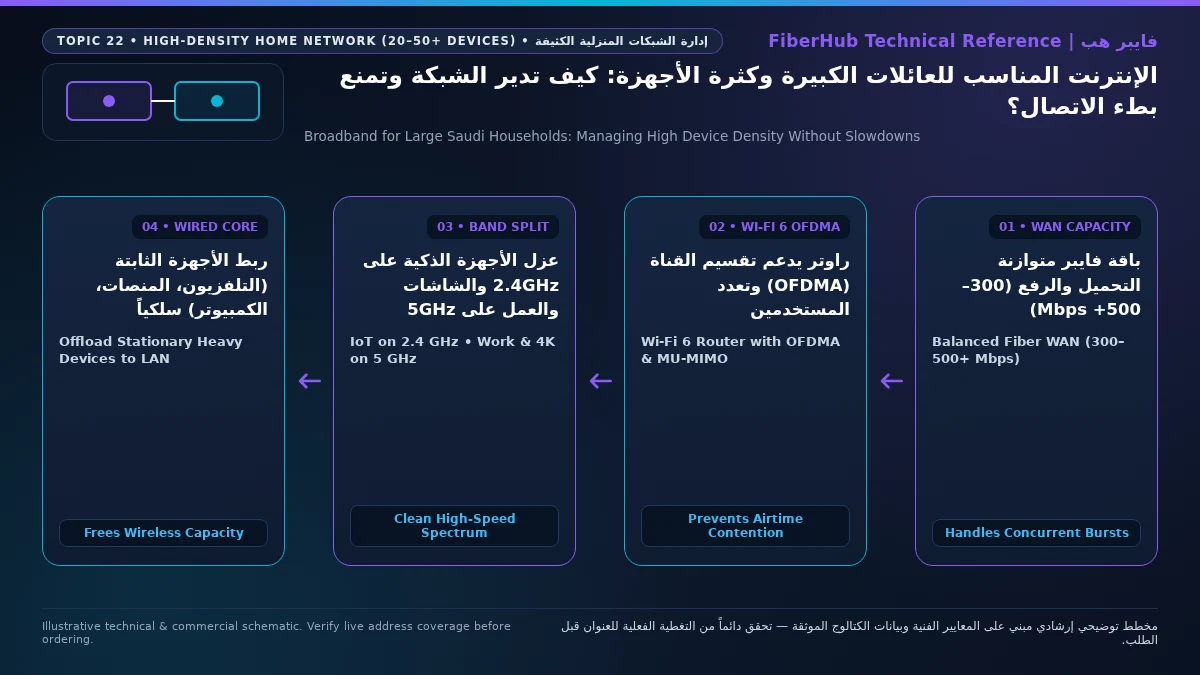
The single most effective configuration change for a large household is to stop dumping all 50 devices onto one flat wireless SSID. Instead, divide your household traffic into three isolated lanes:
Lane 1: Wired Ethernet Offload for Heavy Stationary Consumers (Zero Airtime Cost)
Every byte transferred over a Cat6 Ethernet cable is a byte removed from the crowded wireless airwaves. Connect stationary heavy hitters—PlayStation 5, Xbox, desktop gaming PCs, and the main living-room 4K TV / Apple TV—directly via Ethernet cables to your router or a cheap 8-port Gigabit switch. Wiring just five heavy devices typically frees up 50% to 65% of your home's wireless airtime!
Separate indoor Wi-Fi bottlenecks from line capacity issues
If slow speeds or high ping persist over direct Ethernet, check whether fiber or a higher upload tier is available at your address.
Lane 2: Clean 5 GHz (or 6 GHz) Fast Lane Exclusively for Family Phones and Laptops
Create a dedicated high-speed SSID on the 5 GHz band (with 80 MHz channel width and OFDMA enabled) exclusively for modern smartphones, iPads, and work/study laptops. Because every device on this band supports fast Wi-Fi 6 modulation and sits inside living spaces, no slow legacy sensor can drag down the group's airtime efficiency.
Lane 3: Dedicated 2.4 GHz IoT Network + Bandwidth-Capped Guest Network
Smart air conditioners, robot vacuums, smart plugs, washing machines, and perimeter security cameras only possess 2.4 GHz radios and require long range through walls rather than high speed. Bind all smart-home appliances to a separate 2.4 GHz IoT SSID (set to a clean 20 MHz channel width on Channel 1, 6, or 11). Additionally, enable a Guest Wi-Fi network for visitors in the Majlis with a reasonable bandwidth cap (e.g., 50 Mbps download / 15 Mbps upload) so a guest's phone automatically backing up 4K videos to iCloud never disrupts your household.
Stopping the "One Console Update Chokes the Whole House" Problem
Every large family knows the scenario: at 9:00 PM on Thursday night, a teenager's PlayStation or PC begins downloading a 95 GB update for Call of Duty or Fortnite. Instantly, the living-room TV drops to blurry resolution, WhatsApp voice notes fail to send, and remote work sessions lag out. This happens because modern content delivery networks open 16 to 32 parallel TCP streams that aggressively fill 100% of your ISP connection's download queue.
To prevent any single device from monopolizing the household pipe, configure four router controls:
- Enable Active Queue Management (AQM / QoS) and Per-Device Bandwidth Limits: In your router or Mesh app, enable Quality of Service (QoS). If your family subscribes to a 500 Mbps fiber plan, set a per-device download ceiling of 250 or 300 Mbps on gaming consoles, or set console download throttling directly inside the PlayStation/Xbox/Steam network settings. The game still downloads at a blistering 30+ megabytes per second, while 200 Mbps remains permanently uncontested for the rest of the family.
- Enable Airtime Fairness (ATF): Available on advanced routers and access points, Airtime Fairness allocates equal time slices rather than equal packet counts to wireless clients, preventing a weak-signal device in a distant room from slowing down nearby users.
- Schedule Console Patches and Cloud Backups for Off-Peak Early Morning Hours: Configure PlayStation Rest Mode, Xbox automatic updates, Windows Update active hours, and iCloud/Google Photos bulk uploads to run between 2:00 AM and 7:00 AM rather than during 9:00 PM family prime time.
- Ensure Sufficient Router CPU, NAT Table RAM & Switch Ports: When 50 devices open thousands of concurrent TCP/UDP connections (social media feeds, telemetry, games, DNS lookups), budget single-core routers run out of NAT state-table memory and overheat. For households with 35+ devices, use a multi-node Wi-Fi 6 Mesh system or a quad-core gateway with at least 512 MB to 1 GB of RAM, and attach an inexpensive 8-port Gigabit Ethernet switch to offload wired media and gaming gear from the wireless radios.
Sizing the Right Saudi Broadband Tier for Large Families (VAT Inclusive)
Matching your broadband tier to your family size and device density ensures both downstream and upstream headroom (all monthly prices below include 15% VAT per verified Saudi operator tariffs):
- Households of 5 to 7 Members (25 to 40 Connected Devices): 300 Mbps to 500 Mbps Fiber
While 300 Mbps plans—such as
Zain Fiber Home Plus (300 Mbps)at 279 SAR/month,STC Baity Fiber Basic (300 Mbps)at 287.5 SAR/month,Salam Fiber 300at 287.5 SAR/month, andMobily Fiber Postpaid 300at 345 SAR/month (or Prepaid at 287.5 SAR/month)—handle everyday streaming well, large families with multiple gamers and 4K screens benefit immensely from stepping up to the 500 Mbps tier. Verified 500 Mbps options includeSalam Fiber 500(500/125 Mbps) at 345 SAR/month,Zain Fiber Home Premium (500 Mbps)(featuring a generous 200 Mbps upload ideal for cloud cameras and video calls) at 389 SAR/month,Salam Fiber Gaming(500/200 Mbps) at 399 SAR/month,STC Baity Fiber Stream (500 Mbps)andMobily Fiber Gamers(500/150 Mbps) at 402.5 SAR/month, andSTC Baity Fiber 500/Mobily Fiber Postpaid 500at 460 SAR/month. - Extended Households of 8 to 12+ Members (45 to 75+ Connected Devices): 1 Gbps Fiber & FTTR
For multi-generational homes or large villas running four+ 4K TVs, multiple gaming rigs, and 50+ smart devices simultaneously, 1 Gbps (1000 Mbps download / 300 Mbps upload) eliminates bandwidth contention altogether.
Salam Fiber 1000 (Gigabit)is priced at 460 SAR/month (orSalam Home FTTR 1000at 575 SAR/month), whileSTC Baity Fiber Max (1 Gbps)andMobily Fiber Postpaid 1GBare 920 SAR/month, andZain Fiber Home Black (1 Gbps)is 949 SAR/month. - High-Density 5G Home Alternatives Where Fiber Is Unavailable:
If your neighborhood relies on 5G wireless, choose a top-tier unlimited package such as
Zain 5G Max Home(1000/200 Mbps at 299 SAR/month),Salam HomeFi Max 5G(500/100 Mbps at 345 SAR/month), orSTC Baity 5G UnlimitedandMobily Home 5G Unlimited(500/100 Mbps at 402.5 SAR/month), and pair the 5G modem with a strong Wi-Fi 6 mesh system.
Compare all family broadband options side by side on our broadband plan comparison tool, or explore Saudi fiber broadband packages, 5G home wireless plans, and the full broadband plans directory.
Frequently Asked Questions About Internet for Large Families and Many Devices
Does your current plan support your device count and upload needs?
Compare download/upload ratios and Wi-Fi 6 or FTTR hardware options across plans available at your address.
How many devices can a standard ISP Wi-Fi router handle before slowing down?
Although a router's DHCP server can assign IP addresses to over 100 devices, a single standard ISP router typically begins experiencing wireless airtime congestion and thermal throttling once 25 to 30 devices actively transmit data at the same time. If your household has 35 to 60+ connected devices, distributing the wireless load across two or three wired Wi-Fi 6 access points or Mesh nodes keeps per-radio client counts low and responsive.
Do smart home security cameras slow down family Wi-Fi?
Local cameras wired via PoE to an indoor NVR consume zero internet bandwidth unless viewed remotely. However, wireless cloud cameras (recording 24/7 to cloud servers in 1080p or 2K) consume 2 to 4 Mbps of continuous upload bandwidth and constant Wi-Fi airtime per camera. Six wireless cloud cameras can easily consume 20+ Mbps of upload capacity around the clock—which is why large homes should put cameras on the 2.4 GHz IoT band and choose a fiber plan with at least 100 to 200 Mbps upload speed.
Will setting a download speed cap on my kids' gaming consoles increase their in-game ping?
No—in fact, it lowers and stabilizes their in-game ping! Online multiplayer gameplay (such as EA Sports FC, Fortnite, or Valorant) uses less than 1 to 3 Mbps of bandwidth, whereas background game patch downloads consume hundreds of megabits and cause bufferbloat lag. Capping bulk console downloads at 150 or 200 Mbps on a 500 Mbps fiber line prevents queue saturation so live gameplay ping stays rock-steady at 5 ms.
Why do some phones or smart devices randomly drop off the Wi-Fi when guests visit?
This usually happens when the router's internal DHCP IP address pool is configured too narrowly (for example, allowing only 32 or 50 IP leases with a 24-hour lease timer) or when a single 2.4 GHz radio hits its hardware client association limit. Expand your router's DHCP pool range (e.g., 192.168.1.20 to 192.168.1.220), shorten DHCP lease time to 4 or 8 hours, and place visitors on a dedicated Guest Wi-Fi network.
Should I enable "Smart Connect" (combining 2.4 GHz and 5 GHz into one Wi-Fi name) in a house with 50 devices?
While band steering ("Smart Connect") is convenient, cheap 2.4 GHz-only smart home devices often fail setup wizards on unified SSIDs, and smartphones walking through concrete halls frequently get stuck on the slower 2.4 GHz band. In high-density homes, creating a separate 2.4G-IoT network for smart appliances while keeping your main family SSID on 5 GHz gives you predictable, high-speed performance.
Completed tuning and ready for a more stable fiber line?
Check fiber availability at your address and compare low-latency plans for gaming, telework, and multi-floor homes.
Editorial Transparency & Neutrality Notice:
This guide is provided for comparison and decision support. It does not constitute final address coverage confirmation, binding operator pricing, or regulatory accreditation. Always verify final plan terms and box readiness before completing your subscription request.