
- Core Architectural Differences: Store-and-Forward Repeaters vs Coordinated Mesh vs Optical FTTR
- The Physics of Basic Range Extenders: Half-Duplex Penalties and Sticky Client Syndrome
- Inside Modern Mesh Wi-Fi: Dual-Band vs Tri-Band Backhaul and IEEE 802.11k/v/r Fast Roaming
- Fiber-to-the-Room (FTTR) Explained: Transparent Optical Backhaul Across Concrete Villas
- Residential Decision Matrix: Matching Topology to Apartments, Duplexes, and Multi-Story Villas
- Frequently Asked Questions About Mesh Wi-Fi, Extenders, and FTTR
- Can I mix and match Mesh Wi-Fi nodes from different router brands on the same network?
- When does a wired Ethernet backhaul Mesh system make optical FTTR unnecessary?
- How do transparent FTTR micro-fiber cables survive indoor corners, doors, and daily cleaning?
- How many Mesh nodes or FTTR slave units does a typical two-story Saudi villa actually require?
Choosing between a basic Wi-Fi range extender, a multi-node Mesh Wi-Fi system, or Fiber-to-the-Room (FTTR) depends directly on three physical variables in your home: total floor area across stories, the density of reinforced concrete walls separating living zones, and whether structured Ethernet cabling (Cat6) already exists inside your walls. If you live in a compact single-floor apartment and merely need basic web connectivity in one far corner on a minimal budget, a single plug-in range extender can bridge the gap. If you live in a spacious apartment, duplex, or villa equipped with wall Ethernet ports or an open central stairwell, a Tri-Band or wired-backhaul Mesh Wi-Fi system supporting IEEE 802.11k/v/r fast roaming offers the optimal balance of high throughput, seamless handoffs, and cost efficiency. Conversely, if you reside in a large multi-story Saudi concrete villa without internal network conduits and demand uncompromised gigabit fiber performance in every bedroom, majlis, and rooftop annex without core-drilling walls, optical FTTR is the definitive infrastructure upgrade that eliminates wireless backhaul loss completely.
Many households experience a frustrating paradox shortly after upgrading their broadband subscription through FiberHub's residential fiber catalog: speed tests standing directly beside the main optical modem in the living room register full gigabit throughput, yet stepping into an upstairs bedroom or a ground-floor majlis causes speeds to plummet to a fraction of the plan. This discrepancy occurs because Wide Area Network (WAN) delivery to your property boundary is entirely separate from Local Area Network (LAN/WLAN) distribution through interior building materials. In this comprehensive engineering guide, we dissect how repeaters, mesh topologies, and transparent room-level optical networks handle radio and light propagation, equipping you with an objective decision framework tailored to Saudi residential architecture.

Core Architectural Differences: Store-and-Forward Repeaters vs Coordinated Mesh vs Optical FTTR
While range extenders, Mesh Wi-Fi kits, and FTTR installations all promise to eliminate dead spots, they operate on fundamentally different physical and Medium Access Control (MAC) layer principles. Understanding how a data packet travels from your main Optical Network Terminal (ONT) to your smartphone in each topology reveals why real-world performance diverges so dramatically under heavy household loads:
- Traditional Range Extenders (Single-Radio Store-and-Forward Repeaters): A conventional plug-in repeater connects wirelessly to your existing router and rebroadcasts the signal using a single shared transceiver per frequency band. Because standard Wi-Fi radios operate in half-duplex mode on a given channel—meaning they cannot transmit and receive on the exact same frequency simultaneously—every frame sent from your laptop to the extender must first be received in full, buffered in memory, and then retransmitted over the same radio channel to the main router. This store-and-forward cycle immediately doubles airtime consumption and slices maximum achievable throughput by at least 50% on the first hop, without any centralized coordination between the router and the repeater.
- Coordinated Mesh Wi-Fi Systems (Multi-Node Intelligent Fabrics): Instead of acting as isolated signal boosters, Mesh Wi-Fi nodes operate as a unified wireless cluster governed by a centralized or distributed software controller. All nodes broadcast a single unified network name (SSID) and continuously exchange telemetry regarding channel utilization, link quality, and client signal strength. Higher-tier Tri-Band Mesh systems dedicate an entire radio band exclusively to inter-node communication (Wireless Backhaul) or leverage wall Ethernet cables (Wired Backhaul), while enforcing seamless client roaming standards certified by the Wi-Fi Alliance so mobile devices switch nodes transparently without dropping active voice or gaming sessions.
- Fiber-to-the-Room (Optical FTTR Architecture): Standardized under ITU-T G.fin (G.9940), FTTR replaces radio-based inter-room links with direct point-to-multipoint (P2MP) optical glass connectivity all the way into individual rooms. A central Master FTTR ONT feeds a passive optical splitter, which distributes ultra-thin, transparent bend-insensitive fiber micro-cables along baseboards and door frames to compact Slave Optical Access Points in each room. Because the backhaul travels as laser light inside glass fiber rather than radio waves fighting through steel-reinforced concrete slabs, zero bandwidth is lost between floors, and every room enjoys a dedicated gigabit-plus optical feed.
The Physics of Basic Range Extenders: Half-Duplex Penalties and Sticky Client Syndrome
When a distant bedroom or majlis suffers from weak Wi-Fi, plugging an inexpensive wall extender into a hallway socket appears to be the simplest fix. However, inside Saudi residences built with thick reinforced concrete columns, cement block partitions, and heavy thermal insulation, basic extenders frequently degrade overall network usability rather than improving it. Four structural limitations explain this failure mode:
- The Placement Paradox and Double Attenuation: For a repeater to deliver usable speed, it must be installed at a midpoint where it still receives a strong, clean signal from the primary router (ideally
-60 dBmto-65 dBm) while remaining close enough to project into the dead zone. In practice, users often plug the extender directly inside the dead bedroom where the incoming signal is already degraded to-78 dBm. Although the extender displays full Wi-Fi signal bars on phones inside that room, its upstream link back to the main router is starved for bandwidth, creating the illusion of strong coverage while actual internet pages time out. - The Daisy-Chaining Collapse: Attempting to cover a sprawling two-story villa by chaining a second extender off the first extender compounds the half-duplex airtime tax exponentially. The first repeater halves available capacity to 50%, and the second repeater halves the remaining capacity to 25% or less, while multiplying packet jitter and queuing latency to levels that break interactive video conferencing and online multiplayer gaming.
- Sticky Client Syndrome and Manual Network Switching: Most budget extenders either broadcast a separate network name (such as
Home_Network_EXT) or lack active client-steering protocols. Because mobile operating systems are programmed to stay attached to their current access point until the signal drops below an extreme threshold (often around-80 dBm), your phone will stubbornly cling to the distant living room router even when you walk right past the bedroom extender. Users end up toggling Wi-Fi off and on manually every time they move upstairs. - Co-Channel Contention and Airtime Congestion: Because basic extenders must stay on the exact same radio channel as the host router to relay frames, both devices compete for the same slice of spectrum. Every packet transmitted by the extender forces nearby devices connected to the main router to wait their turn via Carrier Sense Multiple Access with Collision Avoidance (
CSMA/CA), dragging down overall household network efficiency.
Consequently, a basic range extender is only technically justifiable for low-bandwidth secondary zones—such as connecting a smart thermostat, printer, or robotic vacuum in a small single-level apartment—never as the backbone for a family villa.
Inside Modern Mesh Wi-Fi: Dual-Band vs Tri-Band Backhaul and IEEE 802.11k/v/r Fast Roaming
Mesh Wi-Fi systems solve the structural flaws of legacy repeaters by combining multi-hop routing algorithms with coordinated radio management. Yet not all Mesh kits are engineered equally. Selecting the right Mesh tier requires distinguishing between how the nodes communicate behind the scenes (the backhaul) and how they manage moving devices (the fronthaul):
1. Dual-Band vs Tri-Band Wireless Backhaul:
An entry-level Dual-Band Mesh node houses two radios: one 2.4 GHz radio and one 5 GHz radio. When deployed wirelessly without Ethernet cables in the walls, the 5 GHz radio must split its airtime between serving your laptops and smartphones (fronthaul) and relaying traffic back to the main gateway node (backhaul). While modern Wi-Fi 6 and Wi-Fi 7 scheduling technologies like OFDMA and MU-MIMO manage this sharing far more gracefully than old repeaters, a wireless Dual-Band hop across thick concrete still incurs a noticeable throughput ceiling.
A Tri-Band Mesh system introduces a third independent radio—either a second high-band 5 GHz transceiver or a wideband 6 GHz transceiver in Wi-Fi 6E and Wi-Fi 7 models. This third radio acts as a dedicated wireless highway between Mesh nodes, isolating inter-node backhaul traffic from user devices. Furthermore, Wi-Fi 7 Mesh architectures introduce Multi-Link Operation (MLO), enabling nodes to bond multiple frequency bands simultaneously for the wireless backhaul so traffic flows seamlessly across parallel spectrum if interference spikes.
2. The Transformative Power of Wired Ethernet Backhaul:
If your apartment or villa includes structured Cat6 or Cat6A Ethernet cabling terminating at RJ45 wall jacks in each room, you can connect your Mesh satellite nodes back to the main router or central network switch via physical Ethernet cables. Activating Wired Ethernet Backhaul fundamentally transforms Mesh performance:
- Inter-floor and inter-room attenuation drops to zero; concrete slabs and metal fire doors no longer weaken the link between nodes because data travels over twisted-pair copper at full
1 Gbps,2.5 Gbps, or10 Gbpsline rate. - Even a cost-effective Dual-Band Mesh kit connected via wired Ethernet backhaul will consistently outperform an expensive wireless-only Tri-Band Mesh kit in a heavy concrete villa, because 100% of every node's wireless radio capacity is freed up to serve devices inside that specific room.
3. Seamless Handover via IEEE 802.11k, 802.11v, and 802.11r: To prevent the sticky client behavior that plagues basic extenders, quality Mesh systems implement three amendment standards ratified by the Institute of Electrical and Electronics Engineers (IEEE):
- IEEE 802.11k (Neighbor Reports): The Mesh network proactively supplies connected phones with an updated map of nearby nodes and their channel parameters, eliminating slow blind scanning when a user walks down a hallway.
- IEEE 802.11v (BSS Transition Management): The central Mesh controller monitors each device's Received Signal Strength Indicator (RSSI) in real time and sends management frames nudging a roaming phone to switch to a stronger node before signal quality degrades.
- IEEE 802.11r (Fast BSS Transition): Pre-negotiates cryptographic security keys across all nodes in the Mesh domain, cutting roaming re-association times down to under 50 milliseconds—well below the human perception threshold for real-time VoIP calls, WhatsApp voice chats, and cloud gaming.
Separate indoor Wi-Fi bottlenecks from line capacity issues
If slow speeds or high ping persist over direct Ethernet, check whether fiber or a higher upload tier is available at your address.
Fiber-to-the-Room (FTTR) Explained: Transparent Optical Backhaul Across Concrete Villas
What happens when you own or rent a large multi-story Saudi villa with thick reinforced concrete floors, an isolated ground-floor majlis, and a rooftop annex, where wireless Mesh signals struggle to penetrate between levels and no internal Ethernet wall cabling exists? Historically, the only alternative was hiring contractors to drill through concrete walls and run unsightly plastic PVC cable ducts. Today, Fiber-to-the-Room (FTTR) resolves this exact architectural dilemma.
Standardized by the International Telecommunication Union (ITU-T G.9940), FTTR extends optical fiber directly from the primary household entry point into up to 16 individual rooms using specialized micro-optical components:
- Master FTTR Optical Gateway: Replaces the standard ISP router at the main fiber entry box, terminating the external GPON or XGS-PON line while providing local Wi-Fi and housing a built-in optical downstream transceiver.
- Passive Optical Splitter and Transparent Micro-Fiber Cable: Instead of bulky 6mm copper Ethernet cables, FTTR utilizes ultra-thin (
1.2 mmto2.0 mmdiameter) transparent Kevlar-reinforced glass fiber engineered to ITU-T G.657.B3 bend-insensitive specifications. Using a specialized thermal-adhesive laying tool, technicians bond this nearly invisible fiber neatly along top ceiling moldings, skirting boards, and door frames without drilling structural walls or disturbing marble and gypsum finishes. - Slave Optical Wi-Fi Access Points: Compact optical Wi-Fi units mount in each bedroom, home office, and majlis, converting the optical laser signal back into localized Wi-Fi 6 or Wi-Fi 7 coverage plus local Gigabit Ethernet ports for desktop PCs and gaming consoles. Because glass fiber is completely immune to electromagnetic interference (EMI) and experiences virtually zero signal loss over residential distances, every Slave unit receives full fiber line speed with sub-millisecond backhaul latency.
For households comparing multi-gigabit broadband tiers via FiberHub's side-by-side plan comparison tool, FTTR guarantees that the high-speed tier delivered to your villa boundary is replicated without compromise in every room.
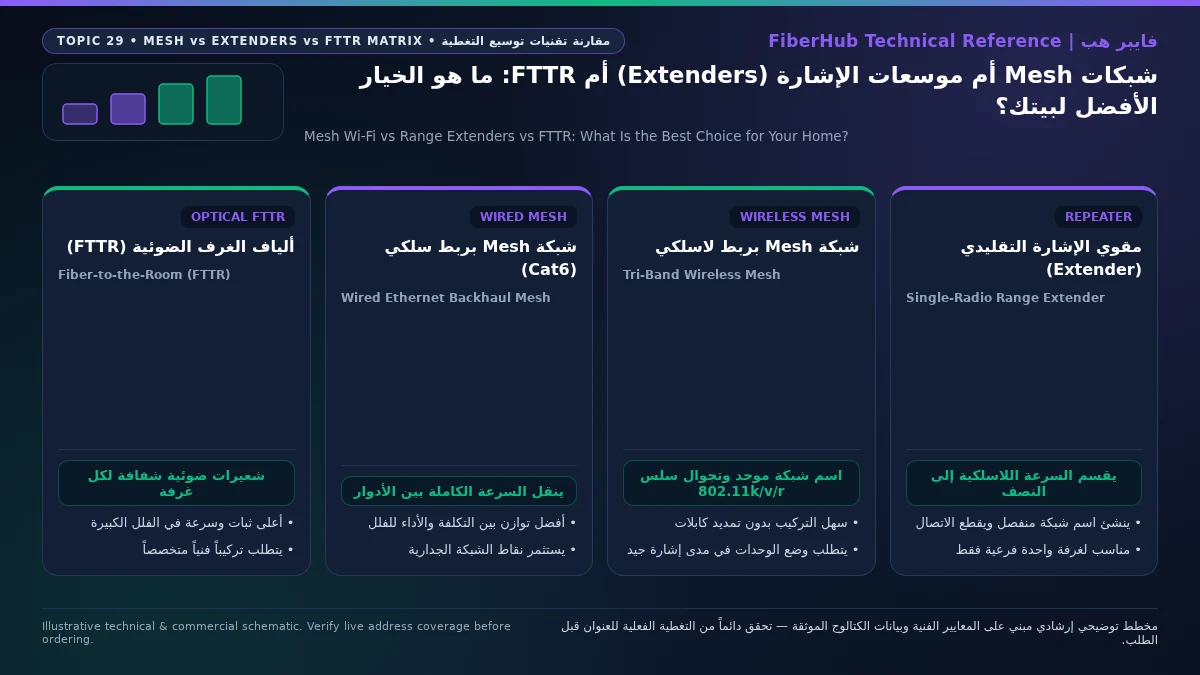
Residential Decision Matrix: Matching Topology to Apartments, Duplexes, and Multi-Story Villas
Selecting the right indoor distribution architecture requires matching technical capabilities against your property's physical layout and cabling readiness. The matrix below summarizes how all four topologies compare across real-world residential metrics:
| Evaluation Metric | Basic Range Extender (Repeater) | Wireless Mesh Wi-Fi (Tri-Band) | Wired Backhaul Mesh Wi-Fi | Optical Fiber-to-the-Room (FTTR) |
|---|---|---|---|---|
| Backhaul Medium | Shared single-band radio (Half-Duplex) | Dedicated 5 GHz or 6 GHz radio link |
Structured Cat6 / Cat6A copper Ethernet |
Transparent G.657.B3 optical micro-fiber |
| Throughput Retention in Far Rooms | Low (loses 50% to 75% per hop) | Good to High (65% to 85% depending on walls) | Near-Complete (95% to 100% up to port speed) | Full Optical Line Rate (100% in every room) |
| Gaming Latency & Jitter Stability | Poor (high jitter and contention spikes) | Stable when nodes have clear line-of-sight | Exceptional (< 2 ms added backhaul latency) |
Exceptional (< 1 ms optical propagation) |
| Seamless Roaming (802.11k/v/r) | Rarely supported; manual switching common | Fully supported with unified single SSID | Fully supported with zero wireless hop loss | Centrally orchestrated by Master optical unit |
| Installation & Wall Modification | Plug-in power outlet only | Plug-in power outlet with strategic spacing | Requires pre-installed RJ45 wall Ethernet jacks | Surface-bonded transparent fiber along trim |
| Ideal Saudi Property Profile | Single low-priority corner in a small flat | Medium-to-large flats & open-plan duplexes | Villas & apartments pre-wired with Cat6 ports |
Large concrete villas lacking Ethernet conduits |
Practical Deployment Blueprint by Property Type:
- Single-Floor Apartments (Under 160 m²): A single high-gain Wi-Fi 6/7 router centrally positioned—or a two-node Mesh kit with one node in the living room and the second in the bedroom corridor—easily covers the entire footprint. Avoid cheap extenders if family members rely on simultaneous video calls or remote work.
- Large Apartments and Two-Story Duplexes (180 m² to 300 m²): First inspect the wall faceplates in each room. If
RJ45Ethernet jacks are wired back to a central distribution box, deploy a 2-to-3 node Mesh system using Wired Ethernet Backhaul. If no Ethernet wiring exists, choose a Tri-Band Mesh system and position the upstairs node near the open stairwell landing so the dedicated wireless backhaul bypasses the thickest reinforced concrete floor slab. - Standalone Multi-Story Saudi Villas with Basement and Annex (400 m²+): In pre-wired villas, combine wired-backhaul Mesh nodes or ceiling-mounted Power-over-Ethernet (PoE) access points wired to a central PoE switch. In older or un-cabled concrete villas where wireless signals cannot bridge between the ground-floor majlis, second-floor bedrooms, and rooftop annex, optical FTTR is the premier investment. Before finalizing your indoor hardware, verify fiber availability at your exact national address on the interactive FiberHub coverage map and review eligible high-speed packages on the residential fiber plans page aligned with quality benchmarks monitored by the Communications, Space and Technology Commission (CST).
Frequently Asked Questions About Mesh Wi-Fi, Extenders, and FTTR
Can I mix and match Mesh Wi-Fi nodes from different router brands on the same network?
Although the Wi-Fi Alliance introduced EasyMesh certification for cross-brand interoperability, mixing Mesh nodes from different manufacturers rarely delivers optimal home results. Most vendors rely on proprietary controller algorithms for dynamic backhaul channel selection, band steering, firmware updates, and app management. Combining brands often disables fast-roaming optimizations (802.11k/v/r) or forces one unit into basic access point mode. Keep all Mesh nodes within the same brand ecosystem, and place your ISP gateway into bridge mode so the primary Mesh node coordinates all routing and wireless handoffs.
Does your current plan support your device count and upload needs?
Compare download/upload ratios and Wi-Fi 6 or FTTR hardware options across plans available at your address.
When does a wired Ethernet backhaul Mesh system make optical FTTR unnecessary?
If your villa or apartment already has functional Cat6 or Cat6A copper Ethernet cables inside the walls terminating at RJ45 sockets in key rooms, a Wired Backhaul Mesh system delivers virtually identical real-world performance to FTTR for plans up to 1 Gbps and 2.5 Gbps. Because Cat6 supports up to 10 Gbps over 55 meters with sub-millisecond latency, your Mesh nodes already have a lossless physical backbone. FTTR becomes the superior choice specifically when your concrete villa lacks internal Ethernet cabling and pulling thick copper cables through existing conduits is impossible without invasive wall construction.
How do transparent FTTR micro-fiber cables survive indoor corners, doors, and daily cleaning?
Modern residential FTTR installations utilize ITU-T G.657.B3 ultra-bend-insensitive optical fiber encased in a tough, transparent jacket reinforced with aramid strength members. This specialized fiber bends around tight 90-degree room corners with a bend radius as small as 5 millimeters without optical macro-bending attenuation. Applied along the upper edge of ceramic skirting boards or ceiling cornices using specialized hot-melt adhesive, the cable sits flush against the surface, withstanding routine floor mopping, vacuuming, and seasonal indoor temperature shifts.
How many Mesh nodes or FTTR slave units does a typical two-story Saudi villa actually require?
More nodes do not automatically mean faster Wi-Fi; placing too many access points in close proximity increases co-channel interference and causes mobile devices to bounce unnecessarily between nodes. As a reliable engineering rule for reinforced-concrete Saudi homes, allocate one node per 100 to 140 square meters per floor, plus dedicated units for isolated zones like a heavy-walled majlis or outdoor annex. A typical two-story villa performs best with three strategically placed Mesh nodes or a 1 Master + 3 Slave FTTR kit covering main gathering and sleeping zones.
Completed tuning and ready for a more stable fiber line?
Check fiber availability at your address and compare low-latency plans for gaming, telework, and multi-floor homes.
Editorial Transparency & Neutrality Notice:
This guide is provided for comparison and decision support. It does not constitute final address coverage confirmation, binding operator pricing, or regulatory accreditation. Always verify final plan terms and box readiness before completing your subscription request.